
App setup & integration
Boost AI Search & Filter Setup and Optimisation for Shopify
Help shoppers find products fast. We set up Boost AI Search & Filter for UK Shopify stores, from filters to merchandising rules. Get a fixed quote today.
Prefer to talk? Call +44 7476 560011 or message us on WhatsApp (opens in new tab)

Boost AI Search & Filter: overview and who it suits
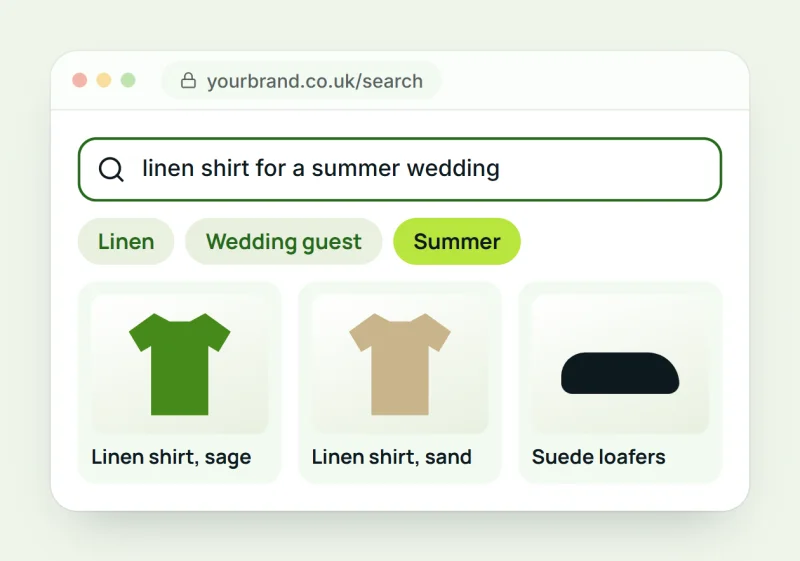
Boost AI Search & Filter, from Boost Commerce, replaces Shopify's standard search and collection filtering with a faster, more flexible product discovery layer. Shoppers get instant suggestions as they type, filters that reflect how they actually shop, and results that understand intent rather than exact keywords. For a UK store with a deep catalogue, that is often the difference between a sale and a bounce back to Google. It also takes pressure off your customer service team, because fewer shoppers need to ask whether you stock something.
It sits alongside Rebuy in our Conversion & Search stack. Where Rebuy grows the basket, Boost makes sure shoppers find that first product quickly. Your merchandisers gain control too: pin hero products, push seasonal lines and bury items running low on stock, all without asking a developer to edit the theme.
Who Boost suits
- Large or complex catalogues, such as fashion with many sizes and colours, homeware with materials and dimensions, or parts and spares with technical attributes.
- Brands whose customers search heavily, where the search bar is a main route to product.
- Merchandising-led teams who want to control collection order for campaigns, launches and seasonal sales.
- Stores selling beyond the UK that need search to behave well across languages and currencies.
- Brands running frequent promotions that want sale collections reordered quickly as stock sells through.
When native tools are enough
If you list a few dozen products in simple collections, Shopify's free Search & Discovery app may handle filters and synonyms well enough. Boost justifies its monthly fee when filter depth, search quality and merchandising control start to hold sales back. We will help you judge that point honestly, using your own search and collection data rather than a sales pitch.
Key Boost AI Search & Filter features
Boost covers the full discovery journey, from the first keystroke in the search bar to the order of products on a sale collection.
Instant search and autocomplete
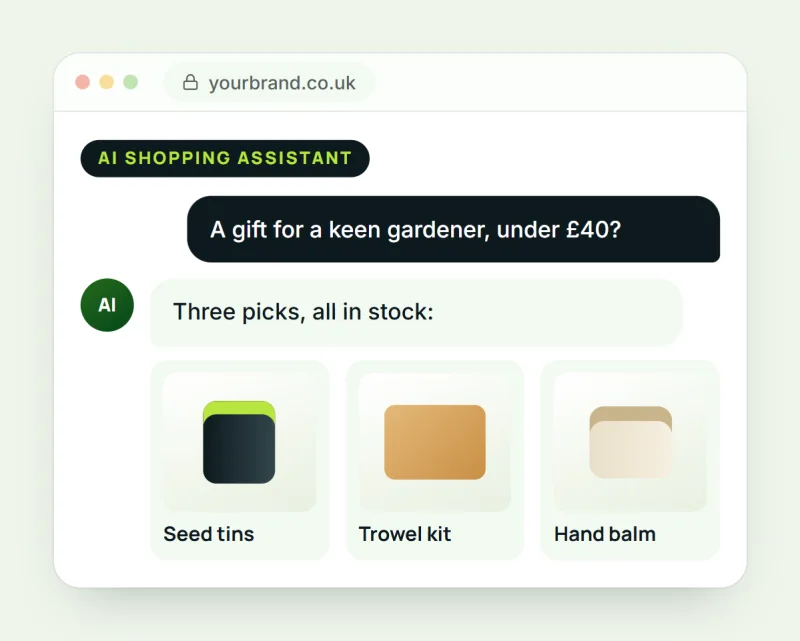
A search-as-you-type panel shows matching products, collections and pages as soon as shoppers start typing. Typo tolerance and synonyms mean slight misspellings still return the right results, which matters on cramped mobile keyboards. Shoppers reach a product page in fewer taps.
AI-powered search
Semantic search interprets natural phrases such as "waterproof jacket for hill walking" instead of relying only on exact keyword matches. Shoppers who describe a need, rather than naming a product, still reach relevant results, which suits gift buyers and first-time visitors.
Flexible product filters
Filters can be built from product options, tags, vendor, product type, price, stock status and metafields. Layout choices include swatches, ranges and collapsible groups, so filters stay usable on small screens. We decide which filters appear on each collection.
Merchandising controls
Pin, boost or bury products in collections and search results, and set rules for campaigns. Your team can lift a new range for launch week or drop end-of-line stock without touching code. Rules can be adjusted quickly around campaigns such as Black Friday.
Search analytics
Reports show what shoppers search for, which terms return nothing and what they click. Zero-result searches are valuable: they reveal missing synonyms, gaps in your range and the words customers really use. We review them with you during handover.
Theme-friendly design
Boost connects to Online Store 2.0 themes through app embeds, and its templates can be styled to match your brand. Results pages, filter trees and product cards are configured to look native, not bolted on, and are tested across browsers.
Get maximum ROI from Boost: setup tips
The app is only half the job. The product data underneath decides how well search and filters perform.
Standardise product attributes
Consistent colour names, sizes and materials stop filters showing Navy, navy and Dark Blue as three separate options.
Build a UK synonym list
Map British and American terms, such as jumper and sweater or trousers and pants, plus common brand misspellings.
Review zero-result searches monthly
Each one is a lost sale. Fix it with a synonym, clearer product copy or a decision to stock what people want.
Order filters by usefulness
Put size, price and availability first for fashion; dimensions, material and colour first for homeware.
App stack
Where Boost sits in your app stack
A discovery-first stack, grouped by job, with Boost handling how shoppers find products and every other tool building on that.
Popular tools by job
Tool names are examples; trademarks belong to their owners.
Search and filtering
Boost runs the search bar, results pages and collection filters.
- Boost AI Search & FilterSearch, filters and merchandising
Upsells and personalisation
Once shoppers find a product, tailored offers grow the basket.
- RebuyRecommendations and Smart Cart
Reviews
Ratings shown in results and filters help shoppers choose faster.
- Judge.meProduct reviews
- YotpoReviews and loyalty
Email and retention
Browsing behaviour feeds timely follow-up campaigns for shoppers who leave.
- KlaviyoBrowse and cart abandonment flows
International selling
Translated catalogues keep search useful for overseas shoppers.
- Translate & AdaptShopify's own translation app
Boost integrations: website, CRM and tracking
We connect Boost to your theme, customer data and reporting, so search works as part of the whole store rather than in a silo.
Website and theme
Results, filters and product cards are matched to your theme and tested on mobile, including sticky filter bars.
Reviews and CRM
Review apps can show star ratings in results, while Klaviyo's own tracking keeps capturing viewed products for browse-abandonment emails.
Analytics
Where your setup allows, we enable GA4 site search reporting so search terms sit beside conversion data.
Call tracking
Boost does not handle calls. Where phone orders matter, we make sure search changes leave existing call-tracking numbers and tags untouched.
Boost AI Search & Filter pricing overview
Boost AI Search & Filter is a paid Shopify app with tiered plans. Tiers typically reflect catalogue size and the depth of features you need, with AI search and advanced merchandising sitting higher up the range. Plans, limits and any free trial are set by Boost Commerce and change over time, so confirm the current details on the Boost Commerce website (opens in new tab) before you budget. If you expect your range to grow sharply, ask how that growth would change your plan over the next year.
What drives the total cost
- Your Boost plan, paid to Boost Commerce, not to us.
- Catalogue size and growth. Adding thousands of SKUs or launching new markets can move you into a different tier.
- Data clean-up. Tidy tags, options and metafields are the foundation of good filters; messy data adds hours before configuration can start.
- Design work. Matching results pages and filter layouts to a custom theme takes styling and cross-device testing.
- Ongoing merchandising. Someone needs to review search terms and update rules as ranges and seasons change.
Working out whether it pays
Before launch, record search conversion rate, the share of sessions that use search and revenue from search users. Compare the same measures afterwards, over a similar trading period, and watch zero-result searches fall as synonyms go in. Shoppers who search are usually further along in their decision than casual browsers, so modest improvements to search quality can be worth more than a cosmetic homepage refresh. If the gains are not showing, the cause is usually data or merchandising rules, not the app itself.
Our fees for setup and tuning are fixed and listed in the price block below, ex VAT, so the only moving part is the Boost plan that fits your catalogue.
What merchants say about Boost
Ratings move as the app evolves, so we do not quote scores or reviews. The most useful source is Boost's listing on the Shopify App Store, where reviews are left by merchants who have installed the app. G2 and Capterra add wider software feedback, and Trustpilot occasionally has entries. Check the month on each review and give most weight to the past year.
Read with a purpose: how quickly support resolved theme conflicts, how filters coped with large catalogues, how much tuning search relevance needed and how pricing changed as stores grew. One merchant with a catalogue like yours is worth more than a pile of generic praise.

Boost alternatives and comparisons
Other discovery tools worth weighing up.
Searchanise
A Shopify search and filter app with a similar brief.
Algolia
Developer-led search platform suited to headless builds.
Rebuy
Grow order value once shoppers find products.
How we help with Boost
Our Apps Integration & Setup specialists configure Boost at a fixed price. Want a wider review first? Book Tech Stack Audit & Consulting.
Starter
From £495 one-off, ex VAT
Best for: Boost installed, connected and handed over with a walkthrough
What it covers:
- Search, filters and styling
- Starter synonym list
Growth
From £1,495 one-off, ex VAT
Best for: Boost plus up to three related tools
What it covers:
- Reviews and Klaviyo connections
- Merchandising rules and training
Custom
Get a quote
Best for: Headless, multi-market or very large catalogues
What it covers:
- Scoped after discovery
- Get a quote
Fixed prices, agreed before work starts. All prices exclude VAT.
Compare every service on our Shopify pricing page.
Will Boost work with my existing Shopify theme?
Boost is designed to integrate with Shopify themes, including Online Store 2.0 themes, through app embeds. Heavily customised or older themes can need extra styling or code changes before filters and results look native. We always configure and test on a duplicate theme first, so your live store keeps trading normally while the work happens and nothing goes live until you approve it.
Can filtered collection pages hurt my Shopify SEO?
They can if left unchecked, because filters create many URL variations. We review canonical tags, keep thin filter combinations out of the index and make sure core collection pages stay crawlable. Handled properly, better on-site search improves engagement without creating duplicate content problems or wasting crawl budget on near-identical pages.
Can Boost cope with British and American spellings?
Yes. Boost lets you set synonyms, so colour and color, jumper and sweater, or trainers and sneakers can return the same products. Typo tolerance catches small slips too. We build an initial synonym list from your range and your existing search terms, then refine it as real shopper searches come in.
How long does a Boost setup take?
It depends on catalogue size and data quality more than the app itself. A tidy catalogue on a standard theme can be configured fairly quickly, while large ranges with inconsistent attributes need data work first. After discovery we confirm a fixed price and timeline in writing, so you know exactly when search will go live.
Free consultation
Get help with your app stack
Share your details and a member of our team will follow up to arrange a brief discussion.
Tell us about your project
What happens next
- You send your store and project details.
- We follow up to arrange a short call.
- On the call, we talk through your goals and explain how we would scope the work.
Talk to us directly
Waverley House, 9 Noel St, London W1F 8GQ
Phone +44 7476 560011 WhatsApp +44 7476 560011 (opens in new tab) Email hello@shopifyagencylondon.co.ukPrefer the full contact page? Visit our Contact / Free Consultation page.