
From WordPress to Shopify
WooCommerce to Shopify Migration Without the Plugin Headaches
Trade plugins, updates and hosting worries for a store that simply works, every day.
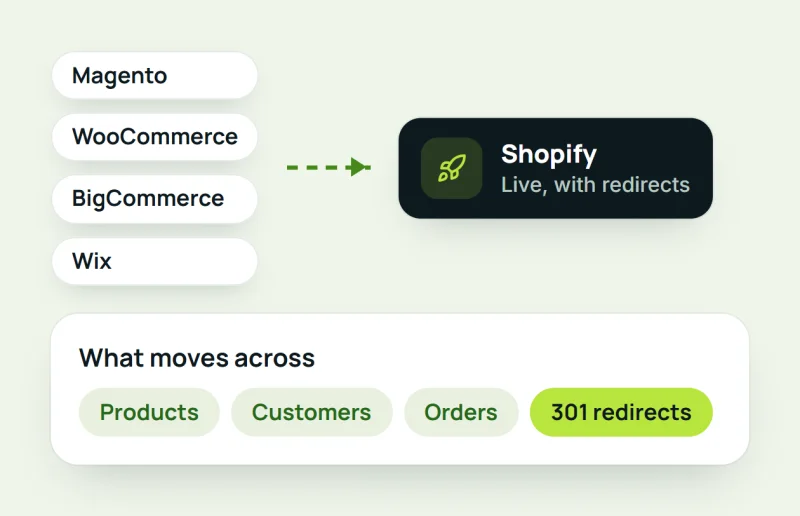
Our fixed-price WooCommerce to Shopify migration moves your products, variations, customers, orders, blog posts and SEO metadata from WordPress to Shopify, with every valuable URL redirected and tested before launch. A dedicated project manager keeps the plan on track, specialist data, SEO and development leads do the work, and a 4-eyes QA review checks each stage, so your shop keeps trading through the switch and your team gains a platform that stays fast, secure and up to date without constant plugin maintenance.
Prefer to talk? Call +44 7476 560011 or message us on WhatsApp (opens in new tab)
Why WooCommerce stores move to Shopify
WooCommerce is a flexible way to sell from WordPress, and plenty of UK brands built their first shop on it. As orders grow, though, so does the maintenance. Every plugin, theme and WordPress core update can break something, hosting has to cope with sale-day traffic, and security sits firmly with you. A planned shopify migration hands those jobs to a hosted platform so your team can get back to selling.
The tipping points are usually practical: checkout slowing under load, a plugin conflict taking the basket offline on a Friday night, a developer needed for every small change, and a growing bill for premium extensions that renew each year.
This service suits
Shopify is not automatically the right answer for everyone. If your site is mainly a publishing platform with a small shop attached, we will talk through whether a full move, a separate blog or staying put serves you best.
When search traffic and loyal customers drive your revenue, a careful, fixed-scope move protects both.
- DTC brands whose WooCommerce store has become the main sales channel
- Teams running WooCommerce Subscriptions or product add-ons that must keep working
- Content-led brands whose WordPress blog brings in valuable organic traffic
- Retailers who want Shopify POS, Shop Pay or Shopify Markets for selling abroad
Everything your WooCommerce to Shopify migration covers
WordPress keeps shop data and site content in one database, so a good move separates the two cleanly and rebuilds each properly. These are the workstreams we deliver, each owned by a specialist and checked by a second reviewer before you see anything.
Store and content audit
We inventory products, variations, customers, orders, coupons, posts, pages and every active plugin, then agree what moves, what is rebuilt and what is retired. The result is a shared mapping sheet your team approves before a single record is imported. Unused plugins are listed for retirement rather than replaced.
Products and variations
Simple and variable products move across with SKUs, prices, stock, weights and image galleries, and WooCommerce attributes become Shopify options or metafields. Grouped products, plus add-ons such as engraving or gift messages, are rebuilt with bundles, line item properties or a reliable options app. Stock levels are checked against WooCommerce before launch.
Customers, orders and coupons
Customer profiles, addresses, marketing consent and order history are imported so your service team keeps full context. Active coupons are recreated as Shopify discount codes, and because WordPress passwords cannot transfer, we plan a simple account activation journey with clear messaging on site and by email.
Subscriptions and recurring revenue
WooCommerce Subscriptions customers move to a Shopify subscription app such as Recharge, with plans and renewal dates preserved. Where your payment gateway supports it, stored payment details move too; where it does not, we plan a reactivation journey that keeps subscribers on board.
Blog posts and WordPress pages
Posts, categories, featured images, authors and publish dates move into a Shopify blog, and key pages are rebuilt in editable theme sections rather than pasted in. Layouts made with page builders such as Elementor are recreated cleanly, without leftover shortcodes cluttering the content.
Yoast or Rank Math metadata
SEO titles, meta descriptions and image alt text set in Yoast or Rank Math are exported and mapped to Shopify's own SEO fields, so the work your team has put into search over the years is not lost in the move. Where categories and tags were indexed, we decide together which become collections, which become blog tags and which are retired.
301 redirect map
Default WooCommerce paths such as /product/ and /product-category/ change to Shopify's /products/ and /collections/, and blog URLs change too. We crawl the live site, map every page that earns traffic or links, and test each redirect on the new store before launch.
Payments, VAT and UK shipping
Shopify Payments, PayPal and pay-later options replace your WooCommerce gateway plugins. VAT-inclusive pricing, UK and international shipping zones and Royal Mail or courier rates are configured, then proven with realistic test orders before a real customer checks out.
Launch, DNS and hypercare
We plan the domain switch around your email and DNS records, run a go-live checklist with a rollback plan and a final delta import, then watch orders, redirects and Search Console closely while everything settles into its new home, with fixes turned round quickly.
From WordPress to Shopify: the four-stage roadmap
Read these as the typical stages of a WooCommerce move rather than fixed dates. Once we have seen your data, plugins and content, your project manager confirms the real timeline in writing with your quote, then updates you on progress every week.
Milestone 1
Inventory and access
- NDA signed, then least-privilege access to WordPress, hosting, DNS and a new Shopify store, all protected with 2FA.
- Database exports, a plugin inventory and a crawl of every live URL, agreed in a mapping sheet your team approves.
Milestone 2
Rebuild and import
- Shopify theme styled to your brand, with key WordPress pages rebuilt as sections your marketers can edit without code.
- Test imports of products, customers, orders and posts, reconciled against WooCommerce counts before moving on.
Milestone 3
Prove it works
- Redirects, coupons, subscriptions, VAT, shipping and payments tested end to end with realistic UK orders.
- Staging links and recorded walkthroughs for your team, with all feedback gathered in a single round.
Milestone 4
Go live and steady
- Final delta import and DNS switch at a quiet hour, with email records protected and a rollback ready.
- Close monitoring of orders and organic traffic, then a handover session and a plan for the first growth projects after launch.
Stages, not fixed durations. Timings are agreed with you once the scope is clear.
How we deliver your WooCommerce migration
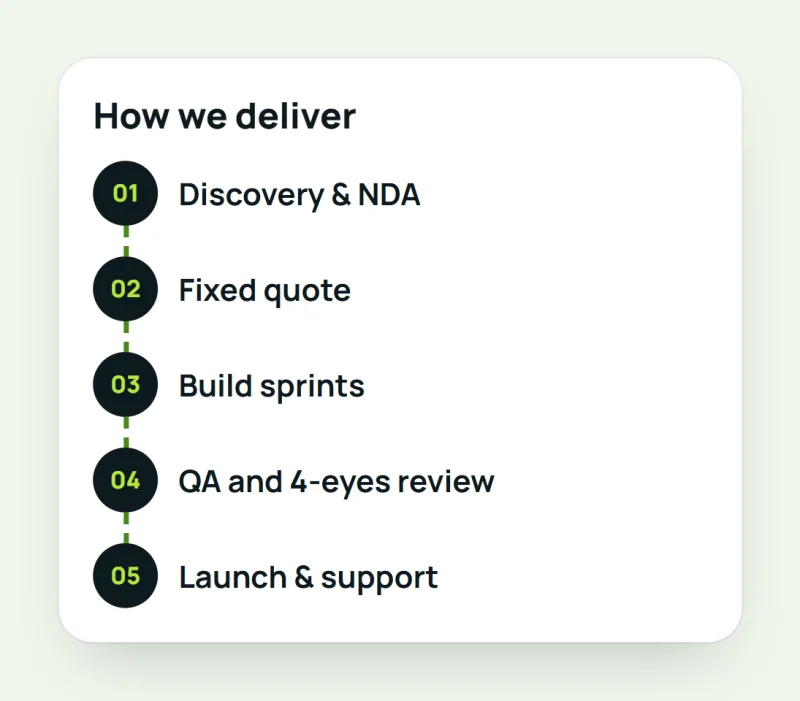
Every project runs on our 10-stage delivery process, with quality checks built into each handover. These six steps are the ones you will take part in directly, each with a named owner.
Discovery under NDA
We sign an NDA, then review your WooCommerce set-up, plugins, integrations, content and peak trading dates to agree clear, measurable goals for the move.
Proposal with a fixed price
You get a Starter, Growth or Custom scope with one fixed price, milestones, named owners and a written timeline your finance team can plan around.
Secure onboarding
WordPress, hosting, DNS and Shopify logins are shared through a password manager with 2FA and least-privilege roles, and every access is logged for the life of the project.
Build in focused sprints
Data, design and development specialists work in one to two week sprints with daily internal stand-ups, importing data and rebuilding pages in parallel.
Quality gates, then your review
Checklists, a 4-eyes review and lead sign-off come before you see anything. You then review a staging store and recorded walkthrough in one round.
Launch and reporting
We switch over using a go-live checklist and rollback plan, then send weekly updates and a monthly report before moving into SLA support or offboarding.
Tools that power a clean WooCommerce move
We favour tools that keep a clear audit trail, so every record can be traced from WordPress to Shopify. These handle most of the work on WooCommerce projects, from first export to final redirect check.
WooCommerce REST API
Lets us extract products, variations, customers, orders and coupons with their relationships intact, including custom fields that a basic CSV export can drop.
WP All Export
A well-known WordPress export plugin we use for posts, pages, custom post types and SEO plugin fields, giving us clean spreadsheets to map and audit.
Matrixify
Our import workhorse on the Shopify side, handling products, customers, orders, blog posts, redirects and metafields in files we can check and safely re-run.
Site crawler and Search Console
A full crawl of your WordPress site, combined with Search Console data, gives us the complete URL list for redirects and a ranking benchmark to measure the launch against.
Recharge
For WooCommerce Subscriptions stores, Recharge handles recurring billing, the customer portal and migration of subscriber plans, so repeat revenue carries on after launch.
Shopify Flow
Jobs that needed WordPress plugins or cron tasks, such as tagging wholesale customers or flagging high-risk orders, are rebuilt as documented Flow workflows your team can adjust.
How AI helps a WooCommerce to Shopify migration
WordPress stores often carry years of content debt: product descriptions pasted from supplier sheets, inconsistent attribute names, blog posts with broken internal links and images uploaded without alt text. Moving to Shopify is the natural moment to tidy it, and AI helps us do that quickly while people make every final call.
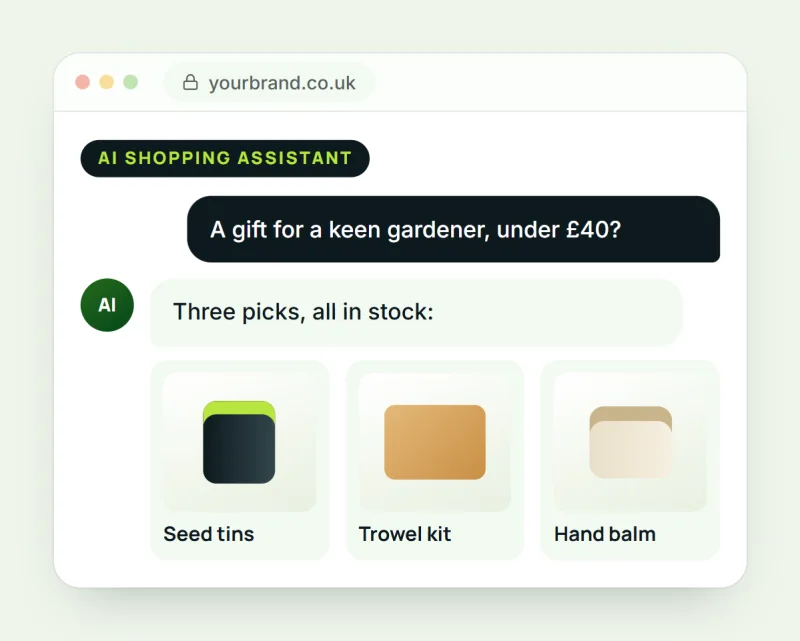
During the audit, AI-assisted checks flag duplicate products, variations with clashing names, missing alt text and posts that compete for the same search terms. They also help us sort old blog content into keep, merge and retire lists, which a content specialist then reviews against your Search Console data. AI can also propose redirect matches for old post URLs, and our SEO lead confirms each one individually before anything is uploaded.
After the switch
Shopify gives your team AI features in the admin: Shopify Magic can draft product descriptions and email copy, and Sidekick can answer questions about orders, reports and settings. We show your team where these tools save time and where a person should still sign off, for example on prices, health claims or anything legally sensitive. Your customer and product data never trains AI models. To see the wider possibilities, visit AI for Shopify Stores.
App stack
Swap WordPress plugins for a lean Shopify app stack
Many WooCommerce stores carry plugins that overlap, conflict or simply sit unused. We replace only the jobs you still need, using proven Shopify apps or native features. Fewer, better-chosen apps also mean fewer monthly bills and fewer scripts slowing your pages down.
Popular tools by job
Tool names are examples; trademarks belong to their owners.
Reviews and UGC
Import WooCommerce product reviews so ratings and photos appear from day one, not months later.
- Judge.meReview imports and photo reviews
- YotpoReviews and UGC at scale
Subscriptions
Keep recurring orders running after you leave WooCommerce Subscriptions, with plans and renewal dates intact.
- RechargeSubscription billing and customer portal
- Shopify SubscriptionsShopify's free app for simple plans
Email marketing
Replace MailPoet or Mailchimp plugins with retention tools that read Shopify order data directly.
- KlaviyoFlows, segments and SMS
- OmnisendEmail and SMS automation
Search and conversion
Help shoppers find the right products fast and add more to the basket before checkout.
- Boost AI Search & FilterFilters for larger catalogues
- RebuyPersonalised upsells and cross-sells
Shipping and returns
Keep UK delivery and returns simple for customers, warehouse staff and your service team.
- Royal Mail Click & DropLabels, tracking and despatch
- Loop ReturnsSelf-serve returns and exchanges
WooCommerce to Shopify migration pricing
One-off fixed fees, shown ex VAT and confirmed in writing before we begin. For the full picture across design, apps and running costs, read our guide to shopify website cost.
Starter
From £1,995 one-off, ex VAT
Best for: WooCommerce stores of up to 1k products moving onto a proven theme.
What it covers:
- Products, variations and customers
- Order history and coupon codes
- Priority redirects and Yoast metadata
Growth
From £3,995 one-off, ex VAT
Best for: Large catalogues and content-heavy sites needing a full redirect map.
What it covers:
- Full crawl and post-by-post 301s
- Subscriptions moved to a Shopify app
- Plugin replacement and integrations
Custom
Get a quote
Best for: Multi-site, B2B, Plus or heavily customised builds. Get a quote.
What it covers:
- Several WordPress sites merged
- Custom middleware and data cleansing
- Phased launches with extended support
Fixed prices, agreed before work starts. All prices exclude VAT.
Compare every service on our Shopify pricing page.
Watch a WooCommerce migration plan come together
- NDA signed before any data is shared
- Least-privilege access with 2FA
- UK GDPR and data processing terms
- Your data never trains AI models
Client projects are delivered under strict non-disclosure agreements, so we keep brand names, dashboards and results off this website. It is the same discretion we would show your business, and it means we earn trust through how we work rather than through logos or bold claims.
The best way to judge that is to see it. Book a Live Walkthrough and one of our migration leads will screen-share on Zoom or Google Meet, using anonymised or concept files to show how WooCommerce data is mapped to Shopify, how a redirect sheet covers products, categories and blog posts, how subscription moves are planned and what our pre-launch QA checklist tests, line by line. Ask about timelines, plugin replacements or SEO risk and you will get straight answers. Sessions are relaxed and practical, and you are welcome to bring your developer or marketing lead along.
From the first call, your information is protected: an NDA before any logins are shared, least-privilege access with 2FA, UK GDPR handling of customer data, non-solicit terms, no client data used to train AI models, and everything returned or deleted when the contract ends. Read the detail on our security and privacy page.
More Shopify migration services
Magento to Shopify migration
For Magento and Adobe Commerce stores with complex catalogues, B2B pricing or several store views.
BigCommerce to Shopify
Running a second brand on BigCommerce? See how we map modifiers, custom fields and URLs.
Shopify subscriptions
Grow recurring revenue further once your WooCommerce subscribers are settled on Shopify.
FAQs
WooCommerce to Shopify migration FAQs
Straight answers before you get in touch. More in our FAQs.
How long does a WooCommerce to Shopify migration take?
It depends on how many products, orders and blog posts you have, which plugins need replacing and whether you want a theme-based or custom design. A tidy catalogue on a proven theme is much quicker than a content-heavy site with subscriptions and integrations. Your fixed quote includes milestones and a written timeline.
Will our SEO suffer when we leave WordPress?
Some short-term movement is common after any platform change, but careful work keeps it limited. We crawl every URL, map products, categories and posts to 301 redirects, carry over Yoast or Rank Math titles and descriptions, and track Search Console after launch so any issues are fixed quickly.
Can we keep our WordPress blog?
Yes. You can move posts into Shopify's built-in blog, which keeps content and products in one place, or keep WordPress running on a subdomain if your content operation depends on it. We weigh up the SEO and workload trade-offs with you and recommend the option that suits your team.
What happens to WooCommerce Subscriptions customers?
We move subscribers to a Shopify subscription app such as Recharge, preserving plans, renewal dates and customer details. If your payment gateway supports token migration, customers keep paying without re-entering card details; if not, we plan a reactivation journey with clear emails and incentives that you approve.
Can customers keep their WordPress passwords?
No. WordPress stores passwords as one-way hashes that Shopify cannot read, which is a security feature rather than a limitation. Customer profiles, addresses and order history still move, and we set up activation emails and on-site notices so returning shoppers can sign in without confusion.
How much does a WooCommerce migration cost?
Our Starter migration starts from £1,995 ex VAT for stores with up to 1k products on a proven theme. Larger catalogues that need a complete redirect map fall into Growth, which starts from £3,995. Multi-site, B2B and Shopify Plus projects are quoted individually, and every price is fixed before work starts.
Will Shopify cost more to run than WooCommerce?
WooCommerce itself is free, but hosting, premium plugins, security tools and developer time all add up. Shopify charges a monthly plan fee plus any paid apps, while hosting, security and core updates are included. We help you compare the total running costs honestly during discovery.
Where can I learn more before deciding?
Read our WooCommerce to Shopify Migration Guide for a practical walkthrough of data, content, SEO and launch decisions. It makes a useful briefing document for your team, and once you have read it, a short discovery call will help confirm scope, risks and the right tier.
Ready to leave plugin maintenance behind?
Tell us about your WooCommerce catalogue, plugins, subscriptions and ideal launch window, and we will send a fixed-price plan for moving to Shopify that protects your rankings, your customer data and the steady sales you have worked hard to build, along with the tier we recommend and why.
Free consultation
Get a fixed quote for wooCommerce to Shopify Migration
Share your details and a member of our team will follow up to arrange a brief discussion.
Tell us about your project
What happens next
- You send your store and project details.
- We follow up to arrange a short call.
- On the call, we talk through your goals and explain how we would scope the work.
Talk to us directly
Waverley House, 9 Noel St, London W1F 8GQ
Phone +44 7476 560011 WhatsApp +44 7476 560011 (opens in new tab) Email hello@shopifyagencylondon.co.ukPrefer the full contact page? Visit our Contact / Free Consultation page.