
App setup & integration
Matrixify Setup, Integration & Optimisation for Shopify Stores
Move, fix and update Shopify data at scale with Matrixify. SAL plans safe imports, migrations and scheduled exports for UK brands. Book a free call today.
Prefer to talk? Call +44 7476 560011 or message us on WhatsApp (opens in new tab)

Matrixify for Shopify: overview and who it suits
Matrixify, formerly known as Excelify, is a bulk import and export app for Shopify. It lets you move large amounts of store data in and out using spreadsheet files, covering far more than Shopify's native CSV tools: products and variants, collections, customers, orders, discounts, redirects, pages, blog posts, metafields and more. Instead of editing hundreds of products one by one, your team prepares a spreadsheet, runs an import and gets a results file showing exactly what changed. For a UK brand repricing a whole range before the summer sale, that turns days of admin into a short, controlled job.
Matrixify belongs in our Operations & Returns stack because clean, consistent data underpins everything else: search filters, email segments, marketplace feeds and automations all depend on it. Bad data in means bad results out, however good the rest of your stack is.
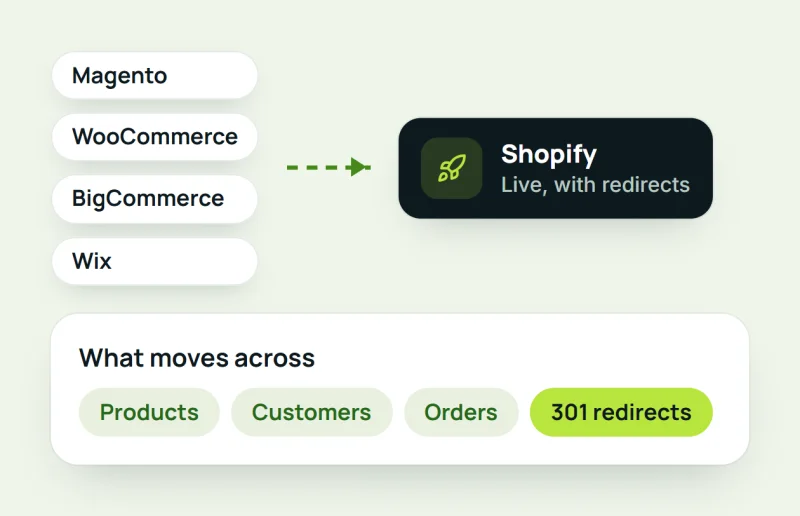
Who Matrixify suits
- Brands migrating to Shopify from Magento, WooCommerce, BigCommerce or another platform.
- Large or complex catalogues with many variants, metafields or collections to maintain.
- Merchandising teams making seasonal price changes, tag updates or product launches in bulk.
- Operations teams that need regular exports for wholesale partners, finance or reporting.
- Stores cleaning up after years of growth, with messy tags, duplicate products or broken redirects left by past campaigns.
When a bulk tool is overkill
If your catalogue is small and changes rarely, Shopify's built-in CSV import and the bulk editor in the admin may be enough. Matrixify becomes worthwhile when data volumes, data types or the cost of a mistake make careful, repeatable jobs essential. Because a bulk import can change thousands of records in one go, we always plan, back up and test before anything touches your live store.
Key Matrixify features for Shopify stores
Matrixify is a power tool for store data. These are the features we use most often on migrations and catalogue projects for UK merchants.

Wide data coverage
Products, variants, collections, customers, orders, discounts, redirects, pages, blog posts, menus, metafields and files can all be exported and imported. Moving several data types in one job keeps relationships intact, such as products and the collections they belong to, which matters on every migration.
Excel, CSV and Google Sheets
Your team works in familiar spreadsheet tools, and one workbook can hold separate sheets for different data types. Column headings follow a documented format, so files are easy to check, share between colleagues and reuse for the next job.
Create, update or delete
A command column tells Matrixify what to do with each row, whether that is creating a new item, updating fields, replacing data or deleting. Precise control means you can change one field across thousands of products without touching anything else.
Platform migrations
Matrixify can work with export files from several other ecommerce platforms and convert them into Shopify's structure. Paired with careful URL mapping and redirects, it does much of the heavy lifting in a replatforming project.
Scheduled and repeat jobs
Imports and exports can run on a schedule, pulling files from a URL or cloud storage and sending exports where they are needed. That suits regular stock or price updates from a supplier and recurring reports for finance teams.
Detailed job results
Every import produces a results file showing what was created, updated or skipped, with any errors listed row by row. Problems are easy to find and fix, and you keep a clear record of every change made to the store.
Get maximum ROI from Matrixify: setup tips
Bulk tools reward careful preparation. These habits keep every import safe, quick and easy to reverse.
Export before you import
Take a full export of the data you plan to change, so you always have a clean, dated backup to restore if anything goes wrong.
Test on a small batch
Run a handful of rows, or use a development store, and check the results carefully before importing the full file.
Keep handles stable
Changing product handles changes URLs, so plan and test redirects before you touch them in bulk.
Save templates
Reuse proven spreadsheet layouts for recurring jobs, so nobody rebuilds columns from memory or guesses at formats.
App stack
Where Matrixify sits in your app stack
Matrixify handles bulk data jobs, while other tools rely on the clean data it leaves behind.
Popular tools by job
Tool names are examples; trademarks belong to their owners.
Bulk data and migration
Large imports, exports and platform moves run through one controlled, documented process.
- MatrixifyBulk import, export and migration
Ongoing automation
Day-to-day rules keep tags, stock and products tidy between bulk jobs.
- Shopify FlowNo-code store automation
Search and filtering
Accurate metafields and tags power the filters shoppers use to find products by size, colour or material.
- Shopify Search & DiscoveryNative filters and search
Email and SMS
Customer records with correct consent fields give marketing a trustworthy starting list.
- KlaviyoEmail and SMS marketing
Matrixify integrations: website, CRM and call tracking
Matrixify touches the data every other system depends on, so we plan each connection carefully.
Website and SEO
Redirects, SEO titles and descriptions import in bulk, helping protect rankings during migrations, range relaunches and URL changes.
CRM and email
Customer imports map marketing consent carefully, so your email platform only contacts people who opted in, in line with UK GDPR.
Feeds and back office
Scheduled exports send order or product data to cloud storage for finance, wholesale or warehouse teams to pick up each morning.
Call tracking
Matrixify has no call-tracking role. Phone orders entered in Shopify simply appear in exports like any other order, tagged as you choose.
Matrixify pricing overview
Matrixify offers a limited free plan for testing, with paid plans that scale with the amount of data you need to move in each job. Smaller stores can often work on a lower tier, while large catalogues and full migrations usually need a bigger plan, sometimes just for the month of the move. Plans change, so check the current options on Matrixify's official website (opens in new tab) and estimate the size of your largest job before choosing a tier. Remember to count variants, not just products, because a range with many sizes and colours adds up quickly.
What shapes your total Matrixify cost
- The Matrixify plan, billed through Shopify and never marked up by us.
- Data volume. Product, variant, customer and order counts decide which plan your biggest job needs.
- Data preparation. Cleaning, mapping and checking spreadsheets is where most of the effort goes, especially on migrations.
- Testing time. Trial imports on a development store or a small batch are essential and must be planned in.
- Implementation. If you want us to plan and run imports, migrations or scheduled jobs, we work to a fixed price agreed upfront.
How to judge value
Compare Matrixify against the hours your team would otherwise spend editing products by hand, and the cost of mistakes made under time pressure. A seasonal repricing, a range relaunch or a platform migration each have a clear manual alternative you can estimate. Add the value of an accurate audit trail, since every job leaves a results file showing what changed. For most growing catalogues, a single well-run bulk job saves more staff time than the plan costs.
Our fees are fixed and shown in the price block below, ex VAT, so the only variable left is the Matrixify plan you choose.
What merchants say about Matrixify
Ratings and reviews shift over time, so we do not quote them here. The richest source of merchant feedback is Matrixify's listing on the Shopify App Store, where reviewers describe real imports and migrations. Search G2, Capterra and Trustpilot as well, though coverage of a specialist app like this can be thinner there. Always check the month a review was posted, as the app adds new data types and features regularly.
Look for comments on support quality, how the app handled large files, documentation and how easy merchants found the spreadsheet format at first. Reviews from stores with a catalogue size similar to yours are the most relevant.

Matrixify alternatives
Not sure you need a dedicated bulk tool?
Shopify CSV import and export
Free native tools for simpler product, customer and inventory files.
Shopify Migration
Our full-service replatforming, with data, redirects and QA all handled for you.
How we help with Matrixify
Our Apps Integration & Setup team plans and runs Matrixify jobs at a fixed price. Data scattered across too many apps? Start with Tech Stack Audit & Consulting.
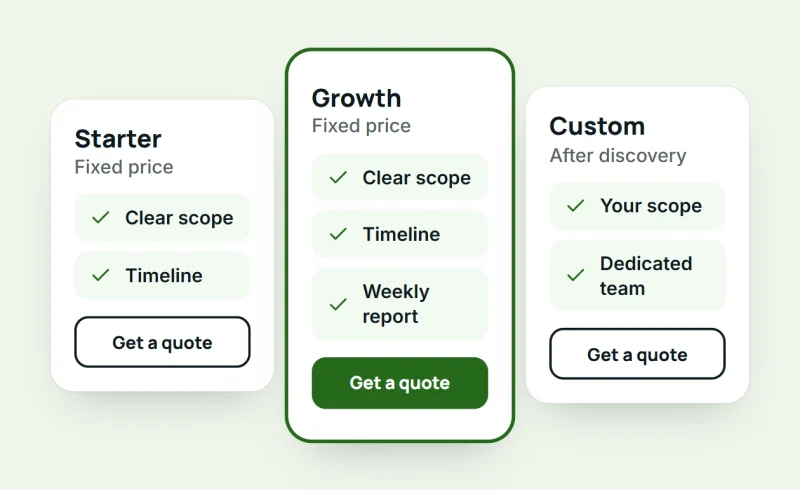
Starter
From £495 one-off, ex VAT
Best for: Matrixify set up with one planned job and a walkthrough
What it covers:
- Backup export and test import
- Reusable templates
Growth
From £1,495 one-off, ex VAT
Best for: Matrixify plus up to three connected tools
What it covers:
- Scheduled imports and exports
- Team training
Custom
Get a quote
Best for: Large migrations or complex data
What it covers:
- Scoped after discovery
- Get a quote
Fixed prices, agreed before work starts. All prices exclude VAT.
Compare every service on our Shopify pricing page.
Can Matrixify move my store to Shopify without losing SEO?
Matrixify moves the data and can import the redirects you prepare, but SEO safety depends on the planning behind it. Old URLs must be mapped to new ones, metadata carried across and internal links checked after launch. We handle that mapping as part of a migration, and test redirects on a sample before switching the domain over.
Will a Matrixify import overwrite my existing products?
Only if the file tells it to. The command you choose for each row decides whether Matrixify creates, updates, replaces or deletes data, and some commands change far more than others. We always export a backup first, test on a small batch and check the results file before running the full import on your live store.
Can Matrixify send order data to my accountant or warehouse?
It can export orders on a schedule to cloud storage or a server, which suits regular reports and simple feeds. For live, two-way accounting or stock sync, a dedicated integration is usually the better choice. We look at how your finance and warehouse teams work and recommend whichever route is more reliable and easier to maintain over time.
How much does Matrixify setup cost with SAL?
Starter, from £495 ex VAT, covers Matrixify set up, connected and demonstrated to your team alongside a carefully planned first job. Choose Growth, from £1,495 ex VAT, when you need up to four tools linked together, scheduled automations and staff training. The Matrixify plan itself is billed separately through Shopify.
Free consultation
Get help with your app stack
Share your details and a member of our team will follow up to arrange a brief discussion.
Tell us about your project
What happens next
- You send your store and project details.
- We follow up to arrange a short call.
- On the call, we talk through your goals and explain how we would scope the work.
Talk to us directly
Waverley House, 9 Noel St, London W1F 8GQ
Phone +44 7476 560011 WhatsApp +44 7476 560011 (opens in new tab) Email hello@shopifyagencylondon.co.ukPrefer the full contact page? Visit our Contact / Free Consultation page.