
Monthly Shopify care
Shopify Support and Maintenance That Keeps Your Store Selling
A UK team on hand for fixes, updates and steady improvements every month.
Our Shopify support plans reserve specialist hours for your store each month, so broken layouts, app conflicts, theme updates and small improvements are handled by people who already know your setup, not whoever happens to be free that week. You get a dedicated PM, checklist QA with 4-eyes review on every change, weekly updates and a fixed monthly price, leaving your team free to focus on product, marketing and customers while the store keeps earning.
Prefer to talk? Call +44 7476 560011 or message us on WhatsApp (opens in new tab)

Who needs Shopify support, and why it pays to plan ahead
Our shopify development services don't stop on launch day. Shopify looks after hosting and the core platform, but everything layered on top is yours to maintain: the theme, the apps, the tracking scripts and the product data. That's where problems quietly creep in.
A monthly plan is built for:
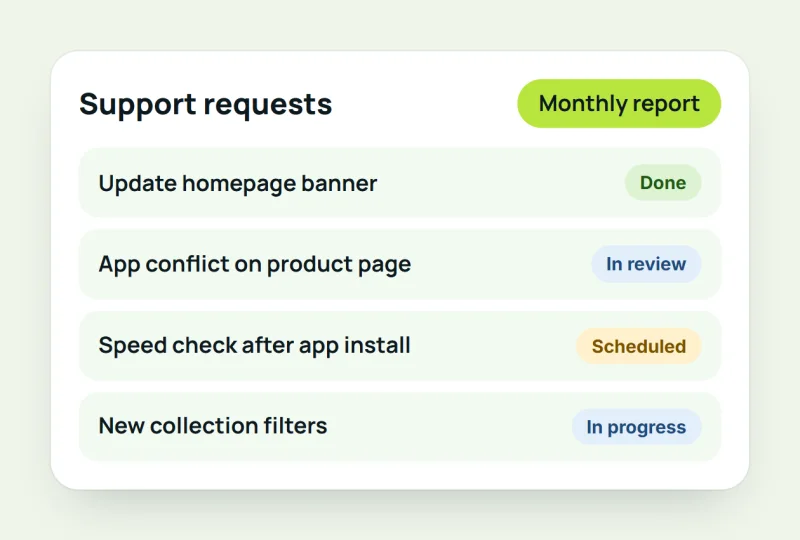
The real cost of having no support is rarely one dramatic outage. It's a broken add-to-cart button on mobile that nobody spots for a week, an app update that clashes with your theme, or a promotion banner still promising free delivery long after the offer ended. Each one chips away at conversion and customer trust. A support plan gives those issues a clear owner and a fix date.
- Growing DTC brands without an in-house developer, relying on a freelancer they can't always reach before a launch.
- Ecommerce managers sitting on a backlog of small fixes that never make it into anyone's sprint.
- Brands heading into peak, from Black Friday to the Boxing Day sales, who need to know the store will hold up.
- Merchants who have just launched and want the same care and standards to continue after go-live.
What's included in our Shopify support plans
Your monthly hours can go on fixes, upkeep or improvements, whatever the store needs most that month. Every request is scoped, tested and signed off by a specialist lead before it reaches your live theme.
Bug fixes and troubleshooting
When a section breaks, a filter stops filtering or a discount code refuses to apply, raise it with your PM and a specialist investigates. We trace the root cause rather than patching symptoms, test the fix on a preview theme and publish only after review.
Theme updates without losing your changes
Theme developers release updates with fixes and new features, but applying them to a customised theme can overwrite months of work. We merge updates carefully, keep your customisations intact and track every change in version control so nothing goes missing.
App health checks
Each app adds scripts and settings to your storefront, and updates can clash. We review the stack, spot conflicts and leftover code from uninstalled apps, then recommend what to keep, replace or remove so the store stays lean and dependable.
Content and merchandising changes
New banners, a landing page for a product drop, collection tweaks or a seasonal homepage for Mother's Day. Support hours cover everyday store updates as well as fixes, so your marketing calendar never stalls waiting for a developer to become free.
Speed and Core Web Vitals care
Stores slow down gradually as apps, images and sections pile up. We keep an eye on page speed and Core Web Vitals, then tackle oversized images, render-blocking scripts and heavy sections before they start costing you sales.
Small features and improvements
Support isn't only reactive. Put spare hours towards a size guide, a delivery cut-off message, a better mobile menu or a new product page block, each estimated before work begins so you always know where the time goes.
Peak season readiness
Before big trading moments, we walk through key journeys, test checkout on real phones and desktops, check discount logic and confirm apps behave as expected under pressure. You head into Black Friday or a major launch knowing the basics are covered.
A dedicated PM and clear reporting
One PM triages your requests, keeps the backlog in order and sends a weekly update. A monthly report covers work completed, hours used and our recommendations for the month ahead, so you can see exactly what your plan delivered.
Access and permissions housekeeping
Staff accounts and app permissions build up over time. We review who and what can reach your admin, remove access that's no longer needed and check 2FA is switched on, quietly supporting your UK GDPR obligations and keeping customer data safer.
Further reading: Shopify Support Plans Explained
Comparing support options for the first time? Our guide explains how monthly hours, scope and SLAs usually work, and what to ask any provider, so you can choose a plan with confidence.
How your support plan beds in
Starting support should feel organised from day one. Here's how a typical plan settles in, from secure access to a store that's ready for its busiest weeks. Exact timings depend on your store and are agreed before we begin.
Onboarding
Access, audit and baseline
- NDA signed first, then a least-privilege staff account set up with 2FA and recorded in our access log.
- A health check of your theme, apps and page speed sets the baseline we measure all future work against.
First month
Clear the urgent backlog
- Priority fixes from the audit are scoped, agreed with you and worked through before anything cosmetic.
- Your PM sets up the request process and a weekly update rhythm that suits the way your team works.
Every month
Maintain and improve
- Theme updates, app checks and your requested changes are delivered in planned, reviewed batches.
- The monthly report shows work done, hours used and the improvements we'd tackle next.
Before peak
Get trading-ready
- Key journeys, discounts and checkout are tested ahead of Black Friday, Christmas and big product launches.
- A change freeze can be agreed for your busiest trading windows, so nothing risky goes live mid-sale.
Stages, not fixed durations. Timings are agreed with you once the scope is clear.
How a support request works
Every request follows the same tested path, built on our 10-step delivery process, so small changes never become big surprises.

Raise the request
Send it to your PM by email or through your shared board, ideally with a screenshot or short screen recording. A clear example helps us reproduce the issue first time.
Triage and estimate
Your PM confirms the priority and estimates the hours. Anything stopping customers from buying goes to the front of the queue; improvements are batched to make the most of your allowance.
Work on a preview theme
A specialist makes the change on a duplicate or preview theme, never directly on the live store, so shoppers aren't affected while work is in progress.
QA and 4-eyes review
Each change is checked against our QA checklist across devices and browsers, then reviewed by a second specialist before the lead signs it off.
Approve and publish
You check the preview link, or a recorded walkthrough for larger changes, and give the go-ahead. We publish and keep a rollback point in case anything needs reversing.
Report and refine
Weekly updates track progress, and the monthly report summarises hours and next priorities, so the store keeps improving rather than simply staying afloat.
Tools and integrations we look after
Support covers the whole stack around your store, not just the theme. These are the tools and connections we check, maintain and fix most often.
Shopify admin and theme editor
Sections, templates, menus, metafields and settings, kept tidy so your team can make everyday edits without breaking layouts.
Shopify CLI, GitHub and Theme Check
Code changes are made locally, linted with Theme Check and committed to version control, giving every fix a clear history and an easy way back.
Klaviyo and email capture
Signup forms, back-in-stock alerts and tracking events that stop firing after a theme change are diagnosed and reconnected.
Analytics and tracking
We check GA4, the Google & YouTube app and Meta's sales channel after updates, so your reporting and ad platforms keep receiving accurate data.
Payments and delivery
Shop Pay, Klarna, Clearpay, Royal Mail Click & Drop and courier apps are tested when settings or themes change.
Reviews and subscription widgets
Judge.me, Okendo and Recharge blocks are re-checked after theme updates, so star ratings and subscribe-and-save options keep displaying correctly on every product page.
Speed and accessibility testing
PageSpeed Insights, Lighthouse and Shopify's own web performance reports help us catch slowdowns and accessibility gaps early.
The AI angle: smarter support, still checked by people
AI helps us work through support requests more efficiently, but it never replaces a specialist's judgement. We use it to summarise long error logs, suggest likely causes for a bug, draft QA test cases and compare theme files after an update. A developer verifies every suggestion, and any change still passes 4-eyes review before it touches your live store.
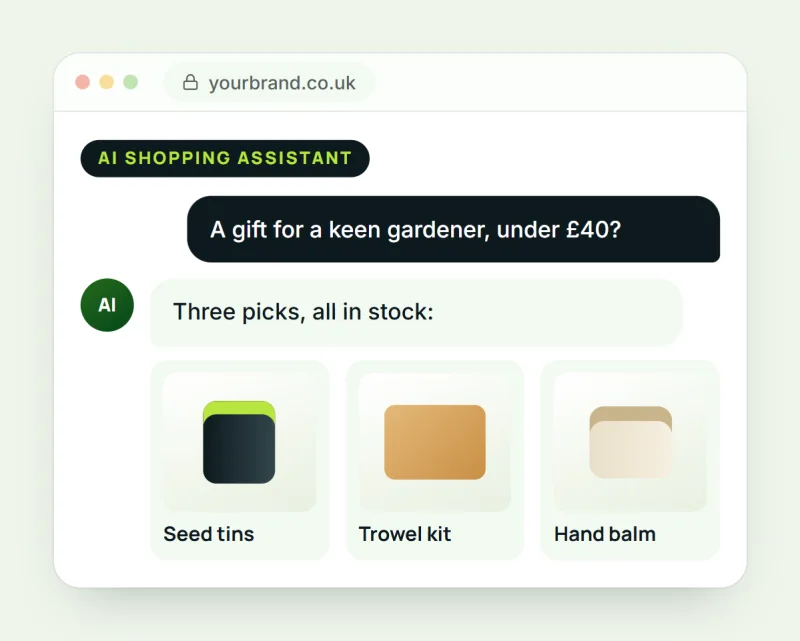
Support also covers the AI features you already rely on. More UK merchants now run tools that need regular attention, and your monthly hours can go towards:
Your data stays protected throughout. Client data is never used to train AI models, and we only connect tools you have approved. If you're planning something bigger than maintenance, explore AI for Shopify Stores to see what a dedicated AI project could add, then use your support plan to keep it running smoothly afterwards.
- refreshing the prompts and brand guidance used with Shopify Magic for product copy
- tuning AI search synonyms and results when shoppers can't find what they're looking for
- updating the answers a chat assistant gives about delivery times, returns and stock
- checking that structured product data stays complete, so AI shopping assistants describe your range accurately
App stack
App stack builder: apps that make support easier
A well-chosen stack reduces the number of things that can go wrong, and fewer overlapping apps means fewer conflicts to fix. These are dependable, widely used apps we often recommend, install and maintain as part of a monthly plan.
Popular tools by job
Tool names are examples; trademarks belong to their owners.
Backups and recovery
Restore products, themes or settings quickly if an import or edit goes wrong.
- Rewind BackupsAutomatic store backups and restores
- MatrixifyScheduled exports as a spare copy
Automation and alerts
Catch low stock, stuck orders and high-risk payments before a customer or courier reports them.
- Shopify FlowRules for alerts, tags and admin tasks
Customer service
Give your team full order context so routine where-is-my-parcel questions are answered in one reply.
- GorgiasShared inbox linked to orders
- Shopify InboxFree live chat for smaller teams
Search and discovery
Keep filters, synonyms and product recommendations accurate as the catalogue grows and changes.
- Shopify Search & DiscoveryFilters, synonyms and boosts
- Boost AI Search & DiscoveryRicher filtering for big ranges
Reviews and retention
Keep review requests and lifecycle emails firing after every theme or app update.
- Judge.mePost-purchase review requests
- KlaviyoAbandoned basket and win-back flows
Support plan pricing
Fixed monthly plans, ex VAT, with hours reserved for your store. Planning a build or redesign instead? See typical shopify website cost for one-off projects.
Starter
From £295 per month, ex VAT
Best for: 5 hours a month for smaller stores needing occasional fixes and updates.
What it covers:
- Bug fixes, theme updates and small edits
- Dedicated PM with weekly updates
- QA and 4-eyes review on every change
Growth
From £595 per month, ex VAT
Best for: 12 hours a month for busy stores with a steady improvement backlog.
What it covers:
- Room for small features and CRO tweaks
- Regular speed and app health checks
- Peak season readiness testing
Custom
Get a quote
Best for: Larger allowances, Plus stores or SLA-backed cover. Get a quote.
What it covers:
- Hours sized to your roadmap
- Agreed SLA and escalation route
- Multi-store and integration support
Fixed prices, agreed before work starts. All prices exclude VAT.
Compare every service on our Shopify pricing page.
Support work stays confidential, so we show it live
- NDA signed before any data is shared
- Least-privilege access with 2FA
- UK GDPR and data processing terms
- Your data never trains AI models
Support means access to your admin, your orders and sometimes your customer data, so discretion matters. Every engagement is covered by an NDA, which is why you won't find client names, store screenshots or before-and-after claims on this page. We extend the same courtesy to every merchant we look after, including you.
Instead, we'll show you how support actually runs on a live screen-share over Zoom or Google Meet. With identifying details removed, a specialist lead will take you through:
- how requests are logged, prioritised and estimated against monthly hours
- what a weekly update and monthly support report look like
- how fixes move from preview theme to QA, approval and publication, with a rollback point kept
- how we run a pre-peak check before Black Friday
The same safeguards apply to your store from the first conversation: an NDA before any data is shared, a non-solicit agreement, least-privilege access with 2FA, UK GDPR compliance and deletion of your data when the contract ends. Read how we handle access on our security and privacy page, or Book a Live Walkthrough and bring a list of the issues that are slowing your store down today.
FAQs
Questions about monthly support plans
Straight answers before you get in touch. More in our FAQs.
What's the difference between support and a new project?
Support covers fixes, updates, small features and content changes that fit within your monthly hours. Larger pieces of work, such as a redesign, a migration or a custom app, are better scoped as separate projects with their own fixed price. Your PM will tell you which route makes sense before any time is used.
Do you support Shopify stores you didn't build?
Yes. Most support clients come to us with an existing store built by another agency, a freelancer or an in-house team. We start with a health check of the theme, apps and speed, so we understand the codebase before making changes and can flag any risky areas early.
What if I need more hours than my plan includes?
Your PM tracks hours throughout the month and flags it before your allowance runs out. You can then approve additional work as a separate quote, hold lower-priority requests until next month or move up to the Growth or Custom plan if busier months are becoming the norm.
How do you handle urgent problems?
Anything that stops customers from buying, such as a broken basket or failing payment method, is prioritised over cosmetic requests. Custom plans can include an SLA with agreed response and escalation times for critical issues, so you know exactly how urgent problems will be handled before you need to rely on it.
Will you need access to my Shopify admin?
Yes, through a staff account with only the permissions the work requires, protected by 2FA and recorded in our access log. Credentials are shared through a password manager, never by email. If the plan ends, access is removed and any data we held is returned or deleted.
Do you support Shopify Plus stores?
Yes. Plus stores often need help with checkout extensions, Shopify Flow automations, B2B catalogues and multiple expansion stores. Because these setups usually need more hours and clearer service levels, Plus support is normally scoped as a Custom plan sized to your roadmap and trading calendar.
Can support hours be used for marketing tasks?
They can be used for store-side work that supports your marketing, such as campaign landing pages, promotional banners, Klaviyo signup forms and tracking fixes. Managing paid ads or running campaigns sits outside a support plan, but our performance marketing team can help with that separately.
How do I know what my monthly hours were spent on?
Your PM sends a weekly update on progress and a monthly report covering completed requests, hours used and recommendations for the next month. Every change is also recorded in version control, so there's a clear trail of what was altered, when it went live and who reviewed it.
Give your Shopify store a support team it can count on
Tell us what's been slowing your store down, from niggling bugs to a growing wish list, and we'll recommend the right monthly plan, with fixed pricing, a dedicated PM and every change checked by two specialists before it goes live on your store.
Free consultation
Get a fixed quote for shopify Support & Maintenance
Share your details and a member of our team will follow up to arrange a brief discussion.
Tell us about your project
What happens next
- You send your store and project details.
- We follow up to arrange a short call.
- On the call, we talk through your goals and explain how we would scope the work.
Talk to us directly
Waverley House, 9 Noel St, London W1F 8GQ
Phone +44 7476 560011 WhatsApp +44 7476 560011 (opens in new tab) Email hello@shopifyagencylondon.co.ukPrefer the full contact page? Visit our Contact / Free Consultation page.