
App setup & integration
Shopify Flow Setup, Integration & Optimisation for UK Brands
Put Shopify Flow to work: automated tagging, stock alerts, risky-order checks and app hand-offs for UK brands. Fixed-price setup – book a free call today.
Prefer to talk? Call +44 7476 560011 or message us on WhatsApp (opens in new tab)

Shopify Flow: overview and who it suits
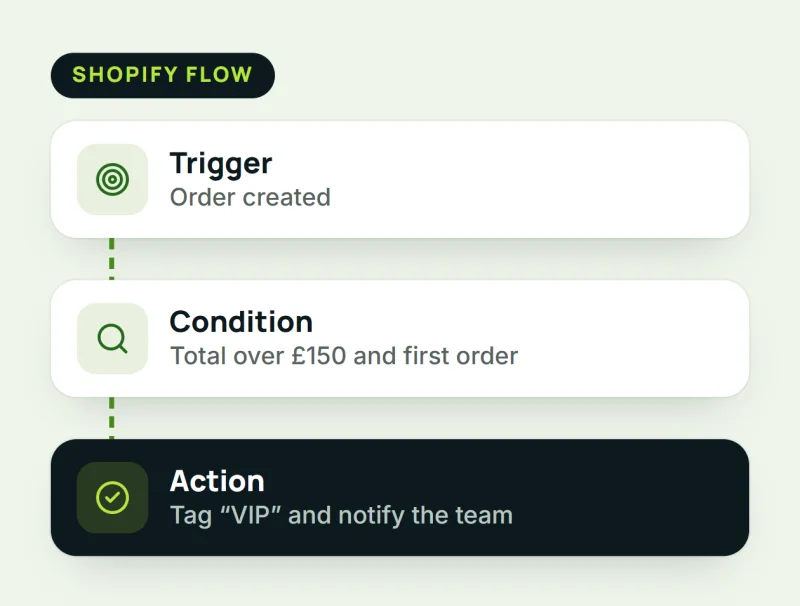
Shopify Flow is Shopify's own automation app. Each workflow has three parts: a trigger, such as an order being placed or stock running low; conditions, such as order value, shipping country or customer tags; and actions, which tell the store what to do next. Most workflows need no code, and everything runs inside your Shopify admin rather than on a separate platform. For a busy UK brand, the repetitive admin your team does by hand every morning can happen automatically, around the clock, including weekends and bank holidays.
Flow underpins our Operations & Returns recommendations because it is the glue between Shopify and your other tools. It can tag a high-value customer, alert the warehouse to a risky order, hide a sold-out product or flag a VIP for priority service, without anyone lifting a finger. For ideas to start with, read Shopify Flow Automations Every Store Should Use.
Who Shopify Flow suits
- Lean teams losing hours each week to tagging, stock checks and order notes.
- Brands running several apps that need email, helpdesk or fulfilment tools to react to store events.
- Shopify Plus merchants managing B2B, multiple markets or complex fulfilment rules.
- Fast-moving catalogues where sold-out lines need hiding and restocks need flagging.
Where it needs care
Flow is powerful, which makes it easy to build workflows that clash with each other. A careless tag rule can overwrite data your email platform depends on, and two workflows reacting to the same event can produce confusing results. We document every workflow, test it against realistic scenarios and keep the set small enough that your team understands exactly what is running and why. Anything that no longer earns its place gets switched off.
Key Shopify Flow features
Flow looks simple on the surface, but it has grown into a capable automation tool. These are the features we use most for UK merchants.

Triggers, conditions and actions
Workflows start when something happens in your store, such as an order being created, a customer signing up or inventory changing. Conditions decide what qualifies, and actions do the work, from adding tags to sending internal emails. The visual editor shows every branch clearly, so logic is easy to follow.
Template library
Flow includes ready-made templates for common jobs, such as tagging repeat customers, flagging high-risk orders or alerting staff when stock runs low. They make a quick starting point, though each still needs checking against your own tags, products and processes before it goes live.
App connectors
Many Shopify apps add their own triggers and actions to Flow, so an event in one tool can set off work in another. Support varies from app to app, so we confirm exactly what each connector offers before designing a workflow around it.
Scheduled workflows
Workflows can run on a schedule as well as in response to events. That suits regular housekeeping, such as reviewing stock levels, tidying tags or sending a morning summary to the team before the first orders are picked.
Data lookups and advanced logic
For more complex jobs, Flow can fetch store data, work through lists of items and, depending on your plan, call outside systems or run custom code. These options let experienced builders handle cases that simple tag rules cannot reach.
Run history
Every workflow keeps a record of its runs, showing what triggered it, which conditions passed and whether each action succeeded. That makes troubleshooting far quicker when something unexpected happens on a busy trading day.
Get maximum ROI from Shopify Flow: setup tips
Automation saves the most time when it is planned like any other store process, not bolted on.
Automate the dull jobs first
Start with tasks your team repeats daily, such as tagging, stock alerts and order notes, before attempting anything clever or cross-app.
Agree names and tags
Clear workflow names and a shared tag list prevent duplicates and make later audits painless for whoever inherits the store.
Test before switching on
Use test orders and narrow conditions to prove each workflow on safe data before it touches live customers.
Check run history weekly
Look for failed runs and odd matches, especially after installing new apps or making theme changes.
App stack
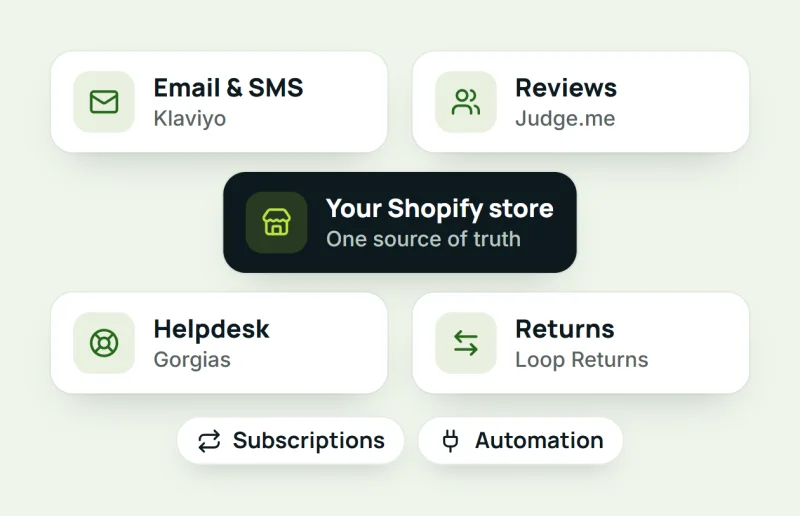
Where Shopify Flow sits in your app stack
Flow is the automation layer that helps your other tools act on the same store events.
Popular tools by job
Tool names are examples; trademarks belong to their owners.
Automation hub
Store events trigger tags, alerts and updates that other tools rely on.
- Shopify FlowTriggers, conditions and actions
Email and SMS
Tags and customer data set by Flow sharpen marketing segments.
- KlaviyoEmail and SMS flows
Customer service
Consistent tags help agents recognise VIPs and flagged orders quickly.
- GorgiasEcommerce helpdesk
Bulk data
Large one-off changes run faster as bulk imports than as workflows.
- MatrixifyBulk import and export
Returns and exchanges
Refunds created in Shopify can trigger follow-up tags and team alerts.
- Loop ReturnsExchange-first returns portal
Shopify Flow integrations: website, CRM and call tracking
Flow touches more of your store than most apps, so we plan each connection with care.
Website and storefront
Flow can hide, publish or retag products, so collections update without manual edits. We check theme filters and merchandising still behave.
CRM and email
Tags and metafields set by Flow give your email platform cleaner segments for VIP, wholesale or lapsed customers.
Call tracking
Flow does not track calls. Phone orders entered in Shopify can still be tagged and routed like any other order.
Internal alerts
Internal emails warn your team about large orders, low stock or orders that Shopify's fraud analysis marks as high risk.
Shopify Flow pricing overview
Shopify Flow is a free app from Shopify, available on most paid Shopify plans. There is no separate subscription to budget for, but some features, limits and advanced actions vary by plan, so check what yours includes on Shopify's official website (opens in new tab) and in its help centre before planning anything ambitious. Free to install does not mean free to run well, and that is where most brands underestimate the effort.
What shapes the real cost of Shopify Flow
- Your Shopify plan. Merchants on Shopify Plus usually have the widest options, which matters for B2B, multi-market or complex fulfilment workflows.
- Connected apps. Flow often triggers actions in paid tools such as your email platform or helpdesk, and some connectors sit on those apps' higher plans.
- Build and testing time. A good workflow needs planning, edge-case testing and documentation, otherwise it creates more admin than it removes.
- Ongoing maintenance. New apps, theme changes and shifting processes mean workflows need an occasional review.
- Implementation support. If you want us to design and build workflows, we work to a fixed price agreed upfront.
How to judge value
Measure Flow by the hours it gives back and the errors it prevents. Before you start, list the manual tasks you want to remove and estimate how long each takes in a normal week, then add the cost of mistakes, such as a fraudulent order despatched or a sold-out product left live during a promotion. After a month, compare the before and after. The strongest returns usually come from a handful of reliable workflows, not dozens of clever ones that nobody fully understands.
Our fees are fixed and shown in the price block below, ex VAT, so you know your total before work begins.
What merchants say about Shopify Flow
Because Flow is Shopify's own app, most first-hand feedback lives on its Shopify App Store listing and in Shopify Community forum threads, where merchants share workflows and troubleshoot problems in the open. Independent sites such as G2, Capterra and Trustpilot mostly review Shopify as a whole rather than Flow on its own, so read those with that in mind. We do not reproduce ratings or quotes here because they change over time.
Check the date on every post, since Flow gains new triggers and actions regularly. Look for comments on reliability, plan limits and how well third-party connectors behave in practice once order volumes climb.
Shopify Flow alternatives
Need automation beyond Shopify's own tools?
Zapier
General automation platform linking Shopify to a wide range of business apps outside ecommerce, such as spreadsheets.
Mesa
Shopify-focused automation app with ready-made templates and developer-friendly options.
How we help with Shopify Flow
Our Apps Integration & Setup team designs, builds and documents Flow workflows at a fixed price. Unsure what to automate? Start with Tech Stack Audit & Consulting.
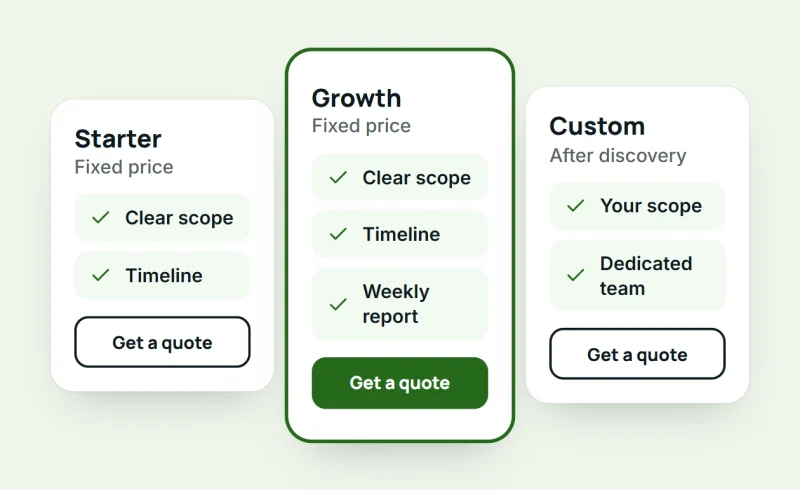
Starter
From £495 one-off, ex VAT
Best for: Flow set up with core workflows and a team walkthrough
What it covers:
- Tagging and stock alerts
- Testing and documentation
Growth
From £1,495 one-off, ex VAT
Best for: Flow plus up to three connected tools
What it covers:
- Cross-app automations
- Team training
Custom
Get a quote
Best for: Plus, B2B or custom-code workflows
What it covers:
- Scoped after discovery
- Get a quote
Fixed prices, agreed before work starts. All prices exclude VAT.
Compare every service on our Shopify pricing page.
Is Shopify Flow only available on Shopify Plus?
Not any more. Flow began as a Plus-only tool, but Shopify has since opened it up to other paid plans. Some features, limits and advanced actions still vary by plan, so we check exactly what your plan includes before designing workflows. That way you never build around an action you cannot actually use.
Can Shopify Flow replace Zapier for my store?
Often for jobs that happen inside Shopify and apps with Flow connectors, such as tagging, alerts and inventory housekeeping. Zapier still earns its place when you need to link tools outside the Shopify ecosystem, like certain accounting or project management software. Many brands run both, with Flow handling store logic and Zapier covering the gaps elsewhere.
Could a badly built workflow damage my store?
It can cause real problems, because workflows change live data. A poorly scoped rule might mislabel orders, hide the wrong products or flood inboxes with alerts. That is why we test on safe data, add clear conditions, document every workflow and show your team how to pause one instantly if something looks wrong during trading.
How much does Shopify Flow setup cost with SAL?
Starter is from £495 ex VAT for one tool set up, connected and walked through with your team, ideal for a first set of Flow workflows. Growth is from £1,495 ex VAT and covers up to four tools, automations, call tracking and training. Flow itself is free from Shopify on eligible plans.
Free consultation
Get help with your app stack
Share your details and a member of our team will follow up to arrange a brief discussion.
Tell us about your project
What happens next
- You send your store and project details.
- We follow up to arrange a short call.
- On the call, we talk through your goals and explain how we would scope the work.
Talk to us directly
Waverley House, 9 Noel St, London W1F 8GQ
Phone +44 7476 560011 WhatsApp +44 7476 560011 (opens in new tab) Email hello@shopifyagencylondon.co.ukPrefer the full contact page? Visit our Contact / Free Consultation page.