
Apps & integrations
Operations & Returns Apps That Keep Your Shopify Store Running
Compare Shopify operations & returns apps, from Gorgias and Flow to Loop and Matrixify, and learn how to choose. SAL sets them up. Book a free call.
Prefer to talk? Call +44 7476 560011 or message us on WhatsApp (opens in new tab)

Run a leaner store with operations & returns apps
Every order a Shopify store takes creates work behind the scenes: a customer asking where their parcel is, a product that needs re-tagging, a jumper coming back in the wrong size, a price change across hundreds of SKUs. Operations & returns apps take that work off your team's plate. A helpdesk keeps conversations in one place, automation handles routine admin, a returns platform turns refunds into exchanges and bulk data tools make catalogue changes in minutes rather than days. Get them right and you can grow order volume without hiring at the same pace.
This category is part of our wider Shopify Apps & Integrations guide, which groups tools by the job they do. Operations apps rarely get the spotlight that marketing tools enjoy, yet they shape what customers remember most: how quickly you replied, how easy the return felt and whether the replacement arrived when you said it would.
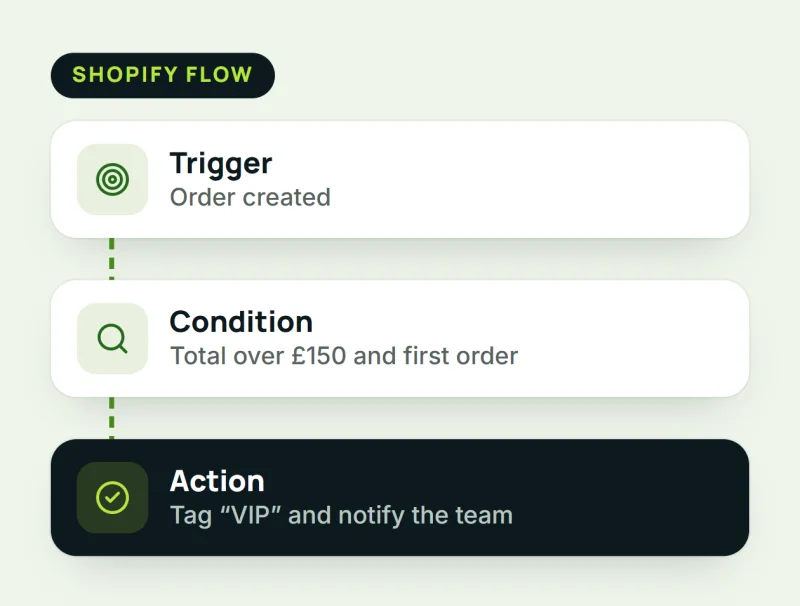
What operations & returns apps cover
- Customer service: a shared inbox for email, chat and social messages, with order details beside every conversation.
- Workflow automation: tagging, alerts, stock housekeeping and order routing that run without anyone clicking a button.
- Returns and exchanges: a branded portal, clear rules and incentives that keep revenue in the business.
- Bulk data: imports, exports and migrations for products, customers, orders and redirects.
Why the UK context matters
UK shoppers have a legal right to cancel most online orders within 14 days of delivery, and many brands extend their window over Christmas. Returns are a normal cost of trading online, not an exception. Peak trading from Black Friday into January can also swamp a service inbox almost overnight. The brands that cope best are those whose tools already talk to each other, with return statuses visible to agents and automations sorting the queue before anyone logs in.
That joined-up setup is what we build. Our specialists audit what you run today, recommend the fewest tools that will do the job, then configure and test them on staging under NDA before training your team to run them confidently.
Operations & returns tools to shortlist
Each of these tools connects natively to Shopify and fixes a specific operational headache. Most brands start with one or two, then add the rest as order volume grows.
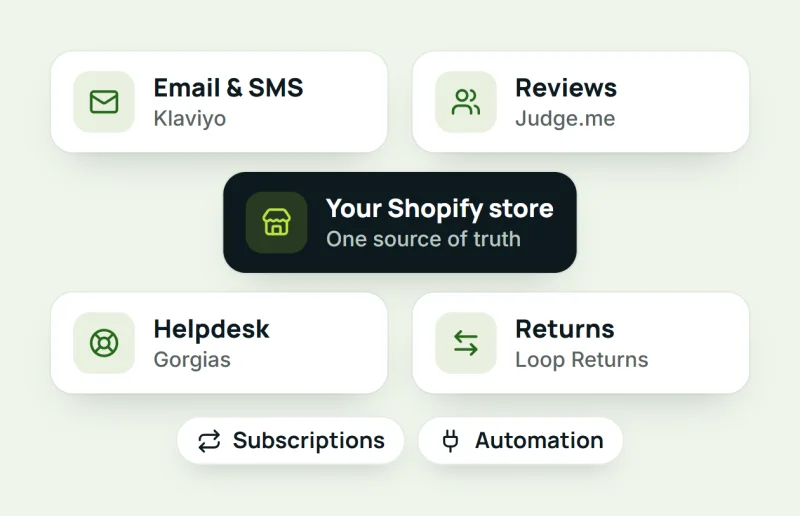
Gorgias
An ecommerce helpdesk that brings email, live chat, social messages and more into one inbox, with each customer's Shopify orders shown beside the conversation. Agents can handle common requests, such as refunds or cancellations, without leaving the ticket, while macros and rules keep queues moving during peak season, when inboxes fill fastest.
Shopify Flow
Shopify's own no-code automation app, built on triggers, conditions and actions. It takes care of the admin nobody enjoys, such as tagging customers, flagging risky orders, hiding sold-out products and alerting staff, and many third-party apps add their own triggers and actions to it. It is free to install on most paid Shopify plans.
Loop Returns
A returns platform for Shopify that encourages exchanges and store credit ahead of refunds. Customers start returns through a branded portal, rules decide what is eligible, and reporting shows why items come back, so buying and product teams can tackle the causes, such as poor sizing guidance or misleading photos.
Matrixify
A bulk import and export app that works with Excel, CSV and Google Sheets files. It covers products, collections, customers, orders, redirects and much more, which makes it a staple for platform migrations, seasonal price updates and large catalogue clean-ups that would take days by hand.
Shopify Inbox
Shopify's free chat app for answering shoppers while they browse your store. It suits smaller brands with modest enquiry volumes and gives agents useful context about each shopper, making it a sensible first step before you invest in a full helpdesk with automation and reporting.
AfterShip Returns
A returns and exchanges app from the team behind AfterShip's parcel tracking tools. It offers a branded returns page, exchange and refund options and return label support, and is a common alternative to Loop for brands already using AfterShip to send delivery updates to customers.
How to choose operations & returns apps
Work through these six checks before you install anything. They keep the focus on the time and money each tool should save, not on the longest feature list.
Map where the hours go
List the repetitive jobs your team does each week: answering delivery queries, logging returns, tagging orders, uploading products. Rough timings are enough. The biggest drains on time usually point straight to the first tool worth buying, and stop you paying for software that solves a problem you barely have.
Fix the policy before the tool
A returns app cannot rescue an unclear returns policy. Decide your window, exclusions, exchange rules and who pays for postage, making sure it respects customers' statutory rights. Do the same for service: agree reply targets and escalation routes, then choose software that enforces them.
Check how the tools connect
Your helpdesk should see returns and order status, your automation should react to tags and refunds, and your warehouse or 3PL needs accurate stock. Confirm each connection is native or well supported before you commit, and decide which system holds the master record for every piece of data.
Plan for peak trading
Test each shortlisted tool against your busiest weeks, not an average Tuesday. Black Friday, Christmas and the January returns rush stretch ticket queues, warehouse capacity and patience. Ask vendors how their pricing behaves when volumes spike, and build automations before peak, not during it.
Model the full running cost
Operations apps are often priced by tickets, returns or data volume rather than by seat. Add carrier label costs, connected app fees, setup and staff training, then compare the total against the hours saved and the revenue kept through exchanges or faster replies.
Protect customer data
Helpdesks and returns portals hold names, addresses and order histories. Check where each vendor stores data, how it supports UK GDPR requests and how access can be restricted by role. Give every team member their own login with two-factor authentication rather than sharing one password across the warehouse.
Compare tools and plan your operations stack
Gorgias vs Zendesk for Shopify
Weigh an ecommerce-first helpdesk against a broad service platform before you sign a contract or migrate years of ticket history.
Shopify website cost
See our fixed, ex VAT prices for app setup, store builds and ongoing support in one place.
Shopify Flow Automations Every Store Should Use
Practical workflows to switch on first once Flow is installed, from VIP tagging to low-stock alerts.
Reducing Returns on Shopify: Tools and Tactics
Ways to cut avoidable returns before parcels ever reach your warehouse.
Get your back office working as hard as your storefront
Tell us which helpdesk, returns, automation and data tools you run now, or plan to add, and we will map how tickets, refunds, tags and stock should flow between them. Your dedicated project manager scopes the work at a fixed price, our specialists build and test it on staging under NDA, and you can book a live walkthrough on Zoom or Google Meet before anything goes live. Weekly updates and SLA support keep it all running smoothly through peak season and beyond.
Free consultation
Get help with your app stack
Share your details and a member of our team will follow up to arrange a brief discussion.
Tell us about your project
What happens next
- You send your store and project details.
- We follow up to arrange a short call.
- On the call, we talk through your goals and explain how we would scope the work.
Talk to us directly
Waverley House, 9 Noel St, London W1F 8GQ
Phone +44 7476 560011 WhatsApp +44 7476 560011 (opens in new tab) Email hello@shopifyagencylondon.co.ukPrefer the full contact page? Visit our Contact / Free Consultation page.