
Shopify app integration
Best Shopify Apps Integration, Connected and Tested for UK Brands
Your apps installed, connected and automated, so they finally work as one system.
Our best Shopify apps integration service takes the tools you've chosen, from Klaviyo and Gorgias to reviews, loyalty and call tracking, and sets them up properly: configured for your brand, connected to your store, CRM and analytics, automated where it saves time and tested before customers see a thing. You get a fixed price, a specialist lead and a team walkthrough instead of half-installed apps, broken theme code and data that never quite adds up.
Prefer to talk? Call +44 7476 560011 or message us on WhatsApp (opens in new tab)

Why app setups go wrong, and who we help
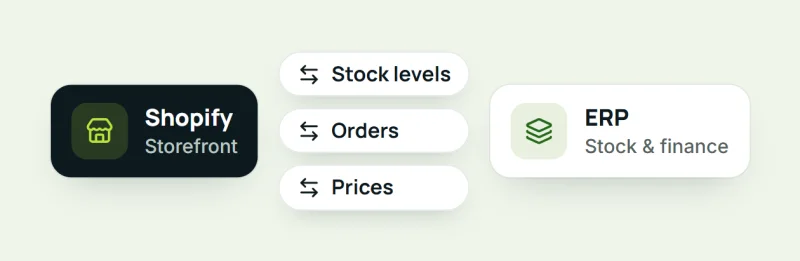
Our guides to the best shopify apps help you choose the right tools; this service makes sure they are installed, connected and genuinely earning their subscription. The Shopify App Store makes adding a tool feel like a two-minute job, but getting it to work properly is another matter. Apps go live on default settings, code is pasted into the theme by hand, data never reaches the CRM and nobody notices that two tools both send a review request after every order.
We usually work with:
The aim is simple: every app does one clear job, data flows where it should and your team trusts the numbers they see each morning.
- DTC brands adding a new tool, such as Klaviyo, a reviews platform or a helpdesk, who want it live quickly without putting the storefront at risk.
- Growing teams connecting Shopify to a CRM such as HubSpot, so sales, service and marketing work from one shared customer history.
- Brands that take phone orders or enquiries and need call tracking tied to campaigns, so they know which ads make the phone ring.
- Merchants who inherited a messy setup from a previous agency or freelancer and want it rebuilt cleanly.
What our app integration and setup covers
Whether you need one tool live next week or a whole stack connected before peak season, every integration follows the same careful, fully tested approach, led by a specialist who knows each platform well.
Tool fit and overlap check
Before installing anything, we confirm the app suits your Shopify plan, theme and existing stack, check for overlap with tools you already pay for and agree what success looks like, such as a live flow or a dashboard your team will actually open.
Installation and configuration
We install each app, then configure it properly instead of accepting the defaults: brand styling, sending domains, permissions, notification wording, rules and settings that reflect how your business really operates day to day.
Theme integration
Widgets, app blocks and embeds are added through the theme editor wherever possible, styled to your brand and checked on mobile, so reviews, upsells and loyalty prompts look native rather than bolted on as an afterthought.
CRM and data connections
We connect Shopify and your apps to CRMs such as HubSpot, mapping customer, order and product fields carefully, so sales and service teams see accurate histories without exporting spreadsheets every Monday morning.
Call tracking setup
For brands that sell by phone, we connect a call tracking platform to your store and analytics, with dynamic numbers on key pages, so you can see which campaigns, keywords and pages generate valuable calls and orders.
Automations and workflows
Using Shopify Flow, Klaviyo flows and tools such as Zapier where needed, we automate repetitive jobs: tagging VIP customers, alerting the warehouse, routing support tickets and syncing records between systems without manual copying.
Analytics and consent
We check that apps send events correctly to GA4, Meta and your email platform, respect your cookie consent settings and count each conversion once, not twice, so marketing reports reflect what really happened.
Speed and conflict checks
Every new app is checked for its effect on page speed and for clashes with existing scripts, so a fresh review widget doesn't quietly slow your product pages or break the cart drawer.
Switching between tools
Changing provider? We move reviews, subscribers, loyalty balances or ticket history from the old tool where the platforms allow it, then remove leftover code once the switch is complete.
Payments and shipping apps
Pay-later messaging from Klarna or Clearpay and shipping tools such as Royal Mail Click & Drop are configured so payment options, delivery promises and tracking updates appear correctly across product pages, checkout and order emails.
Documentation your team can use
We leave a plain-English record of every tool: what it does, who owns it, how it connects and which settings matter. When staff change or a new agency joins, nobody has to reverse-engineer your stack from scratch.
QA, walkthrough and handover
Each integration is tested on a preview theme, checked by a second specialist and signed off before launch. Your team then receives a recorded walkthrough and written notes covering settings, owners and what to monitor.
From app chosen to app earning its keep
Most integration projects move through four stages. A single tool can pass through them quickly, while a multi-app stack takes longer; either way, you'll know the full schedule from your written proposal before anything is installed.
Stage 1
Confirm the fit
- We agree goals, check plan and theme compatibility and map exactly where each app's data needs to go.
- Overlaps with existing tools are flagged early, so you never pay twice for the same job or run two apps that clash.
Stage 2
Install and connect
- Apps are configured on a preview theme, styled to your brand and connected to Shopify, CRM and analytics.
- Automations and call tracking are built and documented, ready for testing with realistic orders and customer journeys.
Stage 3
Test and refine
- Test orders, emails, tickets and calls confirm data arrives in the right place, in the right format.
- A second specialist reviews speed, mobile layout and tracking before you see the preview link.
Stage 4
Hand over and measure
- Your team gets a live or recorded walkthrough, plus written notes on settings and ownership.
- Early reporting confirms each tool is being used properly and is delivering the value it was originally chosen for.
Stages, not fixed durations. Timings are agreed with you once the scope is clear.
How we run an app integration project
App projects follow the same 10-step delivery process as our larger builds, scaled to suit the size of the job. These six steps are the ones you'll notice.
Discovery and NDA
We sign an NDA, then review your current apps, theme and data flows, and agree which tools to integrate and what each one must achieve.
Fixed quote
A written scope sets out a fixed price, the full list of tools and connections, and a realistic timeline that works around your trading calendar.
Secure access
We use least-privilege staff accounts with 2FA, shared through a password manager, and review the permissions each app requests before approving it.
Build in sprints
Specialists configure, connect and automate in short sprints of one to two weeks, with daily internal stand-ups and a weekly update for you.
QA and approval
Internal QA checklists, a second specialist's 4-eyes review and sign-off from the lead are all completed before you're involved. You then test on a preview link, with a single, consolidated round of feedback at each milestone.
Launch and support
Changes are released with a rollback plan ready, early usage is reported back to you, and SLA support means app updates or new tools never leave you stranded.
Tools we integrate most often
We work with established, well-supported tools from the Shopify App Store and beyond. These are the ones UK brands ask us to connect most frequently.
Klaviyo
Email and SMS flows, product feeds, back-in-stock alerts and sign-up forms connected to accurate Shopify data.
Gorgias
Helpdesk linked to orders, so agents can see purchase history, process refunds and edit orders without switching tabs.
HubSpot
CRM records enriched with Shopify orders, so wholesale and high-value customers get joined-up, informed follow-up.
Okendo, Judge.me and Yotpo
Review platforms styled to your theme, with request timing, rich snippets and photo reviews set up properly.
Rebuy and Recharge
Upsells, cart offers and subscriptions configured to work together, without duplicate widgets competing for attention.
Call tracking platforms
Dynamic numbers and call events tied to campaigns, so phone enquiries appear alongside online conversions in your reports.
Shopify Flow and Zapier
Automations that move data between apps, tag customers and alert your team when something needs attention.
Klarna and Clearpay
Pay-later options and on-site messaging configured so customers see their payment choices early, without cluttering product pages.
Royal Mail Click & Drop
Orders flowing straight into label creation, with tracking details passed back to Shopify for customer notifications.
The AI angle: integrations that make AI useful
Most of the apps UK brands rely on now ship with AI features: subject line suggestions in email tools, automated replies in helpdesks, smart product recommendations and review summaries. Shopify itself offers Shopify Magic for content and Sidekick, an assistant inside the admin. All of them share one weakness. AI can only work with the data it can see, and badly connected apps feed it partial, duplicated or out-of-date information that leads to poor suggestions.
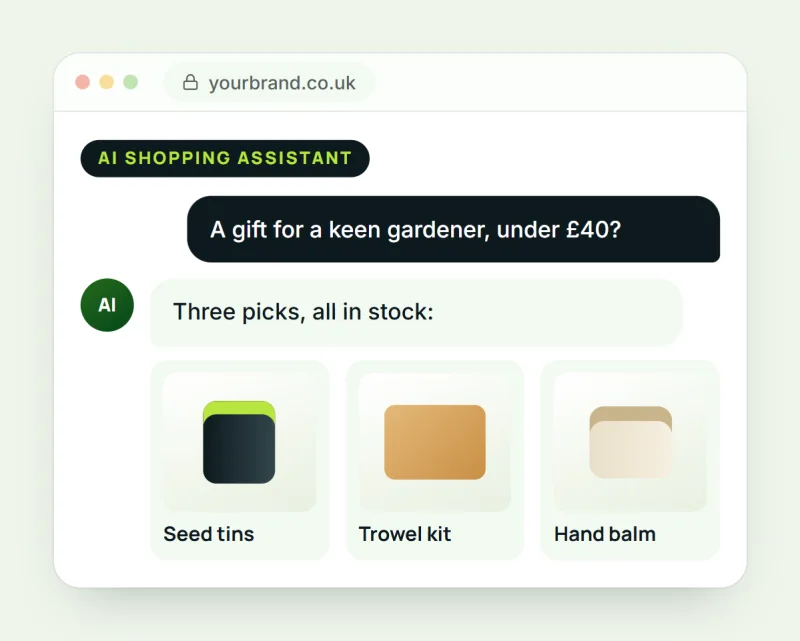
That's why integration comes first. When we connect your stack, we make sure:
Once the foundations are solid, AI features stop being gimmicks and start saving your team real time on replies, reporting and content. To get the most from Shopify's own tools, see our Shopify Magic & Sidekick Setup service, which pairs naturally with any integration project.
- customer and order data is consistent across Shopify, your email platform and your helpdesk
- product information is complete enough for AI recommendations and search to work well
- AI features are switched on deliberately, with human review where customers will see the output
- each app's data permissions are checked, and we never feed client data into AI model training
App stack
App stack builder: a well-connected core
Every brand's stack is different, but most growing UK stores need these jobs covered. We use this benchmark to plan integrations, making sure each tool connects cleanly to the others.
Popular tools by job
Tool names are examples; trademarks belong to their owners.
Email, SMS and CRM
One accurate view of each customer, driving timely, relevant messages and follow-up.
- KlaviyoLifecycle email and SMS
- HubSpotCRM for sales and wholesale teams
Reviews and loyalty
Social proof and rewards that build trust with new visitors and bring existing customers back.
- OkendoReviews, UGC and surveys
- Judge.meCost-conscious reviews option
- Smile: Loyalty & RewardsPoints and referral programmes
Conversion and discovery
Helping shoppers find the right product and add more to the basket.
- RebuyPersonalised upsells and cart offers
- Boost AI Search & FilterSearch, filters and merchandising
Customer service
Quick, informed answers across email, chat and social channels.
- GorgiasHelpdesk that can edit and refund orders
- Shopify InboxBuilt-in chat for lean teams
Automation
Fewer manual tasks and fewer costly mistakes as order volumes and team size grow.
- Shopify FlowNative Shopify automations
- ZapierConnections to non-Shopify tools
App integration pricing
Fixed one-off prices, ex VAT, agreed before any work starts. App subscriptions are paid directly to each vendor, never through us. For wider shopify website cost guidance, visit our pricing page.
Starter
From £495 one-off, ex VAT
Best for: One tool set up, connected to your store and walked through with your team.
What it covers:
- Configuration and theme styling
- Connection to Shopify and analytics
- Team walkthrough session
Growth
From £1,495 one-off, ex VAT
Best for: Up to four tools connected, with automations, call tracking and training.
What it covers:
- CRM and data mapping
- Shopify Flow and app automations
- Call tracking and team training
Custom
Get a quote
Best for: Larger stacks, Shopify Plus, headless or bespoke connections. Get a quote.
What it covers:
- Custom API or middleware work
- Multi-store or international setups
- Scope agreed after discovery
Fixed prices, agreed before work starts. All prices exclude VAT.
Compare every service on our Shopify pricing page.
Integrations touch sensitive data, so we demo live
- NDA signed before any data is shared
- Least-privilege access with 2FA
- UK GDPR and data processing terms
- Your data never trains AI models
Connecting apps means handling customer lists, order histories, marketing performance and sometimes call recordings. Every integration project therefore runs under NDA, and we never publish client names, screenshots of their dashboards or results from their campaigns. That discretion applies from the first call, whether or not you become a client, because the brands we work with trust us with the inner workings of their business.
We'd rather show than tell. On a live Zoom or Google Meet call, an integration lead shares their screen and walks you through a demonstration store, including:
- how we map data between Shopify, a CRM and an email platform
- a Shopify Flow automation tagging customers and alerting a team
- call tracking events appearing alongside online conversions
- the QA checklist each integration passes before launch
- the handover notes your team keeps once the project is finished
Every integration is covered by the same safeguards: NDA first, a non-solicit agreement, least-privilege app and staff access protected by 2FA, UK GDPR-compliant handling and deletion of your data once the contract closes. You can read how we protect store data on our security and privacy page, then Book a Live Walkthrough with a list of the tools you want connected.
Can't we just install apps ourselves?
Many apps install in minutes, and for simple tools that may be all you need. Problems tend to surface later: default settings that don't suit your brand, widgets that slow mobile pages, duplicate tracking or data that never reaches your CRM. We set each tool up properly, connect it and test it first.
Which apps do you integrate?
We work with established Shopify apps for email and SMS, reviews, loyalty, upsells, search, subscriptions, helpdesks, returns and shipping, plus CRMs, call tracking and automation tools. If you've chosen something less common, we review its documentation and App Store listing first, and tell you honestly if we'd suggest an alternative.
Will a new app slow down our store?
It can, which is exactly why we check. Some apps load scripts on every page, even where they aren't needed. We measure speed before and after installation, use app blocks and embeds that load only where required, and flag any tool whose speed cost outweighs the value it brings.
Do you set up call tracking for Shopify stores?
Yes. If phone calls matter to your sales, for example with made-to-order furniture or high-value products, we connect a call tracking platform so numbers change by campaign or channel and calls are reported as conversions in your analytics. You can then see which ads and pages make the phone ring.
Can you connect Shopify to our CRM?
Yes. We connect Shopify to CRMs such as HubSpot using official integrations where they exist, mapping customers, orders and products to the right fields. Where an off-the-shelf connector falls short, we can scope a bespoke link. Either way, you'll know exactly which data syncs, how often and in which direction.
Who pays for the app subscriptions?
You do, directly to each vendor, so accounts and billing stay in your name. Our fee covers setup, integration, testing and training. During discovery we explain each tool's pricing model in plain terms and point you to the vendor's own website for current plans, so there are no surprises later.
What happens if an app update breaks something?
App developers update their tools regularly, and occasionally an update clashes with your theme or another app. On one of our Shopify Support plans, we investigate and fix issues within the agreed SLA. Otherwise, we can quote for a one-off fix or for ongoing monitoring of your key integrations.
Is our data safe while you set up apps?
Yes. An NDA is in place before you share any data, our staff accounts follow least privilege with 2FA, and every access is logged. We also review the permissions each app requests, so nothing gets more access than it needs. When the project ends, our access is withdrawn and your data is handed back or securely deleted.
Ready for apps that actually work together?
Send us the list of tools you use or plan to add, and we'll reply with a fixed-price integration plan covering setup, connections, automations, call tracking and training, led by a specialist from start to finish and tested before a single customer sees the result.
Free consultation
Get help with your app stack
Share your details and a member of our team will follow up to arrange a brief discussion.
Tell us about your project
What happens next
- You send your store and project details.
- We follow up to arrange a short call.
- On the call, we talk through your goals and explain how we would scope the work.
Talk to us directly
Waverley House, 9 Noel St, London W1F 8GQ
Phone +44 7476 560011 WhatsApp +44 7476 560011 (opens in new tab) Email hello@shopifyagencylondon.co.ukPrefer the full contact page? Visit our Contact / Free Consultation page.