
Hands sketching mobile wireframes next to a laptop and phone

Shopify Development

Shopify Support Plans Explained: What UK Brands Need

Compare Shopify support options: ad hoc fixes, monthly hours and SLA plans. Learn what is covered, what to ask and which plan fits. Find your plan today.

In this article (6 sections)
  1. Shopify's own support vs agency support
  2. Signs your current support is not working
  3. Common types of Shopify support plan
  4. What a good Shopify support plan should include
  5. How to choose the right level
  6. How support works at Shopify Agency London

Key takeaways

  • Shopify's own support and agency support do different jobs. Shopify helps with the platform, billing and account questions, but it does not maintain your custom theme code, bespoke features or the way your apps work together. That gap is exactly what an agency support plan is designed to fill, so that someone owns the whole picture.
  • Most plans follow one of three models: ad hoc work billed as needed, a monthly bank of hours, or a dedicated developer. Hours-based plans suit most growing brands, because costs are predictable and the team already knows your store when something urgent comes up on a busy weekend and every minute of downtime costs orders.
  • Size your plan from real demand rather than guesswork. Look back over the last six months of fixes, updates and small projects, then add headroom for peak trading, because Black Friday, Christmas and big product drops always generate far more requests than a quiet February. Plan for those spikes, not the average month.
  • Read the small print on service levels. Ask how urgent issues are prioritised, what happens to unused hours, how work is reported and who can access your admin. Clear answers to those questions matter much more than the headline number of hours on the proposal, because they decide how the plan feels on a bad day.
  • Good support is proactive as well as reactive. The strongest plans include regular checks on speed, apps, theme updates and access, so problems are caught before customers notice them and more of your monthly hours go into improvements that grow revenue rather than firefighting. Ask to see what proactive work is included.

Every Shopify store needs looking after. Apps update, browsers change, campaigns need landing pages and, sooner or later, something breaks on a busy Friday evening. A shopify support plan gives you a team on standby for all of it. This guide explains how Shopify support plans work, what they should cover and how UK brands can choose the right level without paying for hours they never use.

Shopify's own support vs agency support

Shopify's Help Centre and support team handle questions about the platform itself: billing, domains, payment settings, account access and how core features work. They will not normally edit your customised theme code, debug a conflict between two apps or build a new section for your homepage. Theme and app developers support their own products, yet nobody is responsible for how everything fits together on your store. An agency support plan fills that gap.

Signs your current support is not working

  • Simple fixes take weeks because every request needs a new quote.
  • Nobody can explain what changed when something breaks.
  • Several freelancers have edited the theme with no shared record of their work.
  • You only hear from your provider when an invoice arrives.

If two or more of these sound familiar, it is time to compare structured support plans.
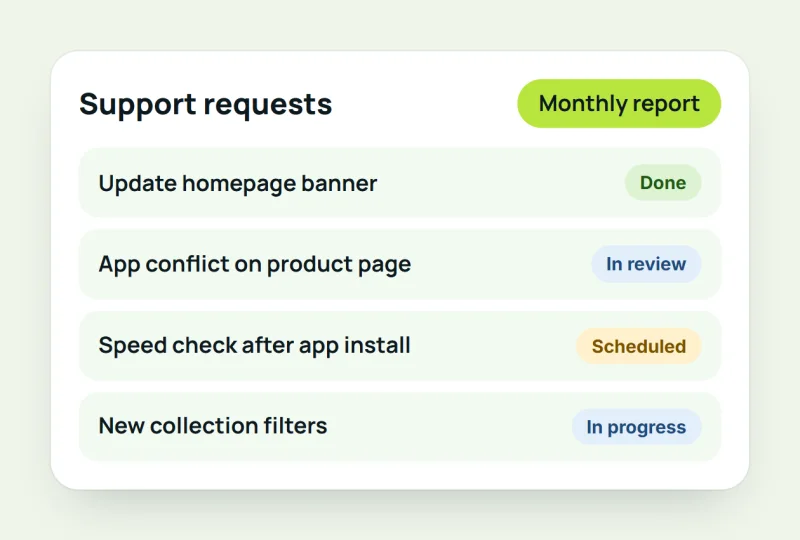
Illustration of a Shopify support board with requests, statuses and a monthly report

Common types of Shopify support plan

Ad hoc support

You pay for work as it arises, usually at an hourly or day rate. It can suit stores with very few changes, but each request starts with a quote and there is no reserved capacity when you need help quickly.

Monthly hours retainer

You buy a set number of hours each month for fixes, updates and small improvements. Costs are predictable, the team learns your store, and requests join an existing queue instead of waiting for a fresh quote. For most growing UK brands, this is the sweet spot between flexibility and cost control.

Dedicated developer

For brands with a steady roadmap, a part-time or full-time developer works on your store as an extension of your team. This sits somewhere between support and a project.

SLA-backed plans

Larger stores, especially on Shopify Plus, often need written service levels covering response and escalation for critical issues. These are tailored to the business rather than bought off the shelf, and they suit brands where an hour of downtime would be expensive.

What a good Shopify support plan should include

  • Bug fixes plus theme and app updates, tested before they go live
  • Small features, new sections and campaign landing pages
  • Regular speed and accessibility checks
  • Seasonal preparation for Black Friday, Christmas and sale periods
  • Least-privilege access with 2FA and an access log
  • Weekly updates and a monthly report showing where the hours went

Woman reviewing documents with a tablet and laptop in an office

How to choose the right level

Start with your history. List every change you requested over the last six months and estimate how long each took. A small Cotswolds homeware brand making occasional banner and app changes may need only a few hours a month, while a London fashion label with weekly drops and Klaviyo campaigns will use far more. Add headroom for your busiest months, and check how the plan treats any hours you do not use.

It is also worth asking how a support partner uses automation. Built-in tools such as Shopify Sidekick and Shopify Magic can speed up routine admin, and our guide to AI for Shopify Stores explains where AI genuinely saves time for merchants and their support teams.

How support works at Shopify Agency London

Our plans come in three levels: Starter with five hours a month, Growth with twelve hours a month, and Custom for Shopify Plus stores, larger hour banks and SLA-backed cover. Every request is handled by a specialist, checked through QA with 4-eyes review and logged, and a dedicated project manager reports progress weekly with a fuller monthly summary. If you ever decide to move on, access is removed and any data we hold is returned or deleted. Monthly prices are in the FAQs below.


Get more from your support hours

  • Batch small requests

    Group minor text, image and banner changes into one weekly request rather than sending them one at a time. Batching cuts the time lost to switching between tasks and repeat testing, so more of your monthly allowance goes into improvements that actually move revenue for the business. Keep a shared list so nothing gets forgotten between batches.

  • Write requests like a bug report

    Include the page URL, device, browser, the steps to reproduce the problem and a screenshot or short screen recording. A clear request can be picked up and fixed straight away, whereas a vague one triggers back-and-forth messages that quietly eat into the hours you are paying for. Agree a simple request template with your provider at the start.

  • Book peak-season work early

    Agree Black Friday and Christmas changes by early autumn, including landing pages, banners, discount logic and any code freeze dates. Your support team can then build and test everything calmly, instead of rushing changes onto a live store just as traffic climbs towards its busiest point of the year. Agree a clear freeze date and stick to it.

  • Keep your access list tidy

    Review staff accounts and app permissions every quarter, remove anyone who has left and make sure everyone uses 2FA. Your support partner should only hold the access its work requires, and you should always be able to see who changed what, when it changed and why. Good access hygiene protects your customer data and your reputation.

Make your team more self-sufficientShopify Magic & Sidekick Setup

FAQs

Shopify support FAQs

Straight answers before you get in touch. More in our FAQs.

How much does Shopify support cost with SAL?

Our Shopify Support plans start from £295 per month for five hours on Starter and from £595 per month for twelve hours on Growth, both ex VAT. Custom plans cover Shopify Plus stores, larger hour banks and written SLAs, and are quoted after a short review of your store, your apps and your trading calendar. The monthly price is agreed in writing before the plan starts.

Is support included in my Shopify subscription?

Shopify's own support for the platform is included with your plan, covering areas such as billing, settings and how standard features work. Help with your customised theme, bespoke features and app conflicts is not, because Shopify does not maintain code written for your store. That is the work an agency support plan covers, billed separately from your Shopify fees and app subscriptions.

What happens to support hours we do not use?

Policies vary between agencies, so check the contract before you sign. Some plans expire unused hours at the end of each month, while others allow limited rollover. Whatever the rule, a good partner flags underused hours early and suggests proactive work, such as speed checks or clearing your improvement backlog, so the time still adds value to your store rather than simply disappearing.

Do I need a support plan if my store has just been built?

Usually, yes. Most builds include a short post-launch period for fixing defects, but after that your store keeps changing around you: apps release updates, Shopify adds features and campaigns need new pages. Starting a small plan straight after launch means the team that knows your store is already in place when the first request arrives, rather than starting a search for help in a hurry.

Can a support plan cover theme and app updates?

Yes, and it should. Updates are tested on a duplicate theme or preview before going live, with release notes checked for changes that could affect your customisations. Applying updates promptly keeps your store compatible with new Shopify features and avoids the painful catch-up work that builds up when a theme is left untouched for years. Small, regular updates are always cheaper than one big rescue job.

Should we choose a support plan or a dedicated developer?

A support plan suits steady maintenance and small changes. If you have a continuous roadmap of features, a dedicated developer may be better value: our Hire Shopify Developer plans start from £2,295 per month for part-time (80 hours) and from £3,995 per month for full-time (160 hours), ex VAT. Some brands combine both approaches, using a developer for the roadmap and a support plan for everyday fixes.

What should a monthly support report include?

At minimum: hours used against your allowance, requests completed, work still in progress and anything waiting on your team. A useful report also flags risks, such as an app nearing end of life or a slow template, and recommends priorities for next month, so you can plan budgets rather than react to surprises in the middle of a busy trading month.

How do we switch Shopify support provider safely?

Plan a short handover. Ask your current provider for documentation, a list of customisations and any code repository, then audit staff accounts and app permissions. Give the new team access before removing the old one, so nothing is left unsupported, and remove every account the outgoing provider no longer needs once the handover is complete. A clean switch protects both your data and your trading.

Need dependable Shopify support?

Tell us about your store, your apps and the requests that keep piling up, and a specialist lead will recommend the right plan, from a few hours a month to Custom SLA cover, with fixed monthly pricing, secure access set up properly and a dedicated project manager reporting every week on exactly what has been done, what is in progress and what comes next for your store.

Get a quote Call WhatsApp (opens in new tab)