
Colleague leaning over a desk to guide a team member at a laptop

Shopify Development

Hire a Shopify Developer or an Agency? A Guide for UK Brands

Should you hire a Shopify developer, a freelancer or an agency? Compare cost, risk, IR35 and speed for UK brands, then talk to SAL about the right fit.

In this article (5 sections)
  1. When it makes sense to hire a Shopify developer
  2. When an agency is the better fit
  3. Questions to ask before you hire a Shopify developer or agency
  4. Signs you have outgrown your current set-up
  5. The hybrid route: a dedicated developer with a team behind them

Key takeaways

  • Hiring a Shopify developer gives you dedicated capacity for an ongoing backlog, while an agency gives you a joined-up team of designers, developers, QA and project management for defined projects. The right answer depends on whether your problem is a steady stream of small tasks or one high-stakes build with a deadline.
  • An in-house hire costs far more than the salary on the offer letter. Employer's National Insurance, workplace pension auto-enrolment, holiday cover, equipment, software licences and recruitment time all add up. Freelancers avoid most of that overhead, but bring IR35 questions and no guarantee they will be free when you need them.
  • A single developer, however talented, is a single point of failure. Without code review, documented access and someone to cover holidays or illness, peak moments such as Black Friday, a Boxing Day sale or a big product drop become a gamble rather than a plan, and your revenue depends on one person being available.
  • Agencies can look dearer per hour on paper, yet fixed-price scopes, a dedicated project manager and built-in QA can remove the hidden costs of rework, missed launch dates and management time that founders and ecommerce managers quietly absorb when they coordinate freelancers themselves.
  • A hybrid model suits many growing UK brands: a dedicated developer on a monthly plan who knows your store inside out, backed by an agency's specialist leads, 4-eyes review process and SLA support. You keep the continuity of a familiar developer with the safety net of a wider team behind them.

Your Shopify store is growing, the to-do list keeps getting longer and your current set-up is starting to creak. Do you hire a Shopify developer, bring in a freelancer or appoint an agency? Each route can work, and each can go badly wrong if it does not match the work you actually need done. If you already know you want dedicated capacity without the overheads of employing someone, our hire Shopify developer plans are built for exactly that. If you are still weighing up the options, this guide sets out the trade-offs for UK brands.

When it makes sense to hire a Shopify developer

A dedicated developer shines when work is continuous and fairly predictable: theme tweaks, campaign landing pages, app integrations, metafield set-up, bug fixes and small features shipped every week. Over time they learn your codebase, your brand guidelines and the quirks of your app stack, so each task gets quicker to deliver.

Employing someone in-house

An employee gives you full control and deep product knowledge. The trade-off is total cost and risk: recruitment, employer's National Insurance, pension contributions, holiday and sick cover, hardware and licences. You also need someone technical enough to set priorities and review code, and if your developer leaves, much of what they know leaves with them.
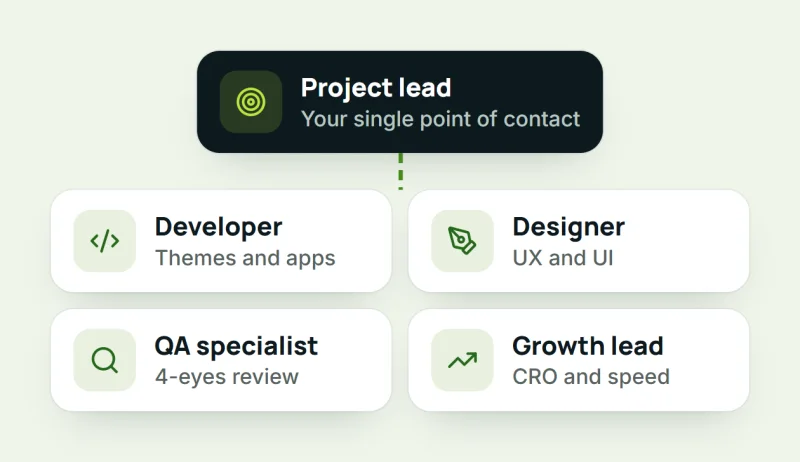
Illustration of a Shopify delivery team: a project lead with a developer, designer, QA specialist and growth lead

Using a freelancer or contractor

Freelancers are flexible and quick to engage, which suits short, well-defined projects. Availability is rarely guaranteed, though, and many juggle several clients at once. If a contractor works through their own limited company, the IR35 off-payroll rules may apply, and medium and large businesses must make the status determination themselves. Take advice before agreeing a long-term arrangement.

When an agency is the better fit

Agencies earn their fee on work that needs several skills at once: a redesign, a migration from Magento or WooCommerce, a Shopify Plus build, an ERP integration or a checkout overhaul. These projects need UX, design, development, QA and project management working together to a deadline, without you coordinating five people yourself.

  • Breadth: design, front-end, apps, SEO and performance specialists under one roof.
  • Process: scoping, fixed quotes, sprints, QA and staged sign-off.
  • Resilience: no single point of failure when someone is on holiday.
  • Accountability: a contract, an SLA and weekly reporting.

Questions to ask before you hire a Shopify developer or agency

  1. Is the work an ongoing backlog or a single project with a clear end?
  2. Who will manage priorities and review the code?
  3. What happens if that person is unavailable during peak trading?
  4. How will access to your store, apps and customer data be controlled?
  5. Do you need specialist skills, such as Shopify Functions or headless builds, only occasionally?

Developer pointing at code on a monitor while colleagues look on

Signs you have outgrown your current set-up

  • Small fixes sit in the queue for weeks because your freelancer is busy elsewhere.
  • Releases regularly break something on mobile or in the cart.
  • Nobody can explain how a key app or integration was configured.
  • You spend more time managing developers than running the business.

If two or more of these sound familiar, it is time to change the model rather than simply adding hours.

The hybrid route: a dedicated developer with a team behind them

For many UK DTC brands the most practical answer is a blend. A developer on a monthly plan works on your store every week, while the agency behind them supplies a project manager, specialist leads and 4-eyes code review. You get continuity without employment overheads, plus cover when you need it.

That is how SAL runs developer placements. An NDA is signed before any data is shared, access is least-privilege with 2FA, and work passes through the same QA checklists as our project work. To see where AI speeds up routine tasks, and why client data is never used to train AI models, read How We Help Clients with AI.

Whichever route you choose, write down the outcome you want, the monthly budget you can commit and who owns decisions. That clarity makes any developer, freelancer or agency far more effective.


Tips before you sign anyone up

  • Start with a paid trial task

    Before committing to a long engagement, give a developer or agency a small, clearly defined paid task, such as building a new collection template or fixing a misbehaving cart drawer. A week of real work tells you more about their communication, code quality and attention to detail than any portfolio, CV or polished sales call ever will.

  • Own every account and repository

    Make sure your business owns the Shopify store, the theme repository, app subscriptions and domains. Give collaborators staff or collaborator accounts with only the permissions they need, switch on two-factor authentication and remove access promptly when work ends. If a working relationship sours, you keep full control of your store, your code and your customer data.

  • Ask who checks the work

    Whoever you hire, ask who reviews their code before it goes live. A second pair of eyes catches broken mobile layouts, slow scripts and accessibility problems before your customers do. If the honest answer is nobody, either budget for an independent review process or choose a partner who already has one built into every release.

  • Plan around your trading calendar

    Map your busiest weeks, from Black Friday and Christmas to Mother's Day and end-of-season sales, and agree a code freeze before each one. Confirm who is on call during those periods and how urgent fixes get approved. Pushing a theme change the night before a big email send is a risk no growing brand needs.

Weighing up AI support as well?AI Consulting for Shopify Brands

FAQs

Hiring a Shopify developer: FAQs

Straight answers before you get in touch. More in our FAQs.

How much does it cost to hire a Shopify developer through SAL?

Our Hire Shopify Developer plans start from £2,295 per month for a part-time developer working 80 hours, and from £3,995 per month for a full-time developer working 160 hours, both ex VAT. Larger teams or mixed skill sets are quoted as Custom. Every plan includes project management and code review, so you are not paying separately for oversight. You can start with the plan that fits your current backlog.

Is a freelancer cheaper than an agency?

Often the day rate is lower, but the total cost is not always. With a freelancer you usually manage the work, write the briefs, test the output and cover gaps when they are busy with other clients. An agency folds those costs into a fixed price. Compare the full cost of getting the job done, including your own time, rather than hourly rates alone.

Do I need to think about IR35 when hiring a Shopify contractor?

Possibly. If a contractor supplies their services through their own limited company, the off-payroll working rules can apply, and medium or large businesses are responsible for deciding whether the engagement falls inside IR35. Small businesses are treated differently, and the contractor makes that call instead. Rules change, so speak to an accountant or check HMRC guidance before agreeing a long-term contract.

What skills should a good Shopify developer have?

Look for confident Liquid, HTML, CSS and JavaScript, experience with Online Store 2.0 themes and sections, and familiarity with Shopify CLI and Git-based workflows. For more advanced work, knowledge of the Admin and Storefront APIs, theme app extensions and Shopify Functions matters. Equally important are clear written communication, sensible estimates and the discipline of testing on real mobile devices.

Who owns the code a developer writes for my store?

That depends on your contract, so check it before work starts. Make sure the agreement assigns intellectual property in custom code to your business on payment, and that code lives in a repository your company controls. Third-party themes and apps remain under their own licences, so keep receipts and licence details alongside your store documentation. Ask for the same terms from any freelancer.

How do I give a developer access to my store safely?

Use Shopify's collaborator or staff accounts rather than sharing your own login, and grant only the permissions the task needs. Require two-factor authentication, keep a simple access log and remove accounts as soon as the engagement ends. SAL also signs an NDA before any data is shared and follows least-privilege access as standard across every client store.

How should I brief a Shopify developer?

Describe the outcome rather than the solution: what customers should be able to do, on which pages and devices, and how you will judge success. Include screenshots, examples you like, deadlines and any trading events the work must avoid. A short, well-structured brief saves hours of back-and-forth and gives you a fair basis for comparing estimates. It also helps whoever picks the work up later.

Can a dedicated developer and an agency work on the same store?

Yes, as long as roles are clear. Agree who owns the theme repository, how changes are merged and who signs off releases. A common pattern is a dedicated developer handling day-to-day changes while agency specialists step in for redesigns, migrations or integrations. Shared standards and a single release process keep the store stable. Weekly check-ins keep everyone aligned.

Need a Shopify developer without the usual hiring headache?

Whether you need part-time help clearing a backlog of theme fixes or a full-time specialist embedded in your trading calendar, SAL places experienced Shopify developers on fixed monthly plans, backed by a dedicated project manager, specialist leads, 4-eyes code review, SLA support and weekly reporting, so your roadmap keeps moving without the cost, admin and risk of a permanent hire.

Get a quote Call WhatsApp (opens in new tab)