
Hands holding a phone with a UX design over paper wireframes

AI & Ecommerce

ChatGPT Shopping: How to Get Your Shopify Products Seen

How ChatGPT shopping finds products, plus the data, feed and page fixes that help UK Shopify stores appear in AI answers. Read the guide and start today.

In this article (5 sections)
  1. What is ChatGPT shopping?
  2. How ChatGPT finds Shopify products
  3. Getting your Shopify data ready for ChatGPT shopping
  4. Measuring ChatGPT shopping traffic
  5. Where to start

Key takeaways

  • ChatGPT shopping turns product research into a conversation. In some markets, where supported, shoppers can ask for recommendations and see product results with images, prices and retailer links, so your Shopify catalogue now competes inside AI answers as well as on Google and marketplaces.
  • Organic visibility is earned through data quality. Clear product titles, barcodes, complete variants, accurate GBP prices and stock, and plainly stated delivery and returns terms give an assistant the facts it needs to recommend you with confidence rather than skipping to a better-described rival.
  • Access comes first. Check that robots.txt and any bot-blocking tools allow OAI-SearchBot, the crawler OpenAI uses for search results, and decide separately whether you are happy for GPTBot to collect content for model training. The two choices are independent.
  • Buying inside the chat is still rolling out. Shopify and OpenAI have announced ways for merchants to sell through ChatGPT, but eligibility and country coverage change, so confirm what applies to UK stores in your admin and the Shopify Help Centre before planning around it.
  • Track it as a channel. Referral visits from ChatGPT often carry a utm_source tag, so build a simple report in Shopify analytics or GA4 and review sessions, conversion and revenue every month next to Google Shopping and organic search.
  • The same foundations serve every AI assistant. Work that makes your products clear to ChatGPT also helps Gemini, Copilot, Perplexity and Google's AI Overviews, so it is rarely wasted effort and usually lifts conversion on your own product pages too.

Shoppers no longer start every product search on Google. Many now ask an AI assistant to shortlist a waterproof jacket for a Lake District weekend or a christening gift on a set budget, then click straight through to buy. ChatGPT shopping is OpenAI's response to that behaviour: in some markets, where supported, it shows product results with images, prices and retailer links, and for some sellers a way to buy inside the chat. For UK Shopify brands, appearing in those answers is part of a wider discipline we call shopify ai seo, which means making products easy for AI systems to find, understand and trust.

What is ChatGPT shopping?

When a question has buying intent, ChatGPT can search the web and return a set of products instead of a block of text. Each result usually shows the item, its price, a short summary drawn from descriptions and reviews, and links to retailers that stock it. Shoppers then refine with follow-up questions such as “which of these is machine washable?” and the answer updates. Features differ by country, account type and device, and OpenAI changes them often, so check what your own customers see before planning around any one feature.

How ChatGPT finds Shopify products

There are two broad routes in, and the strongest brands cover both.
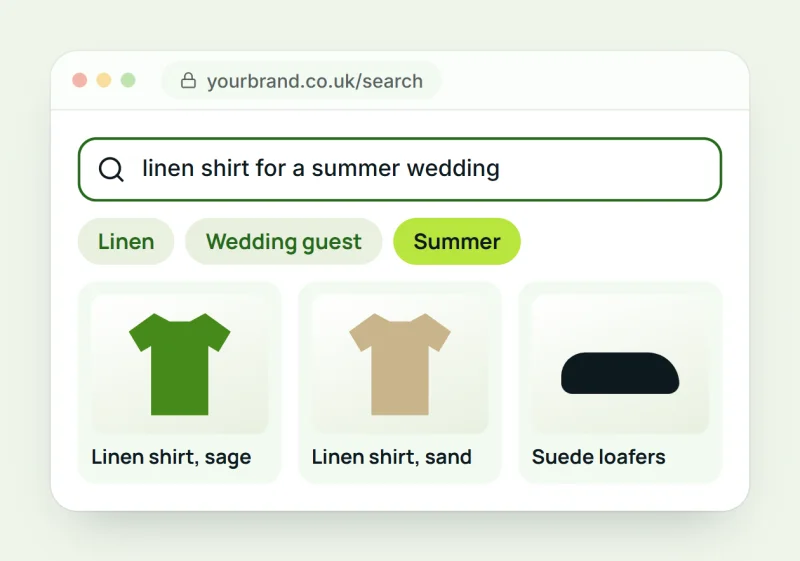
Illustration of natural-language search on a Shopify store matching a shopper’s question to products

Your public product pages

ChatGPT's search reads the open web. OpenAI uses a crawler called OAI-SearchBot to surface pages in search results, separate from GPTBot, which relates to model training. Check robots.txt and any firewall or bot-blocking app so OAI-SearchBot is not turned away, then make sure every product page states price, availability, variants, delivery and returns in plain text, not only inside images or scripts.

Product feeds and Shopify integrations

OpenAI also works with structured product data supplied by merchants and commerce platforms, and Shopify has announced integrations that let eligible merchants make their catalogue available to AI assistants, ChatGPT included, from the Shopify admin. Eligibility, supported countries and terms are still evolving, so check your admin and the Shopify Help Centre for what is live for UK stores today rather than relying on launch headlines.

Getting your Shopify data ready for ChatGPT shopping

Whichever route applies, the same product data does the heavy lifting. Fix these on your best sellers first:

  • Descriptive titles. “Women's Merino Base Layer, Long Sleeve, Navy” beats “The Ellie Top”. Include brand, product type and key attributes.
  • Barcodes and identifiers. Add GTINs and consistent SKUs so assistants can match your item to the same product elsewhere.
  • Structured variants and metafields. Size, colour, material and fit belong in proper fields, not just in prose.
  • Accurate prices and stock. Show GBP prices including VAT and keep inventory in sync, because a stale price erodes trust quickly.
  • Clear policies. Publish delivery times, costs and your returns window on product and policy pages.
  • Genuine reviews. Collect them through a reputable reviews app and show them on the page, since review content can shape AI summaries.
  • Valid structured data. Test your theme's Product markup with Google's Rich Results Test and fill any missing fields.

Man checking his phone in front of a laptop showing charts

Measuring ChatGPT shopping traffic

Links from ChatGPT often carry a utm_source=chatgpt.com tag, which makes the visits visible in Shopify analytics and GA4. Build a simple view of sessions, conversion rate and revenue from AI assistants and review it monthly alongside Google Shopping. Volumes may start small, but the trend shows whether your data work is paying off.

Where to start

Audit your top 50 products, fix titles, identifiers and policies, confirm crawler access, then decide whether a feed or Shopify integration suits your catalogue. For an outside view on priorities and risks, AI Consulting for Shopify Brands places ChatGPT shopping inside a wider AI roadmap, with a fixed scope and fee, managed by a dedicated project manager.


ChatGPT shopping tips for Shopify teams

  • Ask ChatGPT about your own range

    Spend half an hour asking the questions your customers ask, such as “best vegan leather backpack for commuting in London” or “gift for a keen gardener”. Note which brands appear, which details the answers mention and where your products are missing or described wrongly. Repeat monthly and log the results in a shared sheet so progress is visible to the whole team.

  • Write for questions, not keywords

    Assistants match products to detailed requests. Add the practical facts people ask about: dimensions, materials, care, compatibility, who it suits and what is in the box. A short FAQ block on each product page answers follow-ups directly and gives AI systems reliable wording to draw on, while helping hesitant shoppers on your own site.

  • Keep Google and AI data in step

    If you already run Google Shopping through the Google & YouTube app, your Merchant Center diagnostics are a free quality check. Fix disapprovals and missing attributes there first, so one clean set of product data supports every channel and nobody on the team maintains two versions of the truth in separate spreadsheets.

  • Land AI visitors on the right variant

    Check that product links open the exact variant a shopper was shown, in stock and at the same price. Redirects to the homepage, sold-out sizes or a different colour waste a visit from someone who has already done their research and arrived ready to buy. Spot-check your best sellers every month.

Look beyond search to AI shopping agentsAgentic Commerce (AI Shopping Agents)

FAQs

ChatGPT shopping FAQs

Straight answers before you get in touch. More in our FAQs.

Is ChatGPT shopping available to UK shoppers?

Availability changes as OpenAI rolls features out. Product results in ChatGPT search have reached many countries, while buying directly inside the chat started in a limited number of markets. The safest approach is to test it yourself from a UK account and check OpenAI's and Shopify's official announcements for current coverage before building plans that depend on a specific feature being live.

Can I pay to guarantee a place in ChatGPT product results?

No agency or app can guarantee a place in organic results. Visibility depends on how well ChatGPT can find, read and trust your product information. Any paid formats OpenAI offers are separate and governed by its own terms, so check its official site for current options. Either way, clean data, clear policies and genuine reviews remain the foundation for being recommended.

Does Shopify connect my store to ChatGPT automatically?

Shopify has announced ways for merchants to make products available to AI assistants, including ChatGPT, with some settings managed from the admin. What is switched on, and for which stores, depends on eligibility, country and your own choices. Review your sales channels and settings, read the Shopify Help Centre, and never assume a feature is active simply because it was announced.

Should I block AI crawlers to protect my content?

Decide crawler by crawler. Disallowing GPTBot signals that your content should not be used for model training, which some brands prefer. Blocking OAI-SearchBot, however, can stop your pages appearing in ChatGPT search results, including shopping answers. Document each decision, review it with your developer, and avoid blanket bot blocks that quietly cost you visibility you actually want.

Which product details matter most for AI assistants?

Start with descriptive titles, barcodes, complete variants, GBP prices including VAT, live stock levels and clearly stated delivery and returns terms. Add useful descriptions that answer real questions, image alt text that describes the product, and genuine reviews. Assistants weigh what they can verify, so consistency between your product page, structured data and any feeds matters as much as volume.

Can I track sales that come from ChatGPT?

Partly. Visits that click through from ChatGPT often carry a utm_source tag, so they appear as a separate source in Shopify analytics and GA4. Some influence will never be attributed, for example when a shopper reads an answer and later types your web address. Watch branded search and direct traffic trends too, and report AI referrals monthly rather than weekly.

How is ChatGPT shopping different from Google Shopping?

Google Shopping runs on Merchant Center feeds and includes paid Shopping ads, with results shown in a familiar grid. ChatGPT builds conversational answers from web content and structured product data, then lets shoppers refine with follow-up questions. The underlying requirements overlap heavily, so manage product data once, keep it accurate everywhere and treat both as complementary discovery channels.

What does SAL charge to prepare a store for AI search?

AI search setup is included in the Starter tier of AI for Shopify, a one-off fee from £995 ex VAT that also configures Shopify Magic and Sidekick. Broader work involving AI agents and automation starts from £2,495 ex VAT. For large catalogues or bespoke feed work, we agree a fixed quote after a discovery call under NDA.

Want your products ready for AI shopping?

Share your store and a specialist lead will review your product data, structured markup, crawler access and feed options for ChatGPT shopping and other AI assistants, then hand you a prioritised fix list with a fixed price for implementation, delivered under NDA with QA, 4-eyes review and weekly progress updates from a dedicated project manager who keeps every change on track.

Get a quote Call WhatsApp (opens in new tab)