
Colleague leaning over a desk to guide a team member at a laptop

Shopify Development

Shopify Headless with Hydrogen: The Honest Pros and Cons

Weighing up Shopify headless? Get a clear view of Hydrogen's pros, cons and real trade-offs for UK brands, then talk to SAL about the right build for you.

In this article (6 sections)
  1. What Shopify headless actually means
  2. The pros of Hydrogen
  3. The cons of Hydrogen
  4. When Shopify headless makes sense for UK brands
  5. Where AI fits into a headless build
  6. How to decide

Key takeaways

  • Shopify headless separates the storefront your customers see from the Shopify back end that runs products, orders and checkout. Hydrogen is Shopify's own React framework for building that storefront, and Oxygen is the hosting designed for it, so you stay inside one ecosystem rather than stitching unrelated tools together.
  • The strongest reasons to go headless are creative and technical control: bespoke page experiences, content pulled from a headless CMS, several brands or regions running on one back end, and fine-grained performance tuning. If none of those sit on your roadmap, a well-built Online Store 2.0 theme usually wins on cost and speed to market.
  • The trade-offs are real. Many Shopify apps assume a Liquid theme, so reviews, bundles, search and loyalty tools may need fresh API work. Your marketing team also loses the drag-and-drop theme editor unless you add a CMS, which means routine storefront changes can quietly turn into development tickets.
  • Checkout stays on Shopify. Going headless does not let you rebuild the checkout itself; customisation still runs through checkout extensibility, Shopify Functions and whatever your plan allows. That keeps payments secure and familiar for UK shoppers, but it also means headless is never a shortcut to a fully bespoke checkout.
  • Budget for the whole life of the storefront, not just launch day. Hydrogen projects need developers comfortable with React, GraphQL and the Storefront API, plus regular updates as Shopify ships new framework and API versions. Treat the front end as a product you maintain, with an owner, a roadmap and a support arrangement.

Headless is one of the most talked-about options for growing Shopify brands, usually after someone on the team has seen a slick, app-like storefront and wants the same. Going shopify headless can deliver that experience, but it changes how your store is built, edited and paid for. This guide explains what a Hydrogen build really involves, where it pays off, where it hurts, and how to decide before you commit budget.

What Shopify headless actually means

A standard Shopify store renders pages through a Liquid theme. A headless build keeps Shopify as the commerce engine (products, inventory, customers, orders and checkout) but replaces the theme with a separate front end that talks to Shopify through the Storefront API. Hydrogen is Shopify's React-based framework for that front end, with ready-made building blocks for carts, variants and collections. Oxygen is Shopify's hosting for Hydrogen storefronts, serving pages from locations close to your shoppers.

The pros of Hydrogen

Full control over the experience

You are no longer limited to theme sections and blocks. Product configurators, editorial lookbooks, quiz-led journeys and app-style navigation are all achievable because the front end is your own application.

Content from anywhere

Headless pairs well with a CMS such as Sanity, Contentful or Storyblok, so editorial teams can publish rich campaigns without touching product data. That suits brands where storytelling drives sales.
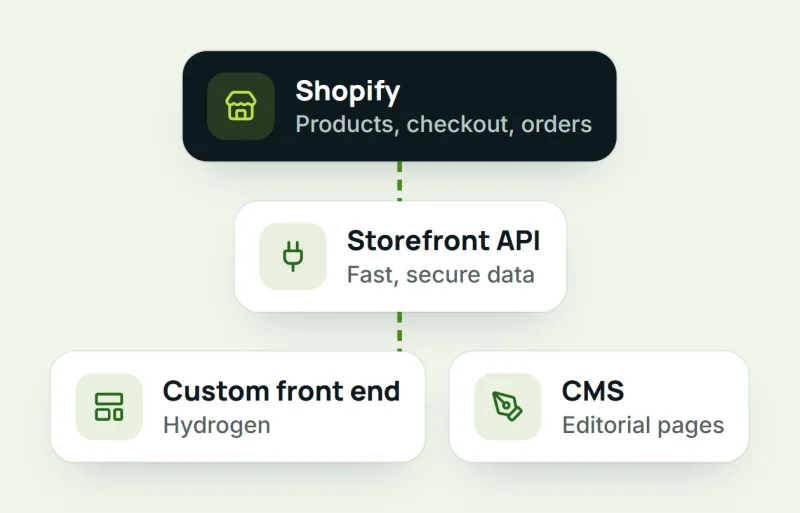
Illustration of a headless Shopify setup: Shopify feeding a custom front end and a CMS through the Storefront API

Performance you can tune

Server-side rendering, streaming and caching are in your hands. A disciplined team can build very fast pages, although a careless one can just as easily ship a bloated JavaScript bundle.

One back end, several storefronts

Groups running multiple brands or regional sites can share a single Shopify back end while giving each storefront its own design, content and release schedule.

The cons of Hydrogen

  • Higher build cost. You are building a web application, not configuring a theme, so discovery, design and development all take longer.
  • App compatibility. Theme app extensions do not load on a Hydrogen storefront. Reviews, search, upsell and loyalty tools need API integrations, and not every vendor offers one.
  • Editing moves to developers. Without a CMS, everyday jobs such as a new banner or landing page become tickets.
  • More moving parts. Analytics, a cookie banner that meets UK GDPR and PECR, redirects, sitemaps and structured data all need deliberate setup.
  • Ongoing maintenance. Hydrogen and the Storefront API move on a regular release cycle, so someone must keep dependencies current.

Person working at a laptop in a bright home office

When Shopify headless makes sense for UK brands

Headless tends to justify itself when at least one of these is true: your brand experience genuinely cannot be delivered with a theme; you publish content at scale and need a proper CMS; you run several brands or markets from one catalogue; or you have a development team ready to own the code. A London fashion label running interactive drops, or a homeware group serving the UK and EU from shared stock, are typical fits.

It rarely makes sense when the real problem is slow pages, weak product pages or a cluttered app stack. Those are usually fixed faster on Online Store 2.0 with focused speed and conversion work.

Where AI fits into a headless build

Because a Hydrogen storefront is code you control, plugging in AI-driven search, recommendations or conversational shopping through APIs is more straightforward. If that is on your roadmap, our guide to AI for Shopify Stores covers the options and what to prepare first.

How to decide

  1. List the experiences your current theme cannot deliver.
  2. Audit every app and confirm whether it supports headless.
  3. Decide who will edit content, and in which tool.
  4. Price the build and two years of upkeep together.
  5. Prototype one key journey before committing the whole store.

If the answers point clearly to headless, scope it properly with discovery, a fixed quote and a named owner for the code after launch. If they do not, put the same budget into design, speed and conversion work on your existing theme. Either route is a growth decision, so judge it on revenue potential, running costs and the team you actually have, not on what looks impressive in a pitch deck.

Headless planning tips

  • Audit your apps first

    Export your installed app list and check each vendor's documentation for Storefront API, SDK or headless support. Anything that only works through theme app extensions will need replacing or rebuilding. Put that cost into the business case from day one, rather than discovering it halfway through development when the budget is already committed. Ask vendors directly whether headless support is on their own roadmap too.

  • Give marketers a real editor

    Decide early whether content will live in Shopify metaobjects or a dedicated headless CMS. Either can work well, but your marketing team must be able to launch a campaign page, swap a hero image or schedule a sale banner for Black Friday without waiting in a developer queue every single time. Test the editing workflow with the people who will actually use it.

  • Prototype one journey

    Build a single high-value journey, such as a product page with its add-to-cart flow, as a working prototype on real data. It shows genuine performance, exposes integration gaps early and gives directors something concrete to judge before the full build budget is signed off and the timeline is locked in. If the prototype disappoints, you have spent a fraction of the budget learning it.

  • Protect your rankings

    Map every existing URL, recreate redirects and confirm that server-rendered pages output titles, canonical tags, structured data and an XML sitemap. A headless relaunch that forgets these basics can undo years of organic visibility, so treat SEO as a launch requirement with its own checklist and sign-off. Crawl the staging site before go-live and fix every broken link you find.

Get your storefront ready for AI shoppersAgentic Commerce (AI Shopping Agents)

FAQs

Shopify headless FAQs

Straight answers before you get in touch. More in our FAQs.

Is Shopify headless worth it for a smaller UK brand?

Often not yet. If your store runs on a single theme, sells mainly through product pages and has a lean team, a well-optimised Online Store 2.0 theme will usually deliver more growth per pound. Headless starts to pay back when you need experiences a theme cannot handle, publish content at scale, or run several storefronts, and when you have developers ready to maintain the code. Revisit the question as your range, team and ambitions grow.

Do I need Shopify Plus to use Hydrogen?

No. Hydrogen is not limited to Shopify Plus, and Oxygen hosting is available on most paid Shopify plans. Plan eligibility and limits can change, so check Shopify's current plan details before you commit. Plus becomes relevant for other reasons, such as advanced checkout customisation, B2B features, higher API limits or running several expansion stores, rather than being a hard requirement for going headless. We can map which plan suits your roadmap during discovery.

Can I keep my existing Shopify apps on a headless store?

Some, but not automatically. Apps that work in the Shopify admin, such as inventory, fulfilment or email tools, usually carry on unaffected. Apps that add features to the storefront through theme app extensions will not load on Hydrogen. For those, you need the vendor's API or SDK, a custom integration, or a replacement tool, so audit the whole stack before scoping the build. That audit often reveals apps you no longer need at all.

Will going headless automatically make my store faster?

No. Hydrogen gives you the tools for a very fast storefront, including server-side rendering, streaming and caching, but speed depends on how the code is written. Heavy scripts, oversized images and too many third-party tags will slow a headless site just as they slow a theme. If speed is your only concern, targeted theme optimisation is usually quicker and cheaper. Measure Core Web Vitals first so you know exactly what needs fixing.

What happens to checkout on a Hydrogen storefront?

Shoppers move from your custom front end to Shopify's checkout, which stays secure, hosted and familiar. You can brand it and extend it with checkout extensibility and Shopify Functions within the limits of your plan, but you cannot replace it with a fully custom checkout. Payment methods such as Shopify Payments, PayPal, Apple Pay and Klarna keep working as normal. Test the hand-off from cart to checkout carefully, including discount codes and analytics events.

How does a headless relaunch affect our SEO?

Handled well, it need not hurt. Hydrogen renders pages on the server, so search engines can read content properly. The risk comes from what a theme gave you for free: redirects, canonical tags, sitemaps, structured data and sensible URL patterns. Map every URL before launch, rebuild those foundations deliberately and monitor Google Search Console closely in the weeks after go-live. Keep the old theme unpublished but available as a reference.

How do you scope and price a headless project?

We start with discovery under NDA, reviewing your roadmap, apps and content needs, then issue a fixed quote with a clear timeline. Headless work is priced as a custom project because scope varies so widely. If discovery shows a theme is the better route, our custom design store build starts from £4,995 ex VAT, and we will tell you so. You only commit once the scope, price and timeline are agreed in writing.

Not sure if headless is right for you?

Our team will review your theme, app stack and roadmap, then tell you plainly whether Hydrogen is worth the investment or whether a sharper Online Store 2.0 build gets you there faster and for less. Either way you get a fixed quote, a dedicated project manager, QA with 4-eyes review and weekly reporting from discovery through to launch and beyond, so you always know exactly where the project stands.

Get a quote Call WhatsApp (opens in new tab)