
Hand holding a bank card and phone beside a mini trolley and parcel boxes

Software & Tools

The 30 Best Shopify Apps for UK Stores, Grouped by Job

The 30 best Shopify apps for UK stores, grouped by job: email, reviews, search, shipping and returns. Build a leaner stack and book a free app review.

In this article (8 sections)
  1. How we chose the best Shopify apps for UK stores
  2. Marketing and retention apps
  3. Reviews and UGC apps
  4. Search and conversion apps
  5. Payments, shipping and delivery apps
  6. Customer service and operations apps
  7. Sales channel and international apps
  8. Making the best Shopify apps work together

Key takeaways

  • Choose apps by the job they do, not by their position in the app store charts. Write down the problem first, whether that is abandoned baskets, slow customer service or messy stock updates, then shortlist two or three tools that solve it and compare how each one fits your team, your theme, your data and your budget before you install anything at all. A clear brief also makes vendor demos far more useful.
  • Start with what Shopify already gives you. Search & Discovery, Flow, Inbox, Bundles, Subscriptions and Translate & Adapt are free Shopify apps that cover a lot of ground, so check whether they meet your needs before paying for a third-party tool that does something similar with extra scripts, another login and another monthly invoice to approve. Free does not mean basic: these apps are maintained by Shopify and updated alongside the platform.
  • UK fit matters as much as features. Look for proper support for Royal Mail and UK couriers, buy now, pay later options such as Klarna and Clearpay, VAT-ready accounting exports, support hours that suit a UK team and clear data processing terms that sit comfortably with UK GDPR and the rules on marketing consent. Ask vendors directly if any of this is unclear on their website.
  • Every app costs more than its monthly fee. Scripts can slow pages, overlapping features confuse customers and staff, and each tool that touches customer data adds another processor to manage. Prefer apps that use theme app blocks, load only on the templates where they are needed and remove their code cleanly when you uninstall them. Test speed before and after every install so you can see the true cost.
  • The real value sits in the connections between apps. Reviews that feed Klaviyo segments, a helpdesk that shows Shopify orders inside tickets and Flow tags that trigger the right message all depend on careful setup, testing on a staging theme, clear documentation and a named owner for each integration who checks it after vendor updates. Without that ownership, even the best tools drift out of sync.
  • Review the stack every quarter. Check usage, cost and ownership for every app, retire anything that no longer earns its place, and revisit your shortlist before peak trading, so Black Friday, Christmas and the January sales run on a lean, tested setup rather than a pile of half-used subscriptions that nobody remembers approving. A short shared spreadsheet is enough to keep the review honest.

There are thousands of apps in the Shopify App Store, and most UK stores need only a handful. The trick is choosing tools that solve a real problem, connect cleanly with the rest of your stack and keep pages fast. This guide lists 30 of the best Shopify apps for UK stores, grouped by the job they do, from email and reviews to shipping, returns and accounting. For a wider view of how we select, connect and support tools for clients, see our hub of the best shopify apps and integrations.

How we chose the best Shopify apps for UK stores

Every app here is well established, widely used by Shopify merchants and relevant to how UK brands trade. We favoured tools with clear Shopify integration, sensible data handling and support for UK payments or carriers where it matters. We have left out prices and ratings because both change often; check each vendor's website and the Shopify App Store for current plans and reviews. Treat the list as a menu, not a shopping list: few stores need more than one app from each group. Where a free Shopify app does the job, we say so, because the best Shopify apps are often the ones that add the least weight.

Marketing and retention apps

Turn first orders into repeat customers and steadier revenue.

  • 1. Klaviyo: email and SMS platform that uses Shopify order and browsing data for segmented campaigns and automated flows such as welcome, abandoned basket and win-back.
  • 2. Omnisend: ecommerce email, SMS and web push with ready-made automations, a good fit for smaller teams that want results without a complex build.
  • 3. Recharge: recurring orders for replenishment products such as coffee, pet food and skincare, with a self-service area where subscribers manage their own deliveries.
  • 4. Shopify Subscriptions: Shopify's free app for straightforward subscribe-and-save offers, managed from the admin you already use.
  • 5. Smile.io: points, referrals and VIP tiers that reward repeat purchases and turn happy customers into advocates.
  • 6. LoyaltyLion: loyalty programmes with flexible rewards that can feed points and tier data into your email marketing.
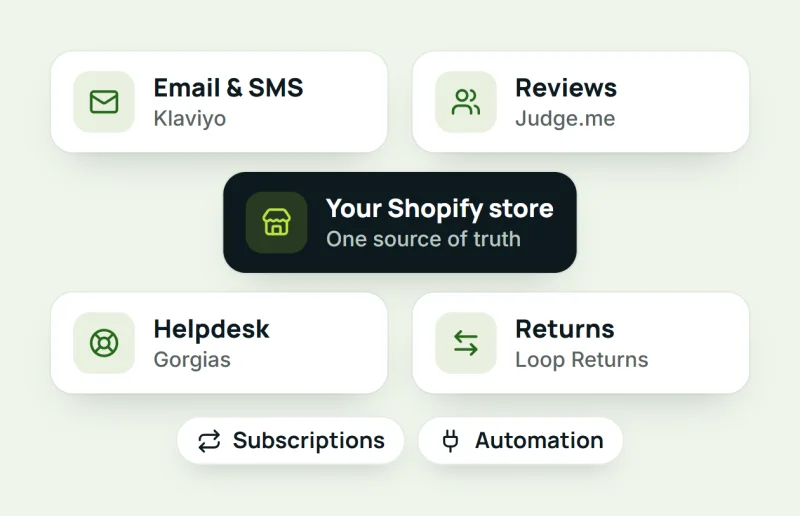
Illustration of a Shopify store connected to apps for email, reviews, helpdesk and returns

Reviews and UGC apps

Let genuine customers do the persuading for you.

  • 7. Judge.me: product reviews with photos and video, offering a free plan plus paid tiers, and quick to install on most themes.
  • 8. Yotpo: reviews and UGC alongside a loyalty product from the same vendor, useful when you want both under one contract.
  • 9. Okendo: reviews, customer media, Q&A, surveys and quizzes, with attribute ratings that suit fashion and beauty.
  • 10. REVIEWS.io: company and product reviews managed in one platform, so service and product feedback sit side by side.
  • 11. Trustpilot: automatic review invitations after purchase on a review site that many UK shoppers already recognise.

Search and conversion apps

Help shoppers find the right product quickly and add one more to the basket.

  • 12. Shopify Search & Discovery: free filters, synonyms, search boosts and product recommendations, ideal for small and mid-sized catalogues.
  • 13. Boost AI Search & Filter: advanced search, filtering and collection merchandising for larger catalogues with many variants.
  • 14. Rebuy: personalised upsells, cross-sells and a smart cart that lift order value without heavy manual setup.
  • 15. Shopify Bundles: free fixed bundles and multipacks with stock tracked for each component product.
  • 16. PageFly: drag-and-drop landing pages for campaigns and launches; keep an eye on page weight as designs grow.

Man checking his phone in front of a laptop showing charts

Payments, shipping and delivery apps

Meet UK expectations at checkout and keep customers informed after it.

  • 17. Klarna: buy now, pay later options with on-site messaging that shows instalments on product and basket pages.
  • 18. Clearpay: instalment payments familiar to many UK shoppers, particularly in fashion, beauty and lifestyle categories.
  • 19. Royal Mail Click & Drop: imports Shopify orders, prints labels and sends tracking numbers back to each order automatically.
  • 20. ShipStation: multi-carrier labels, shipping rules and batch printing for warehouses that use several UK couriers.
  • 21. AfterShip: branded tracking pages and delivery updates that reduce “where is my order?” emails to your service team.

Customer service and operations apps

Keep tickets, stock, returns and finance moving without extra headcount.

  • 22. Gorgias: ecommerce helpdesk showing Shopify orders inside each ticket, with email, chat and social messages in one inbox.
  • 23. Shopify Inbox: free live chat for storefront conversations, managed on desktop or the Shopify mobile app.
  • 24. Shopify Flow: free automation built on triggers, conditions and actions, for tagging, alerts and stock rules.
  • 25. Loop Returns: self-service returns that steer customers towards a swap or credit instead of money back.
  • 26. Matrixify: bulk import and export of products, customers, orders and redirects via spreadsheets, invaluable for migrations.
  • 27. A2X: summarises Shopify payouts, fees and refunds into tidy entries for Xero or QuickBooks, easing reconciliation.
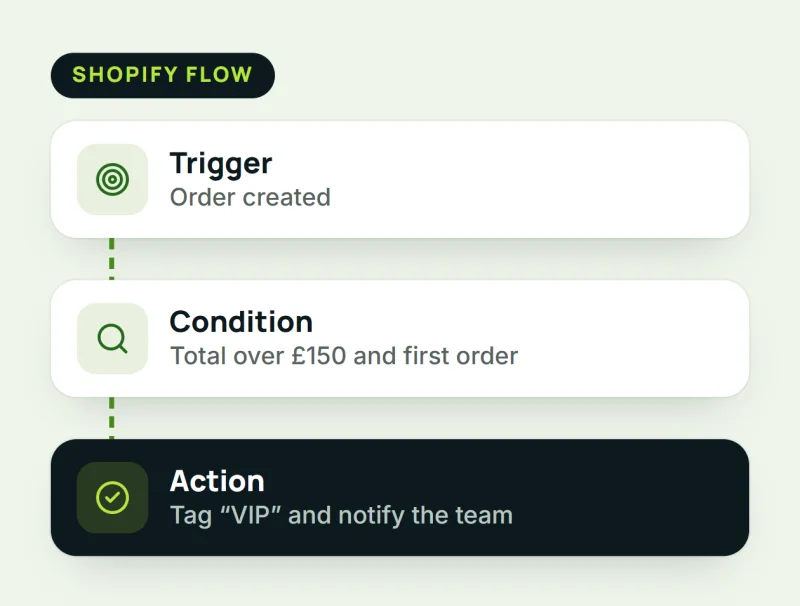
Illustration of a Shopify Flow automation with a trigger, a condition and an action

Sales channel and international apps

Reach shoppers beyond your own storefront and across borders.

  • 28. Google & YouTube: syncs products to Google Merchant Center for free listings and Shopping ads, using your Shopify catalogue.
  • 29. Facebook & Instagram: Meta's channel for catalogue sync, shops and conversion tracking across both platforms.
  • 30. Shopify Translate & Adapt: free translation plus wording adapted for markets that share a language, such as UK and US spelling.

Making the best Shopify apps work together

A long list is only useful if the tools talk to each other. Map how customer, order and product data should flow between them, install on a duplicate theme first and give every app a named owner who checks it after each update. Resist installing everything at once; add one tool, measure its impact on conversion, speed and team time, and then move to the next. Several of these tools now include AI features, and Shopify adds more of its own each year; read AI for Shopify Stores to judge which of those features genuinely help and when a simpler setup wins.


Before you install your next app

  • Trial it on a duplicate theme

    Never test a new app on the live theme during trading hours. Duplicate your theme, install and configure the app there, then preview every key page on a real phone and on desktop. Check that widgets sit where you expect, that nothing clashes with existing apps and that page speed has not dipped. Run a test order with a discount code and a gift card too. Only publish once the whole team is happy with what customers will see and the checkout still works end to end, from basket to confirmation email.

  • Read the data processing terms

    Every app that touches customer data becomes one of your data processors under UK GDPR. Before you install, check where the vendor stores data, which sub-processors it uses and whether it offers a data processing agreement. For email and SMS tools, confirm how consent is recorded, because UK marketing rules require clear permission for most messages. Keep a simple register of every processor, what data it holds and who approved it, so you can answer customer requests and supplier questionnaires quickly.

  • Check support before peak trading

    Find out how and when each vendor offers support, and whether its hours overlap with the UK working day. An app that fails on Black Friday morning with no one to call can cost far more than its monthly fee. Bookmark each vendor's status page, keep contact details in a shared document and avoid installing anything new in the weeks before a big sale. Agree who on your team escalates an outage, and how you would switch the app off quickly if it misbehaves.

  • Plan the exit before you commit

    Ask how you would leave before you sign up. Can you export reviews, loyalty balances or subscription contracts in a usable format, and would customers notice the move? Does the app leave code in your theme when removed? Annual plans may be cheaper, but they lock you in, so trial monthly first and only commit once the tool has proved its value against the job you hired it to do. Diary the renewal date so it never rolls over unnoticed.

Get more from Shopify's own AI before adding more appsShopify Magic & Sidekick Setup

FAQs

Best Shopify apps: UK merchant FAQs

Straight answers before you get in touch. More in our FAQs.

Which Shopify apps should a new UK store install first?

Keep the first stack small. Most new UK stores benefit from an email platform such as Klaviyo or Omnisend, a reviews app, a shipping tool such as Royal Mail Click & Drop and Shopify's free Search & Discovery app. Add buy now, pay later if it suits your price point. Everything else can wait until you have orders, data and a clear problem to solve.

Are Shopify's free apps good enough?

Often, yes, especially early on. Flow, Inbox, Bundles, Subscriptions, Search & Discovery and Translate & Adapt are built by Shopify, so they integrate cleanly and add little weight. Third-party tools usually win when you need deeper features, such as advanced merchandising, complex subscriptions or a full helpdesk. Start with the free option and upgrade when you hit a genuine limit.

How many apps should a Shopify store run?

There is no right number. A focused store might run eight apps comfortably while a larger brand needs twenty. The useful test is whether every app has a distinct purpose, a person accountable for it and a return that outweighs its fee. If you cannot say what an app does or who uses it, it is probably time for an audit.

Do Shopify apps work with UK couriers?

Many do. Royal Mail Click & Drop connects directly to Shopify, and multi-carrier tools such as ShipStation support a range of UK couriers. Check the exact carrier services you use, including tracked, signed-for and international options, before choosing. Also make sure each tracking number lands on the Shopify order automatically, so dispatch emails go out correct without anyone retyping codes.

Klaviyo or Omnisend: which suits a UK brand better?

Both are ecommerce-focused and integrate well with Shopify. Klaviyo is known for deep segmentation and flexible flows, which suits brands with a dedicated retention lead. Omnisend is quick to set up and combines email, SMS and web push, which suits smaller teams. Compare how each handles UK SMS, consent and reporting, then trial the one that matches your team's skills.

Are Shopify apps compliant with UK GDPR?

Compliance depends on how you use an app as well as the vendor's practices. Check each vendor's privacy policy, data processing agreement, data location and sub-processors. Collect marketing consent properly, only share the customer data each app needs and remove access when you uninstall. Keep a record of which apps process personal data, so you can answer customer requests quickly.

How can I tell whether an app is hurting page speed?

Test before and after installing. Score a few key templates with Lighthouse or a similar tool, then score them again with the app active on a copy of your theme. Disable its app embed and compare again. Watch for heavy scripts on every page when the app only needs one template. If speed drops noticeably, ask the vendor about lighter loading options.

What happens to my data when I uninstall an app?

It depends on the vendor. Some keep your data for a period so you can return, while others delete it quickly. Download whatever you may want later, whether that is review content, points balances, subscriber records or support conversations. Then check your theme for leftover code, because older apps sometimes edited theme files directly rather than using app blocks that remove themselves cleanly.

Should I choose an all-in-one platform or specialist apps?

All-in-one platforms reduce the number of vendors, logins and contracts, and data sits in one place. Specialist apps often go deeper on a single job, such as search or returns. Many UK brands land on a mix: one platform for email, SMS and loyalty, plus specialist tools where a feature directly affects revenue. Decide by job, not by bundle discount.

Which apps help a UK store sell into Europe?

Shopify Markets handles currencies, domains and pricing by region, and Translate & Adapt manages translated content and local wording. Your shipping app needs to produce the customs data that post-Brexit parcels require, and your checkout should show duties and taxes clearly so customers are not surprised on delivery. Test the full journey from an EU address before launching any campaign.

How often should I review my Shopify apps?

Quarterly works well for most stores, with an extra check before peak season. Review each app's cost, usage, owner and impact on speed. Look for overlapping features introduced by vendor updates, since apps often expand into each other's territory over time. Cancel trials you forgot about, and confirm that billing on your Shopify invoice matches what you expect to pay.

How much does SAL charge to set up Shopify apps?

Our Apps Integration & Consulting packages are one-off and fixed price, ex VAT. Starter covers a single app configured, linked to your store and explained to your staff in a live session, from £495. Growth takes in as many as four tools plus automations, call tracking and team training, from £1,495. Bigger stacks receive their own fixed quote once we understand the scope.

Want an app shortlist built around your UK store?

Tell us which jobs your store needs doing, from reviews and email to shipping, returns and customer service, and one of our specialist leads will look over the apps you run today, recommend in plain English the apps that genuinely fit your catalogue, team and budget, flag anything you can safely remove or consolidate and quote setup and migration at a fixed price, with every integration tested on a staging theme, checked through QA and 4-eyes review, reported weekly by a dedicated project manager, and handed over with training so your team can run each tool confidently from day one.

Get a quote Call WhatsApp (opens in new tab)