
Team marking up paper wireframes and colour swatches on a table

Software & Tools

Too Many Apps? How to Run a Shopify App Audit

Run a Shopify app audit in six steps: list every app, check cost, speed and overlap, then remove what you don't need safely. Read the guide and start now.

In this article (4 sections)
  1. Signs you need a Shopify app audit
  2. How to run a Shopify app audit in six steps
  3. Removing apps without breaking your store
  4. Keeping your stack lean

Key takeaways

  • App sprawl creeps up quietly. Trials that were never cancelled, tools replaced but not removed and overlapping features from vendor updates all add cost, weight and risk to a Shopify store, even when nobody has installed anything new for months.
  • A Shopify app audit starts with a complete inventory. List every installed app, its monthly cost, what it does, who owns it and which pages it touches, using your Shopify bills, the Apps section of the admin and your theme's app embeds. Include tools billed directly by vendors too.
  • Judge every app on four tests: does it do a job nothing else covers, does someone actually use it, does it earn more than it costs, and can you live with its impact on page speed and data handling?
  • Remove apps carefully, never all at once. Export data first, uninstall on a quiet day, check the theme for leftover code and watch orders, emails and checkout closely for a few days afterwards in case something depended on the app.
  • Make the audit a habit. A short quarterly review, a named owner for every app and a simple rule that new tools need a clear job and an exit plan will keep your stack lean, fast and much easier to manage through peak trading.
  • Consolidation is often the quickest win. Many vendors now cover several jobs, so one well-configured platform can replace two or three single-purpose apps, cutting monthly fees, scripts and logins in a single move, provided the data migrates cleanly and your team is trained on the new setup.

Most Shopify stores collect apps the way kitchen drawers collect cables. A review widget here, a pop-up there, a trial from last Black Friday that nobody cancelled. Each one made sense at the time, but together they slow pages, overlap and add up on your monthly bill. A Shopify app audit fixes that, and it is worth doing before you shop for the best shopify apps to add next. This guide walks through the process we use, step by step, so your team can run it in an afternoon.

Signs you need a Shopify app audit

  • Your Shopify bill includes app charges nobody can explain.
  • Two or more apps offer the same feature, such as reviews, pop-ups or upsells.
  • Product and collection pages feel slower than they used to, especially on mobile.
  • Staff work around tools instead of using them, or keep spreadsheets alongside apps.
  • A theme update or new app broke something and nobody knew which tool was responsible.

How to run a Shopify app audit in six steps

1. Build the inventory

List every app from the Apps section of your admin, every app embed in your theme editor and every app charge on your recent Shopify bills. Add tools billed directly by vendors, which will not appear on your Shopify invoice.
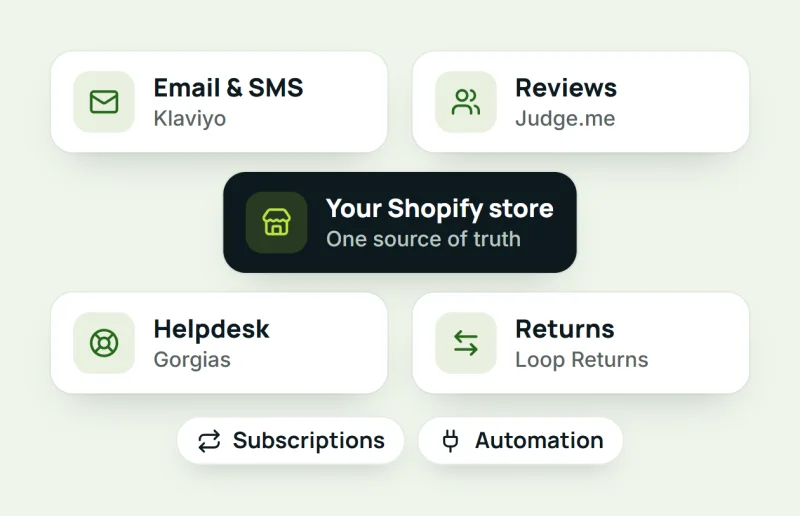
Illustration of a Shopify store connected to apps for email, reviews, helpdesk and returns

2. Record the job and the owner

For each app, write one sentence on what it does and name the person who uses it. If nobody can do either, mark it as a removal candidate.

3. Check cost against value

Note the monthly cost and any usage-based charges, then ask what the app delivers: revenue, saved hours or fewer service tickets. Be honest where the answer is “not much”.

4. Spot overlap

Group apps by job. Many vendors expand their features over time, so your email platform may now handle pop-ups, or your reviews app may offer loyalty. Consolidating can cut cost and scripts in one move.

5. Measure speed impact

On a duplicate theme, run PageSpeed Insights on a product page and a collection page, switch off one app embed at a time and test again. Apps loading scripts on every page are prime suspects.

6. Review data and access

Check which apps hold customer data, what permissions they were granted and whether a data processing agreement is in place. Under UK GDPR, every unused app with customer data is a liability you do not need.

Decide: keep, replace, consolidate or remove

Give every app one of four labels. Keep the tools that pass every test. Replace those doing a valid job badly. Consolidate where one platform can cover several jobs. Remove anything with no owner, no clear job or no measurable value. The labels turn a long list into a plan your team can act on.

Man checking his phone in front of a laptop showing charts

Removing apps without breaking your store

Export anything valuable first, such as reviews, loyalty balances, subscriptions or helpdesk history. Uninstall on a quiet weekday, never during a promotion. Then search your theme code for snippets older apps may have left behind, and test the full journey from product page to order confirmation. Check that order confirmation emails, discount codes, gift cards and tracking updates still behave as expected. Keep a simple change log with the date, the app removed and the person responsible, so you can trace any issue back to its cause.

Keeping your stack lean

Agree a rule that any new app needs a clear job, an owner and an exit plan before it is installed. Review the inventory quarterly and again before peak season. As AI features arrive in Shopify and in the apps you already pay for, check whether they replace a tool rather than adding another; our guide to AI for Shopify Stores helps you judge which are worth switching on. If you would rather hand the whole job to specialists, our Tech Stack Audit & Consulting service maps, tests and trims your stack under NDA, with QA and 4-eyes review on every change.


App audit tips from the field

  • Check billing outside Shopify

    Some vendors bill by card or invoice rather than through your Shopify bill, especially on annual plans. Ask your finance team for every software payment linked to the store over the last year, so the audit covers the full cost, not just the charges that appear in the admin. Cancel anything you cannot match to a current tool or owner.

  • Talk to the people who use the tools

    Spend ten minutes each with customer service, marketing and the warehouse team. Ask which apps they rely on, which they avoid and which tasks still happen in spreadsheets. Their answers often reveal duplicate tools and gaps faster than any report or usage dashboard can. Write down what you hear so nothing gets lost.

  • Test removals on a duplicate theme

    Before uninstalling anything, disable the app's embeds and blocks on a duplicate theme and preview key pages. If layouts break or features vanish, you have found a dependency to plan around. Fix it on the copy first, then repeat the change on the live theme. Keep notes on every dependency you uncover.

  • Diary every renewal date

    Annual plans renew quietly. Add each renewal date to a shared calendar with a reminder a month before, and attach a quick note on whether the app still earns its place. It turns every renewal into a small decision instead of an automatic spend. Share the calendar with finance as well.

Plan AI tools before they join your stackAI Consulting for Shopify Brands

FAQs

Shopify app audit FAQs

Straight answers before you get in touch. More in our FAQs.

How often should I run a Shopify app audit?

A light review every quarter suits most stores, with a fuller audit once a year and an extra check before peak trading. You should also audit after a redesign, a replatforming project or a change of agency, because those moments often leave behind apps, scripts and integrations that nobody is responsible for any more. Put the dates in the calendar now so the review actually happens.

Does uninstalling an app remove all of its code?

Not always. Apps built with theme app blocks and embeds remove their storefront elements cleanly when uninstalled. Older apps sometimes edited theme files directly, and those snippets can remain, loading broken scripts or empty containers. After any removal, search your theme code for the app's name and test key pages on mobile and desktop before you move on. Ask the vendor's support team if you are unsure what was added.

How do I find out which app is slowing my store down?

Work on a duplicate theme. Run PageSpeed Insights on a product page and a collection page, then disable one app embed at a time and test again. The browser's developer tools also show which scripts load and how heavy they are. Focus on apps that load on every page when they only need to appear on one template. Record your before and after scores for the audit file.

Where can I see what I pay for each app?

Your Shopify bills list app subscriptions and usage charges, and the billing area of the admin shows recent invoices. Some vendors bill directly by card or invoice, particularly for annual or enterprise plans, so check company card statements and accounts payable as well. Combine both sources in one spreadsheet so the audit reflects the true cost. Note any free trials due to convert into paid plans.

What should I save before removing an app?

Export any data you might need again: product reviews, loyalty points balances, subscription contracts, helpdesk tickets, form submissions or custom reports. Check whether the replacement tool can import that data, and in what format. Note any customer tags, metafields or Flow workflows that depend on the app so you can update them before the switch. Keep the exports somewhere secure and access-controlled.

Is one all-in-one app better than several specialists?

It depends on the job. Consolidating into one platform reduces scripts, logins and contracts, and keeps data in one place. Specialists can go deeper where a feature directly drives revenue, such as search or subscriptions. A good audit compares both options on cost, speed, features and migration effort rather than defaulting to either approach. Factor in training time for your team as well.

Who should own our Shopify apps?

Every app needs a named owner who understands what it does, checks it after updates and decides on renewal. Usually that is the person whose job it supports: marketing for email, service for the helpdesk, operations for shipping. A senior person should approve new installs, so tools are added deliberately rather than on impulse. Record each owner in your app inventory.

How much does an app stack audit cost with SAL?

We scope stack audits after a short call and quote a fixed price before any work begins. Clean-up tasks such as removing leftover code and retesting can run through a Shopify Support plan from £295 a month, which buys five hours of specialist time, ex VAT. Rebuilding or replacing integrations falls under our Apps Integration & Consulting packages, from £495 ex VAT. Every quote is fixed before work begins.

Want a specialist to audit your Shopify app stack?

Give us read access to your admin and a specialist lead will list every app, script and subscription on your account, test the speed impact of each one, flag overlaps and data risks, and give you a prioritised clean-up plan with a fixed price for any removals, rebuilds or consolidation work, all delivered under NDA and reported weekly by a dedicated project manager.

Get a quote Call WhatsApp (opens in new tab)