Team marking up paper wireframes on a table

Migration

BigCommerce vs Shopify: Signs It's Time to Switch

BigCommerce vs Shopify for UK brands: a balanced look at where each platform wins, and the signs it's time to switch. Read it, then get a migration quote.

In this article (8 sections)
  1. BigCommerce vs Shopify at a glance
  2. Where BigCommerce is strong
  3. Where Shopify pulls ahead
  4. Signs it is time to switch
  5. Signs to stay where you are
  6. What a switch actually involves
  7. Built-in AI is part of the decision
  8. A UK example

Key takeaways

  • BigCommerce vs Shopify is not a contest between a good platform and a bad one. Both are mature, hosted SaaS platforms that handle security and updates for you. The right choice depends on your catalogue, sales channels, integrations, in-house skills and how you plan to grow over the next few years.
  • BigCommerce has genuine strengths, including flexible product options, strong built-in catalogue features and well-regarded B2B tooling. If those features underpin your business and your team is productive, staying put can be the sensible decision rather than a lack of ambition.
  • Shopify tends to pull ahead on ecosystem breadth: a very large app store, plenty of themes, Shop Pay, Shopify POS for physical retail, Shopify Markets for international selling and a wide pool of UK developers and agencies who know the platform well.
  • The clearest signs it is time to switch are practical ones: integrations you need are only well supported on Shopify, your team finds daily admin slow, adding features means custom development every time, or you are opening shops and need online and in-store stock in one system.
  • Compare total cost of ownership, not headline plan prices. Include apps, payment processing, transaction fees, development and staff time, using each vendor's current official pricing pages, because plan details change and a like-for-like comparison is the only fair one.
  • If you do switch, protect what you have built. Map every product, customer and URL, plan 301 redirects, rebuild product options carefully and prepare customers for new account sign-in, so the move improves your store without costing you rankings or loyal customers.

Many UK brands chose BigCommerce for good reasons, and plenty are still well served by it. But businesses change: new channels, new markets, physical shops and bigger teams can expose gaps that were not there at launch. This article sets out an honest BigCommerce vs Shopify comparison, then lists the signs that switching would pay off. If you decide the time is right, our bigcommerce to shopify migration service moves products, customers, orders and URLs at a fixed price, with SEO protected throughout.

BigCommerce vs Shopify at a glance

AreaBigCommerceShopify
Hosting and securityFully hosted SaaSFully hosted SaaS
Product optionsFlexible options and modifiersVariants plus metafields or apps
B2BStrong built-in B2B toolingNative B2B, fullest on Plus
App ecosystemSolid, smaller marketplaceVery large app store
CheckoutCustomisable checkoutShop Pay, checkout extensibility
Physical retailVia third-party POSNative Shopify POS
InternationalMulti-currency, multi-storefrontShopify Markets built in
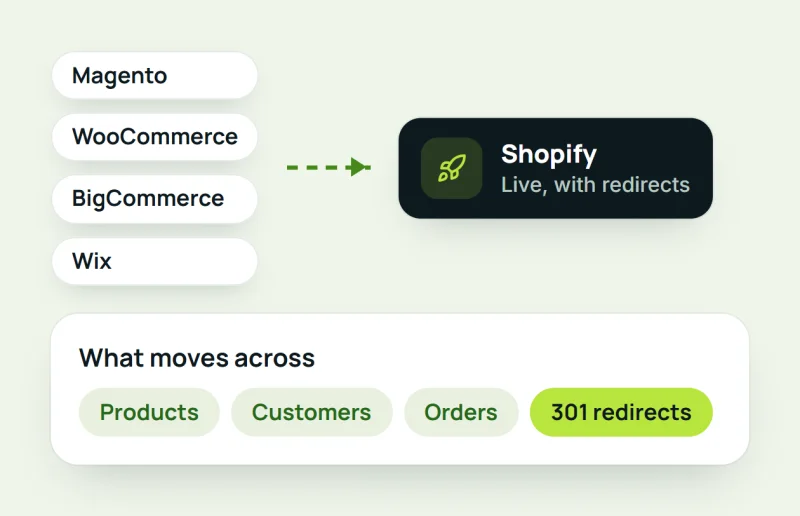
Illustration of a store migration from Magento, WooCommerce, BigCommerce or Wix to Shopify, with data and redirects carried across

Where BigCommerce is strong

BigCommerce includes a lot out of the box. Complex product options, such as engraving fields, add-ons and modifiers that change price, are handled natively. Its B2B features suit wholesale-heavy businesses, and its APIs give developers plenty of room for headless builds. Multi-storefront support also lets one account run several branded sites, which can suit groups with more than one brand. If your operation leans on these features and runs smoothly, there may be no case to move yet.

Where Shopify pulls ahead

Shopify's advantage lies in its ecosystem. The app store covers almost any job, from reviews and subscriptions to returns and loyalty, and many tools built for UK merchants offer a ready-made Shopify integration. Shop Pay gives returning shoppers a fast, familiar checkout, Shopify POS joins online and in-store sales, and Shopify Markets supports selling abroad from one admin. Hiring is easier too, because more UK developers, freelancers and agencies work with Shopify every day.

Signs it is time to switch

  • Integration gaps: the apps, marketplaces or 3PLs you want work best with Shopify.
  • Everything needs a developer: simple content or layout changes require custom code.
  • You are opening shops or pop-ups: you need one view of stock, customers and orders across channels.
  • International growth: you want localised pricing, currencies and domains managed in one place.
  • Team productivity: staff find day-to-day admin slow or confusing.
  • Hiring trouble: finding developers who know your platform has become a bottleneck.
Laptop showing a website template gallery on a desk

Signs to stay where you are

If your B2B ordering depends on BigCommerce-specific features, you have recently re-platformed, or your product options would need heavy rebuilding, run a proper requirements workshop before deciding. Switching for its own sake wastes budget. Equally, if a planned BigCommerce upgrade or redesign would fix your main frustrations at lower cost, that option deserves a fair hearing.

What a switch actually involves

A BigCommerce to Shopify move follows a familiar pattern: audit the catalogue, customers, orders and content; decide how options, modifiers and custom fields map to variants and metafields; build or adapt the Shopify theme; import data in test rounds; and map every valuable URL to a 301 redirect. Customer passwords cannot be carried across, so returning customers sign in again through Shopify's account process. Most of the effort goes into planning and testing rather than the final import, which is why a clear scope matters more than speed.

Built-in AI is part of the decision

Shopify now includes AI tools such as Shopify Magic and Sidekick inside the admin, and a growing range of AI apps. Our hub on AI for Shopify Stores explains what they can do for your team. They can draft product descriptions, summarise trading performance and suggest next steps, which saves real time for small teams. Treat them as assistants rather than decision-makers: a person should still check every claim before it reaches customers.

A UK example

Consider a Leeds homeware brand opening its first shop. On BigCommerce it would need a separate POS and a sync between systems; on Shopify, online and in-store stock, customers and reporting sit together, which is often the moment the switch starts to make sense.

Tips before you decide

  • Write requirements, not wishlists

    List what your store must do, ranked by revenue impact: product options, B2B pricing, integrations, channels and reporting. Score both platforms against that list rather than against glossy demos. The exercise often settles the decision faster than weeks of debate between departments. Involve finance, operations and customer service, not just marketing.

  • Map product options early

    BigCommerce modifiers, such as personalisation text or optional add-ons, do not always map directly to Shopify variants. Decide early whether each one becomes a variant, a line item property, a metafield or an app feature, because that choice shapes the theme, the cart and your fulfilment process. Test the trickiest products on a staging store first.

  • Check your URL patterns

    BigCommerce product and category URLs often sit at the root of the domain, while Shopify uses /products/ and /collections/. Export every indexed URL, match each one to its new address and test the redirects before launch, starting with the pages that bring in the most organic revenue. Keep the map in one shared spreadsheet so every rule can be checked.

  • Talk to your warehouse first

    Your 3PL, ERP or stock system may connect differently to Shopify. Confirm the integration route, the data it needs and any setup lead time before you commit to a launch date, so fulfilment carries on without a hitch on the day you switch platforms. Ask for a test order to flow end to end before launch.

See Shopify's built-in AI in actionShopify Magic & Sidekick Setup

FAQs

BigCommerce vs Shopify FAQs

Straight answers before you get in touch. More in our FAQs.

Is Shopify better than BigCommerce for UK brands?

Neither is better for everyone. Shopify often suits brands that value a large app ecosystem, a fast checkout, physical retail and a wide pool of UK developers. BigCommerce can suit catalogue-heavy or B2B-led businesses that rely on its built-in product options. The right answer comes from your requirements, not from a general ranking, a sales demo or what a competitor happens to use.

Which platform costs less to run?

It depends on your plan, sales volume, payment provider and app stack. Headline subscription prices tell only part of the story. Add up apps, payment processing, any transaction fees, development and staff time on each platform, using the vendors' current official pricing, and compare the total over three years rather than one month, including the one-off cost of migrating.

Can Shopify handle complex product options like BigCommerce?

Often, yes, but sometimes in a different way. Shopify uses variants for options that change stock or price, and line item properties, metafields or specialist apps for personalisation and add-ons. Very complex configurators may need a custom solution. Map your options in detail before migrating, so nothing your customers rely on disappears during the move or behaves differently at checkout.

Will switching from BigCommerce hurt our SEO?

A switch carries risk if URLs change without redirects, but careful planning keeps rankings stable. Build a full URL inventory, map 301 redirects one to one, carry across titles, descriptions and content, and monitor Search Console closely after launch. Most problems come from rushed redirect work rather than from the platform change itself, so give redirects the time they deserve.

Do we need Shopify Plus if we are coming from BigCommerce Enterprise?

Not necessarily. Plus makes sense if you need its fuller B2B features, deeper checkout customisation, advanced automation or several expansion stores. Many mid-sized brands run well on standard Shopify plans. Compare your current Enterprise features against what you will actually use, and choose the plan that matches your requirements rather than your current tier name. You can always upgrade later as needs grow.

Can we keep our BigCommerce theme design?

The design can be recreated, but the theme itself cannot be transferred, because Shopify themes use a different templating language. Many brands rebuild their look on a quality Shopify theme with custom sections, which keeps the brand recognisable while improving speed and editing. A migration is also a good moment to fix known usability issues that have frustrated customers.

How do we decide without bias from a Shopify agency?

Fair question. Ask for a written requirements comparison that lists where BigCommerce would serve you better, not just reasons to move. A trustworthy partner will tell you when staying is the right call. We would rather advise you to stay than run a migration that does not improve your business. That honesty protects your budget and our reputation alike, and it keeps the decision firmly focused on your growth.

What does a BigCommerce to Shopify migration cost with SAL?

We price BigCommerce moves as fixed packages. For catalogues of up to 1k products, Starter begins at £1,995 ex VAT. Growth, from £3,995 ex VAT, is built for larger catalogues and complete redirect mapping. Complex integrations or B2B requirements fall under Custom and receive their own quote. Whichever applies, the figure is fixed before work starts, so the budget you approve is the budget you pay.

Thinking about leaving BigCommerce?

Book a call with our migration team and we will review your catalogue, integrations and SEO, give you an honest view on whether switching makes sense, and if it does, quote the full move at a fixed price with a dedicated project manager, 4-eyes QA and weekly progress reports. Every conversation starts under NDA, and you can book a live walkthrough on Zoom or Google Meet first.

Get a quote Call WhatsApp (opens in new tab)