
Team working on laptops around a shared table

Shopify Development

Custom Shopify Themes vs Premium Themes: Which Should You Choose?

Custom Shopify themes or a premium theme? Compare cost, speed, flexibility and ownership, see when each route wins, then get a fixed quote for your build.

In this article (7 sections)
  1. Premium themes vs custom Shopify themes: what is the difference?
  2. Side-by-side comparison
  3. When a premium theme is the right call
  4. When custom Shopify themes pay off
  5. The middle route: premium base, custom sections
  6. Do not forget content and running costs
  7. Questions to ask before you decide

Key takeaways

  • Premium themes and custom Shopify themes solve different problems. A premium theme from the Shopify Theme Store gets you live quickly on a proven, reviewed design, while a custom theme is designed and coded around your brand, your products and the way your customers actually shop and buy. Neither is automatically better; the right answer depends on your stage.
  • Speed to market favours premium themes. If you are launching a new brand, testing a product line or working to a tight budget, a well-chosen premium theme tailored with strong photography and copy can look polished and convert well from the very first week of trading.
  • Differentiation favours a custom build. In crowded UK categories such as fashion, beauty and homeware, bespoke product pages, navigation and merchandising help you stand apart from every competitor who bought the same popular theme and changed little more than the logo and the colours.
  • There is a middle route. Many growing brands keep a premium theme as the base and add custom sections, templates and app blocks where they matter most, which balances budget, flexibility and the ease of applying future theme updates without breaking anything your customers rely on.
  • Judge the total cost of ownership, not just the launch price. Factor in theme updates, app compatibility, page speed, accessibility and how easily your team can edit pages without a developer, because those costs carry on long after go-live and shape every redesign that follows.

Your theme shapes how every product, collection and campaign looks, so choosing between a premium theme and custom Shopify themes is one of the biggest decisions in any build. A new Brighton coffee roaster and an established Edinburgh knitwear label will rarely need the same answer. This guide compares both routes honestly, drawing on what we see every week in shopify theme development projects for UK brands, so you can match the choice to your stage, budget and growth plans.

Premium themes vs custom Shopify themes: what is the difference?

Premium themes

Premium themes are paid themes sold through the Shopify Theme Store by independent developers. Each one passes Shopify's review for quality and performance, comes with documentation and support from its developer, and receives updates over time. You customise it through the theme editor with your colours, fonts, imagery and content. Shopify's free themes, such as Dawn, sit alongside them and suit very lean launches. The trade-off is that thousands of other shops can buy the same design, so standing out relies on your brand assets.

Custom Shopify themes

A custom theme is designed from your customer journeys and brand, then coded specifically for your store, often on top of a clean, modern Online Store 2.0 foundation. Layouts, product pages and merchandising are built for your catalogue rather than adapted from someone else's idea of a typical shop. You also avoid carrying code for features you will never switch on, which helps keep pages lean and fast on mobile.
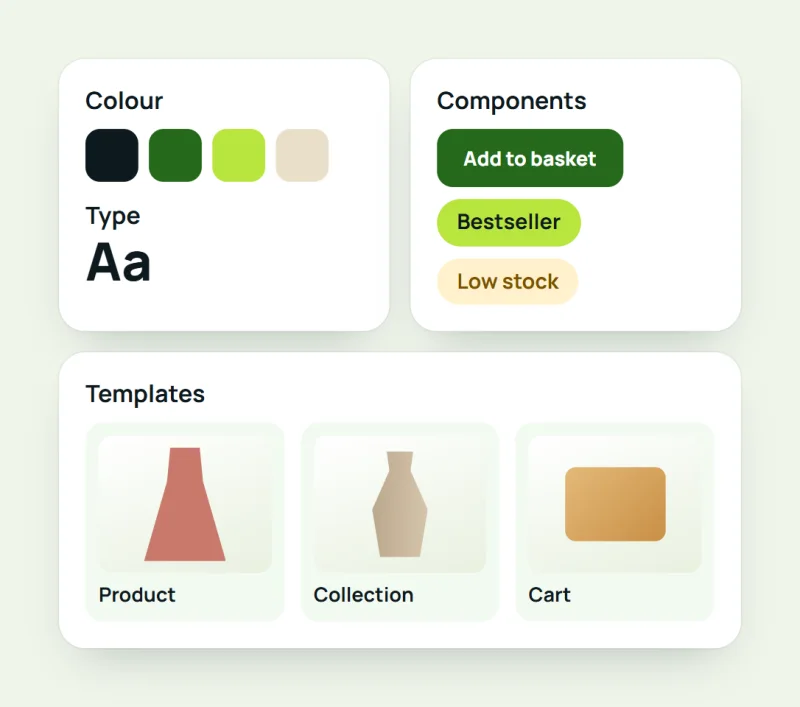
Illustration of a Shopify design system with colours, type, components and page templates

Side-by-side comparison

FactorPremium themeCustom theme
Time to launchFasterLonger design and build
Upfront costLowerHigher
Brand differentiationLimitedBuilt around your brand
Feature flexibilityWithin theme settingsAnything the platform supports
UpdatesFrom the theme developerManaged by your agency
Code weightCarries unused featuresOnly what you need

When a premium theme is the right call

  • You are launching a new brand and need to start trading quickly.
  • Your catalogue is simple and fits standard product and collection layouts.
  • Budget is better spent on photography, ads or stock at this stage.
  • You want to validate demand before investing in bespoke design.

When custom Shopify themes pay off

  • Your products need richer storytelling, such as ingredient breakdowns, size guidance or bundles.
  • You compete in a busy category where looking generic costs conversions.
  • You have outgrown your theme's settings and keep paying for workarounds.
  • You need specific integrations, B2B layouts or multi-market templates.

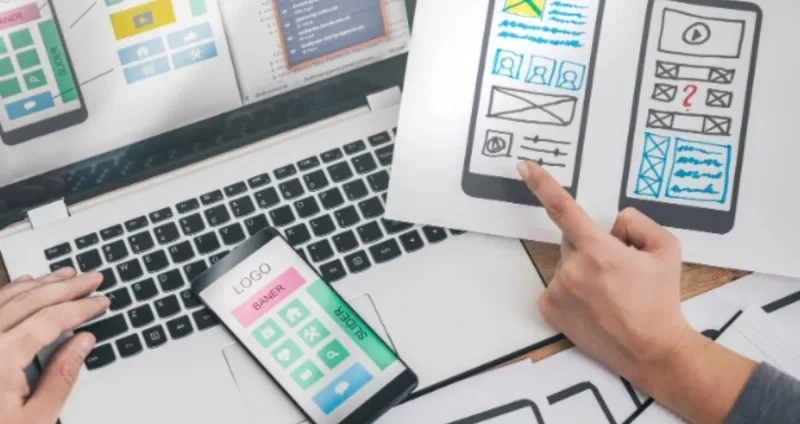
Team marking up paper wireframes on a table

The middle route: premium base, custom sections

You do not have to choose all or nothing. Starting from a strong premium theme and adding custom sections, metafield-driven content and bespoke product templates gives you a distinctive store at a lower cost than a full custom build. The key is keeping those changes modular and documented, so theme updates stay manageable. A hybrid build is often the sweet spot for brands moving from startup to scale-up, because it lets you invest only where customers will notice the difference.

Do not forget content and running costs

Whichever route you choose, the templates are only as good as the content inside them. Clear product copy, consistent imagery and structured metafields make any theme look sharper. Our guide to AI for Shopify Stores explains how built-in AI tools can speed up that content work without losing your brand voice. Then budget for upkeep: app compatibility, accessibility checks and performance tuning apply to both routes.

Questions to ask before you decide

  1. Which three features would make the biggest difference to conversion?
  2. Can a premium theme deliver them through settings, or will they need code?
  3. Who will maintain the theme, and how will updates be applied?
  4. How will your team edit pages day to day without a developer?

At Shopify Agency London we build both routes on a fixed price, with a dedicated project manager, QA and 4-eyes review, so the recommendation is driven by your goals rather than by what is easiest for us to sell.
Theme decision tips

  • Test the demo on your phone

    Most UK shoppers will meet your store on a mobile screen, so judge any premium theme demo there first, ideally on a mid-range handset over a normal connection. Check how product images, filters, the menu and the add-to-basket button behave with your own catalogue in mind, rather than relying on the polished desktop screenshots in the Theme Store listing.

  • Read the update history

    Before buying a premium theme, look at how recently and how regularly its developer has released updates, and how quickly support questions are answered. An actively maintained theme keeps pace with new Shopify features, while an abandoned one can quietly turn into a costly technical debt that you only discover when something breaks.

  • Keep custom code modular

    Whether you go fully custom or extend a premium theme, ask for changes to be built as separate sections and snippets with clear notes. That makes future updates, redesigns and handovers far simpler, and stops one small edit from breaking several unrelated templates across the store at the worst moment.

  • Plan the editing experience

    Ask how your marketing team will build landing pages, swap banners and launch collections after go-live. A theme that relies on a developer for every change slows campaigns down, so insist on flexible sections and blocks your team can use confidently from the very first day, with a short recorded walkthrough for new starters.

Fill your new theme with content that sellsAI Product Content & Descriptions

FAQs

Custom vs premium theme FAQs

Straight answers before you get in touch. More in our FAQs.

What is the price difference between a theme-based build and a custom design at SAL?

Our Starter package for a theme-based store starts from £1,995 ex VAT, and our Growth package for a custom design store starts from £4,995 ex VAT. Complex builds with bespoke functionality are quoted as Custom. A premium theme licence is bought separately from the Shopify Theme Store, so add it to your budget if you choose that route, alongside any paid apps.

Can I customise a premium theme without losing future updates?

Yes, if changes are made carefully. Use theme settings, sections and app blocks wherever possible, and keep any code changes in separate, well-documented files. Heavy edits to the theme's core files make updates harder to apply, because each new version has to be merged with your changes by hand before it can go live on your store.

Is a free theme such as Dawn good enough to launch with?

For many new brands, yes. Shopify's free themes are fast, accessible and maintained by Shopify, which makes them a sensible base for a first store. You will have fewer layout options than a premium theme offers, so they suit focused catalogues where photography and copy do most of the selling work. You can always move up to a premium or custom theme later.

Will custom Shopify themes help my SEO?

A custom theme is not automatically better for search, but it gives you full control over headings, structured data, internal linking and page weight. A well-built premium theme can rank perfectly well too. What matters most is clean markup, fast pages, helpful content and sensible URL and redirect management whichever route you choose for your store.

Can we start on a premium theme and move to a custom one later?

Absolutely, and it is a common path for growing brands. Storing product details in metafields and keeping content in reusable sections makes the later move much smoother. When you are ready, a custom theme can be built and previewed on an unpublished copy, then switched live once it has passed testing, with no downtime for shoppers.

Can our team still edit a custom theme in the Shopify editor?

They should be able to. A well-built custom theme uses Online Store 2.0 sections and blocks, so your team can rearrange pages, update banners and create landing pages in the theme editor without code. Ask any agency to show you the editing experience before sign-off, not after launch day, so there are no unwelcome surprises.

Can one premium theme licence be used on several stores?

A Theme Store licence is generally tied to a single store, so running separate UK, EU or wholesale stores may mean extra licences. Check the current licence terms on the Shopify Theme Store before you buy. A custom theme can be built with multiple storefronts in mind from the start, subject to the ownership terms in your agreement.

How can I tell if my current theme is slowing the store down?

Start with the web performance report in your Shopify admin and Google PageSpeed Insights, then compare a clean preview of the theme with your live store. If the clean version is much quicker, apps, scripts and oversized images are usually the culprits rather than the theme itself, and those are usually quick to fix.

Not sure which theme route fits your brand?

Share your catalogue, brand goals, budget and current theme, and a specialist lead will recommend a premium, hybrid or fully custom route with a fixed price and timeline in writing, then a dedicated project manager will guide design, build, QA and launch with weekly updates, so you always know exactly where your new storefront stands and what happens next on the way to launch.

Get a quote Call WhatsApp (opens in new tab)