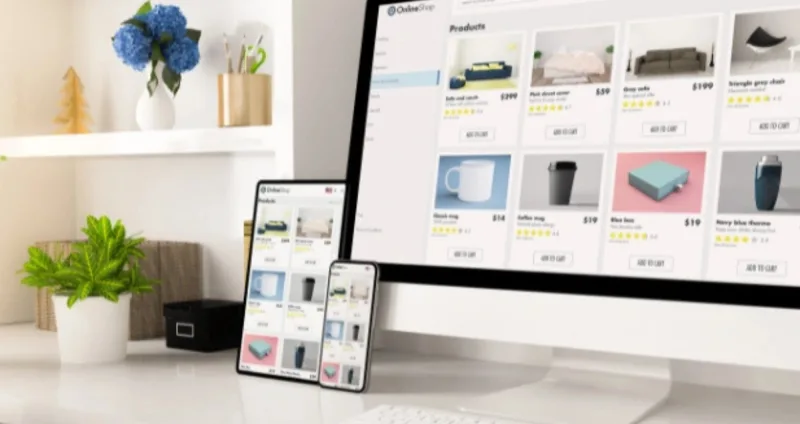
Desktop monitor, tablet and phone showing the same online store

Shopify Development

Shopify vs Shopify Plus: When Should You Upgrade?

Shopify or Shopify Plus? Learn the real upgrade triggers, the Plus-only features worth paying for and how to plan the switch. Read on, then talk to us.

In this article (6 sections)
  1. What is Shopify Plus?
  2. Shopify vs Shopify Plus: the differences that matter
  3. Signs it is time to upgrade to Shopify Plus
  4. What Shopify Plus really costs to run
  5. When standard Shopify is still the better choice
  6. How to plan a smooth Shopify Plus upgrade

Key takeaways

  • Shopify Plus is Shopify's enterprise plan for brands whose volume, complexity or team size has outgrown the standard plans. It runs on the same core platform, so moving up is normally a plan change plus a set of new capabilities, not a replatform or a fresh build from a blank page.
  • Upgrade for capability, not status. The strongest triggers are a checkout that needs to do more, native B2B trading, several regional or brand storefronts and heavy manual admin. If none of those apply yet, the Advanced plan may still be the leaner and smarter place for your brand to grow.
  • Model the full cost before you switch. Plus carries a higher platform fee, so set it against what you already spend on overlapping apps, extra stores, custom workarounds and staff hours lost to repetitive tasks. The business case often looks very different once those hidden costs sit on the same spreadsheet.
  • Checkout is where Plus earns its keep for many UK brands. Checkout Extensibility lets you tailor the steps where shoppers actually pay, from delivery messaging to custom fields and upsells, in a way that stays upgrade-safe and supported by Shopify as the platform evolves.
  • Treat the upgrade as a project. Audit your apps, retire legacy checkout code, map future stores and markets, train the team and choose a quiet trading window, so the move strengthens your next peak season instead of disrupting it at the worst possible moment.

Every fast-growing Shopify brand reaches the same crossroads: is it time for Shopify Plus? Perhaps a London streetwear label is bracing for a record Black Friday, or a Manchester supplements brand wants trade accounts alongside its DTC shop. Upgrade too early and you burn budget; upgrade too late and you spend months stitching apps together to imitate features Plus provides natively. As a shopify plus agency, we see both mistakes, so this guide sets out what really changes and how to judge the timing for your business.

What is Shopify Plus?

Shopify Plus is the top-tier plan for high-volume and complex merchants. It shares the same admin, theme architecture and app ecosystem as the standard plans, which is why moving up rarely means a rebuild. What you gain is a layer of enterprise tooling, room for larger teams and closer support from Shopify itself.

Shopify vs Shopify Plus: the differences that matter

  • Checkout customisation: Checkout Extensibility lets Plus stores add custom content, fields, upsells and logic to the information, shipping and payment steps.
  • Shopify Functions in custom apps: build your own discount, delivery and payment rules instead of bending an off-the-shelf app to fit.
  • Native B2B: company accounts, catalogues, price lists, payment terms and quantity rules inside one store.
  • Expansion stores: extra storefronts for new regions, brands or wholesale, managed from one organisation admin.
  • Launchpad: schedule sales, product drops and theme changes to go live automatically.
  • Team scale: more staff accounts and finer permissions for larger in-house teams.
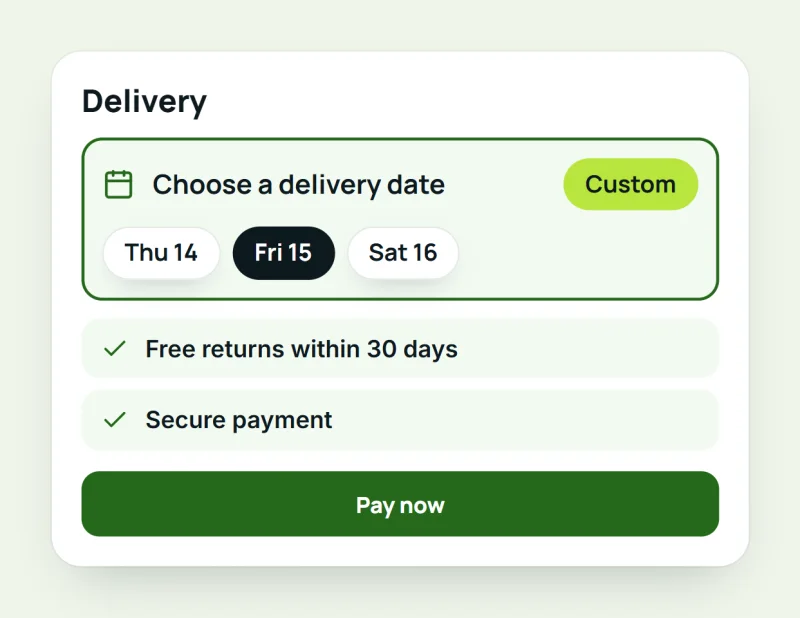
Illustration of a customised Shopify checkout with an added delivery-date block and trust messages

Signs it is time to upgrade to Shopify Plus

Your checkout needs to do more

Delivery date pickers, gift messaging, purchase order fields for trade buyers or bespoke upsells at the payment step all point towards Plus as the supported route.

You sell to trade as well as consumers

Wholesale apps can work on standard plans, but native B2B keeps trade pricing, terms and buyer accounts in one place with less ongoing maintenance.

You run several storefronts

A UK shop, an EU shop and a separate wholesale site soon become awkward to run as unconnected plans. Expansion stores and shared organisation settings keep that estate under control.

Manual work is eating your team's week

If someone is staying up past midnight to start a sale, editing prices by hand or chasing order exceptions, Launchpad, Shopify Flow and Functions can take that load away. Pair them with the tools in our guide to AI for Shopify Stores and a lean team can run a far bigger operation without burning out.

Colleague leaning over a desk to guide a team member at a laptop

What Shopify Plus really costs to run

Plus is billed through an agreement with Shopify rather than the self-serve plan picker, and the fee is noticeably higher than Advanced. Ask Shopify for current UK terms, then add payment processing, apps and any agency retainer. Against that, subtract the apps, extra stores and manual hours Plus replaces. The net figure, not the sticker price, is what should drive your decision.

When standard Shopify is still the better choice

Plenty of ambitious UK brands trade happily on Advanced. If apps already cover your checkout needs, you sell into one or two markets and your team is small, the extra platform fee may work harder in CRO, content or paid media. Revisit the decision once a year as revenue, markets and complexity grow.

How to plan a smooth Shopify Plus upgrade

  1. Audit your apps and remove anything Plus makes redundant.
  2. Replace legacy checkout customisations and scripts with Checkout Extensibility and Functions.
  3. Map the B2B, market and store structure you expect to need over the next few years.
  4. Schedule the switch away from peak trading and test every payment and shipping route.
  5. Train the team on Launchpad, Flow and new permissions before go-live.

At Shopify Agency London, every Plus project runs on our fixed-price, PM-led process with QA and 4-eyes review at each milestone, so the upgrade adds capability without adding risk.

Tips before you upgrade to Plus

  • Cost your workarounds first

    Before comparing plan fees, list every app, script and manual task that exists only because your current plan lacks a feature. Add up the subscriptions and the staff hours involved. Set against the Plus fee, that total gives your finance team a far more honest picture than the headline platform price alone, and it shows exactly where the upgrade pays for itself.

  • Check app compatibility early

    Most apps run on every plan, but some offer Plus-specific features or pricing tiers. Ask each vendor how their app behaves on Plus and whether any checkout features need to move to extensions, so nothing breaks once the new plan is live and handling real orders from paying customers.

  • Upgrade outside peak season

    Avoid switching plans in the run-up to Black Friday, Christmas or a major launch. Give yourself a few calm weeks to configure checkout, test payments and shipping rates, and let staff get comfortable with Launchpad and new permissions before traffic spikes and every hour of disruption becomes expensive for the whole business.

  • Design for where you are heading

    Plan the structure you will need as you grow, not just today's. Decide early whether wholesale lives in the same store, whether EU shoppers get their own storefront and which systems need connecting, so your Plus set-up supports expansion rather than demanding another rework next year or when you open your next market.

Prepare your Plus store for AI shoppersAgentic Commerce (AI Shopping Agents)

FAQs

Shopify Plus upgrade FAQs

Straight answers before you get in touch. More in our FAQs.

Is a Shopify Plus project priced differently from a standard Shopify build?

Yes, because the scope is bigger. Our Shopify Store packages start from £1,995 ex VAT for a theme-based store and from £4,995 ex VAT for a custom design. Shopify Plus Build packages start from £9,995 ex VAT, or from £19,995 ex VAT when integrations and B2B are included. Shopify's own Plus fee is billed separately by Shopify, so include both figures in your business case.

Is there a revenue level at which we should move to Plus?

There is no magic figure. Shopify positions Plus for high-volume and complex merchants, but the better test is whether Plus solves problems you are paying to work around today. A brand with modest revenue and heavy B2B needs may benefit sooner than a larger, simpler shop selling a small range in a single market with few staff.

Do we need to rebuild our store to move to Shopify Plus?

Usually not. Plus runs on the same platform, so your products, customers, orders and theme carry across when the plan changes. Many brands still use the upgrade as a moment to tidy the theme, trim apps and rebuild checkout customisations properly, because those changes unlock most of the value the higher fee is paying for.

Can we move back to a standard plan later?

Plus is typically agreed on a term with Shopify rather than as a simple monthly plan, so check the minimum term and notice conditions before signing. Moving back would also mean losing Plus-only features such as checkout customisation, native B2B and expansion stores, so rework any processes that depend on them well before the switch so customers notice nothing.

Will Shopify Plus make our storefront faster?

Not by itself. Plus stores benefit from the same hosting and global infrastructure as every Shopify plan, so storefront speed still depends on your theme, images, apps and third-party scripts. If pages feel slow, a performance audit and an app clean-up will do far more than a plan upgrade ever could, and costs a fraction of the fee.

Is Plus required to sell into the EU from the UK?

No. Shopify Markets lets standard plans sell internationally with local currencies, languages and duties settings. Plus becomes useful when you want separate expansion stores per region, market-specific checkout rules, local teams with their own permissions or a wholesale operation abroad. Confirm VAT and customs treatment with your accountant whichever plan you choose.

How long does a Shopify Plus upgrade take?

The plan change itself is quick. The preparation is what takes time: rebuilding checkout features, configuring B2B or expansion stores, testing payments and training staff. We set a fixed timeline alongside the fixed price at proposal stage, then deliver in one-to-two-week sprints with a single feedback round at each milestone, so you always know what comes next.

What support does Shopify provide on Plus, and where does an agency fit?

Shopify offers Plus merchants enhanced, priority support for platform questions and account matters. An agency covers what Shopify does not: designing and building features, integrating your ERP or 3PL, managing releases and fixing theme or app issues. Our SLA support plans keep that development help available long after launch day, with clear priorities for urgent issues.

Ready to scale on Shopify Plus?

Tell us about your trading volume, markets, checkout needs and current app stack, and a Shopify Plus specialist lead will tell you honestly whether upgrading makes sense now, what it should cost and how to plan the move, then back it with a fixed price, a dedicated project manager and weekly progress reports from kickoff to launch, with SLA support ready for the trading peaks that follow.

Get a quote Call WhatsApp (opens in new tab)