Hands holding a phone with a UX design over paper wireframes

Shopify Growth

Shopify Klaviyo Flows Every UK Store Needs

The Shopify Klaviyo flows every UK store needs, from welcome and abandoned checkout to post-purchase and winback. Build them right or ask us to help.

In this article (5 sections)
  1. Before you build: connect Shopify and Klaviyo properly
  2. The six core Shopify Klaviyo flows
  3. Useful extras once the core is live
  4. Getting timing and frequency right
  5. Where AI fits

Key takeaways

  • A Shopify Klaviyo setup earns its keep through automated flows, not one-off campaigns. Flows trigger on what shoppers actually do, such as signing up, browsing, adding to basket or buying, so the right message arrives at the moment it is most relevant to them.
  • Build the core flows first: welcome series, abandoned checkout, abandoned basket, browse abandonment, post-purchase and winback. Together they cover the journey from first visit to repeat order, and they keep working every day while your team focuses on campaigns, stock and customer service.
  • Get the data right before you write a single email. Connect Shopify properly, switch on Klaviyo's onsite tracking through its theme app embed, check that events such as Viewed Product and Started Checkout are recording, and keep consent fields clean from day one.
  • Respect UK rules on consent. Under PECR and UK GDPR you need a lawful basis to send marketing emails and SMS, so collect clear opt-ins, record where each one came from, and make unsubscribing easy in every message you send to customers.
  • Personalise with restraint. Product recommendations, first names and location-based delivery messages help, but relevance matters more than clever merge tags. Split flows by first-time and returning customers before you build anything more complex, and keep the copy short and honest throughout.
  • Review flows quarterly. Check revenue per recipient, click rates and unsubscribes for each message, refresh tired creative before peak trading, and switch off any message that no longer matches your offers, delivery promises or returns policy.

Most Shopify stores install Klaviyo, send a few newsletters and leave the real opportunity untouched. The real value sits in flows: automated sequences that react to what each shopper does on your store. Set up well, they welcome new subscribers, rescue abandoned baskets and bring lapsed customers back without anyone pressing send. This guide covers the flows every UK store should run, in the order we would build them. If you would like a specialist team to plan, write and build them, our shopify klaviyo agency service handles the whole job at a fixed price.

Before you build: connect Shopify and Klaviyo properly

Flows are only as good as the data behind them. Connect your store through Klaviyo's Shopify integration, enable onsite tracking via the app embed in your theme and confirm that key events are recording: Active on Site, Viewed Product, Added to Cart, Started Checkout and Placed Order. Sync email and SMS consent, and decide how sign-up forms will tag each subscriber's source. Then tidy the list: suppress hard bounces, remove obvious test addresses and agree which existing contacts can lawfully receive marketing before the first flow goes live.

The six core Shopify Klaviyo flows

1. Welcome series

Triggered when someone joins your list. Introduce the brand, explain what makes your products different and answer common worries about delivery, returns and sizing. If you offer a first-order incentive, deliver it in the first email and remind people once before it expires.
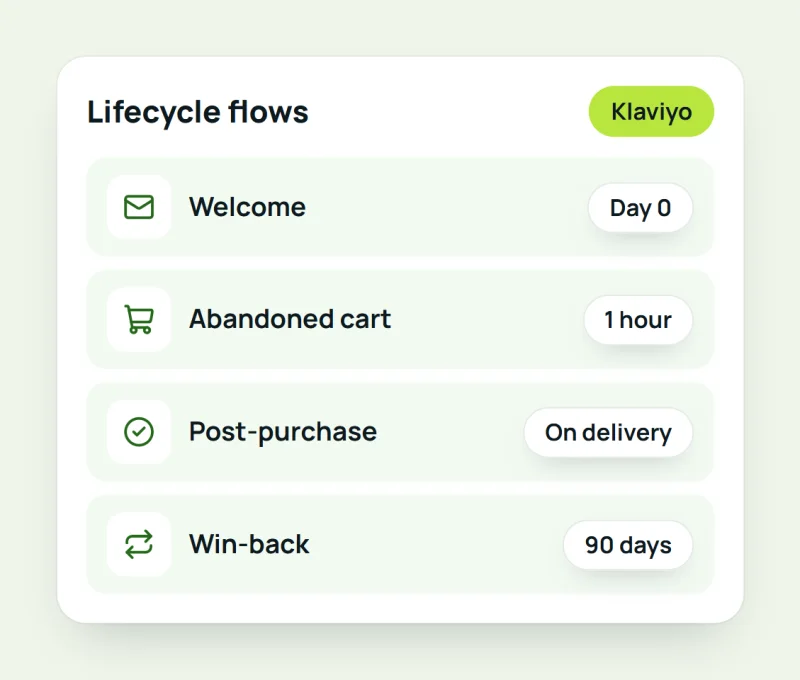
Illustration of email marketing flows: welcome, abandoned cart, post-purchase and win-back

2. Abandoned checkout

Usually the highest-intent flow, because the shopper has started checkout. Send a helpful reminder quickly, then a follow-up that answers likely objections such as delivery cost or returns. Avoid leading with a discount, or customers learn to abandon on purpose.

3. Abandoned basket

Catches shoppers who added to basket but never reached checkout. Keep it lighter than the checkout flow, show the products clearly, and exclude anyone already in the checkout flow so nobody receives two near-identical emails.

4. Browse abandonment

Reaches known subscribers who viewed products without adding anything. A short, friendly nudge with the product and a few alternatives works well, with strict frequency limits so it never feels like surveillance.

5. Post-purchase

Thank the customer, confirm what happens next and set expectations on Royal Mail or courier delivery. Later emails can share care guides, request a review once the order has arrived and suggest genuinely complementary products.

6. Winback

Targets customers who have not ordered for longer than your typical buying cycle. A skincare brand might wait a couple of months; a furniture retailer much longer. Remind them what they loved, show what is new and, if they still do not engage, move them to a sunset flow that protects your sender reputation.
Laptop showing a dark analytics dashboard with charts

Useful extras once the core is live

  • Back-in-stock alerts for popular sizes and colours.
  • Price-drop or low-stock reminders for viewed products, used sparingly.
  • Replenishment reminders for consumables such as coffee, candles or supplements.
  • VIP or loyalty messages for your most valuable customers.

Getting timing and frequency right

Timing is where many flows go wrong. Use Klaviyo's Smart Sending so one shopper does not receive several messages in a single day, and make sure flows stop for anyone who has just ordered. Think about UK habits too: a reminder that lands at 3am is buried by breakfast, while one sent in the evening, when people browse on the sofa, gets a fairer hearing. Review timings after launch rather than guessing forever.

Where AI fits

Klaviyo and Shopify both include AI features that can draft subject lines, suggest send times and segment audiences. They speed up production, but a person should still check tone, accuracy and offers before anything goes live, including any claims about ingredients, sizing or delivery. Our hub on AI for Shopify Stores explains how to use these tools safely across your store.

At Shopify Agency London, flow builds follow a written plan, every email passes 4-eyes QA on desktop and mobile, and performance is reported weekly by a dedicated project manager.


Flow-building tips worth stealing

  • Write for the phone first

    Most flow emails are opened on a phone, often in a quick glance on the bus or between meetings. Put the key message and button in the top third, keep subject lines short and check every template in dark mode, where pale logos and thin text can disappear completely. Send yourself a test on both iPhone and Android before switching anything on.

  • Use flow filters generously

    Filters stop embarrassing overlaps. Exclude anyone who has ordered since the flow began, keep recent purchasers out of winback, and stop browse abandonment for people already in the checkout flow. Five minutes spent on filters saves customers from mixed messages that make your brand look careless. Recheck filters whenever you add a new flow to the account.

  • Match your real delivery promise

    If your site says next-day delivery before 2pm, your post-purchase and abandoned checkout emails must say the same. Review copy whenever couriers, cut-offs or returns windows change, and before Christmas, when last order dates for Royal Mail and couriers become the most important message you send. Keep a shared calendar of these dates for the whole team.

  • Test one thing at a time

    Klaviyo lets you split-test messages inside a flow. Change a single element, such as the subject line or the timing of the first email, and give the test long enough to reach enough recipients. Small, steady improvements across several flows add up over a full trading year. Keep a short log of each test and its outcome.

Let AI agents handle what email cannotAI Agents for Shopify

FAQs

Shopify Klaviyo FAQs

Straight answers before you get in touch. More in our FAQs.

How many emails should an abandoned checkout flow include?

Two or three is a sensible starting point for most stores: a prompt reminder, a follow-up that answers common questions about delivery or returns, and an optional final nudge. Beyond that, returns usually fall and unsubscribes rise. Watch the performance of each email separately and remove any message that consistently adds complaints rather than orders, or that customers mark as spam.

Should every flow include a discount?

No. Discounts in every flow train customers to wait for one and quietly erode your margin. Lead with reassurance, product detail and social proof, and keep incentives for specific moments, such as a first-order welcome offer or a final winback attempt. Many shoppers simply needed a reminder, not a reduction in price, to come back and complete their order.

Can I add SMS to my Klaviyo flows?

Yes, Klaviyo supports SMS alongside email, and it can work well for time-sensitive messages such as abandoned checkout or back-in-stock alerts. SMS needs its own explicit consent in the UK, and each message costs more to send than an email, so use it for high-intent moments rather than copying every email into a text message word for word.

How do I know if a flow is working?

Look at revenue per recipient, click rate, conversion rate and unsubscribes for each message, not just open rates, which privacy features in some email apps can inflate. Compare flows over consistent periods, and check that the attribution window in Klaviyo matches how you report revenue elsewhere, so the numbers mean the same thing to everyone in the business, from marketing to finance.

Do I need separate flows for first-time and repeat customers?

Not at first, but splitting them is often the first sensible upgrade. A first-time buyer needs reassurance and an introduction to your brand, while a repeat customer wants new arrivals, reorder reminders and recognition. Conditional splits inside one flow can handle this neatly without doubling the number of flows you need to maintain over time, which keeps reporting simpler as well.

What happens to my flows if I change my Shopify theme?

The flows themselves live in Klaviyo, so they carry on. The risk is onsite tracking and sign-up forms. After a theme change, confirm the Klaviyo app embed is still switched on, test that product views and add-to-basket events still record, and check every form displays correctly on mobile before you publish the new theme to shoppers. A ten-minute test prevents weeks of missing data.

How long does it take to set up the core flows?

It depends on how much copy, design and segmentation you need, and on how clean your existing data is. A simple set of core flows can be planned and built in a few focused weeks, while brands with several ranges, markets or customer types need longer. A written plan agreed up front keeps the build on schedule and stops last-minute changes from delaying launch.

Can SAL manage our Klaviyo flows after launch?

Yes. Ongoing flow reviews, refreshes before peak season and new automations can run through a Shopify Support plan: Starter covers five hours a month from £295 and Growth covers twelve hours a month from £595 (both ex VAT). Larger email programmes are scoped and quoted at a fixed price after a short call about your goals, so you know the cost before any work begins.

Want your core flows built and earning?

Tell us about your store and list, and our email specialists will audit your current Klaviyo account, map the flows you are missing and quote the plan, copy, design and build at a fixed price, with every email checked through 4-eyes QA on desktop and mobile before anything goes live to customers, and progress reported weekly by a dedicated project manager.

Get a quote Call WhatsApp (opens in new tab)