
Smiling business owner standing among parcel boxes in a small office

Shopify Growth

Shopify Subscriptions: Choosing the Right App and Setting It Up

Compare Shopify subscriptions apps, choose the right model and set up subscribe-and-save the right way for UK customers. Read the guide, then launch.

In this article (6 sections)
  1. Which subscription model suits your products?
  2. Getting the terms right for UK customers
  3. Shopify subscriptions apps compared
  4. Setting up Shopify subscriptions step by step
  5. Automation and AI support
  6. A UK example

Key takeaways

  • Shopify subscriptions run through apps that plug into Shopify's own checkout, so subscribers pay in the same familiar checkout as everyone else. Shopify offers its own free Subscriptions app, and specialist apps add richer customer portals, bundles, analytics and retention tools on top.
  • Choose the model before the app. Replenishment for consumables, curated boxes, memberships and prepaid gift subscriptions each need different features, so write down how customers will buy, pause, skip and cancel before you compare any software or book a single demo.
  • The customer portal decides retention. Subscribers who can easily skip a delivery, swap a flavour, change frequency or update an address are far less likely to cancel outright, so test the portal on mobile as carefully as you test the product page and the checkout itself.
  • Plan for failed payments from day one. Cards expire and get replaced, so check how each app retries failed charges, which payment methods support recurring billing on your store, and what customers see when a renewal does not go through.
  • Be clear and fair with UK customers. Show the price, frequency, any discount and how to cancel before checkout, send reminders before renewals where appropriate and make cancelling as easy as signing up, because consumer rules on subscriptions are tightening.
  • Connect subscriptions to the rest of your stack. Klaviyo flows, Shopify Flow automations, your reviews app and your warehouse or 3PL all need subscription data, so map those connections early rather than discovering a broken integration after your first renewal run has gone out.

Recurring revenue changes the shape of a Shopify business. Instead of winning every order from scratch, you build a base of customers who buy on a schedule, which makes stock, cash flow and marketing far easier to plan. Getting there means choosing the right model, the right app and a setup customers trust. This guide walks through each decision for UK brands. If you would like help planning or launching, our shopify subscriptions service covers app selection, setup, migration and testing at a fixed price.

Which subscription model suits your products?

  • Replenishment (subscribe and save): coffee, pet food, skincare, razors and supplements that run out on a predictable cycle.
  • Curated boxes: a monthly selection chosen by you, such as a tea or snack box.
  • Memberships: paid access to perks, early drops or members-only pricing.
  • Prepaid gifts: three, six or twelve months bought upfront, popular before Christmas and Father's Day.

Most UK brands start with replenishment because it fits products customers already reorder. Curated boxes need more operational planning, since every cycle involves picking, packing and fresh content.

Getting the terms right for UK customers

Subscriptions attract close attention from regulators, so clarity protects you as well as your customers. Before checkout, show the price per delivery, the frequency, any minimum term and exactly how to cancel. Confirm the same details by email straight after sign-up, and keep a record of what each customer agreed to. The Digital Markets, Competition and Consumers Act 2024 introduces specific subscription rules, so check current guidance or take legal advice before launch rather than copying another brand's wording.
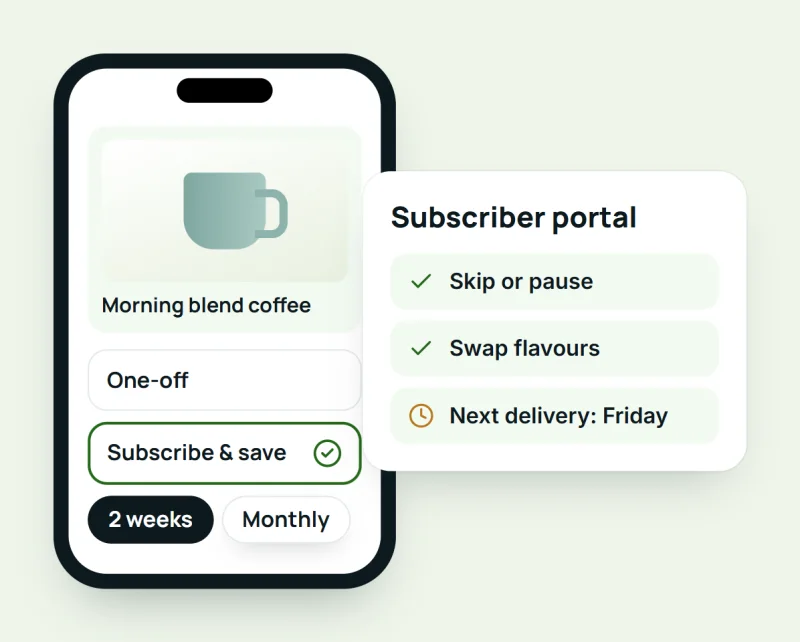
Illustration of a subscribe-and-save option on a product page with delivery frequency and a subscriber portal

Shopify subscriptions apps compared

All the main apps work with Shopify checkout. The differences lie in portals, flexibility, analytics and price.

  • Shopify Subscriptions: Shopify's own free app. A sensible start for straightforward subscribe-and-save offers.
  • Recharge: long established, with a large integration ecosystem and strong reporting.
  • Appstle and Seal Subscriptions: feature-rich options often chosen by smaller and growing stores.
  • Loop and Skio: focused on retention tools, flexible portals and cancellation flows for scaling brands.

Pricing models differ, typically combining a monthly plan with transaction-based fees on paid tiers, so compare current plans on each vendor's own site against your expected subscriber numbers. Whichever apps you shortlist, ask to see the customer portal on a phone, and check how easily you could move subscribers to another app later.

Two colleagues reviewing a printed report

Setting up Shopify subscriptions step by step

  1. Define your offers: products, frequencies, discount and any minimum commitment.
  2. Check payments: confirm which payment methods support recurring charges with your chosen app.
  3. Create selling plans: set up the subscription options on each product and test them on a duplicate theme.
  4. Design the product page: make the one-off versus subscribe choice clear, with the saving and frequency explained in plain English.
  5. Configure the portal: allow skip, swap, pause, frequency changes and address updates.
  6. Connect your stack: pass subscription events to Klaviyo, your 3PL and your helpdesk.
  7. Brief customer service: give the team a short guide to common subscriber requests.
  8. Test end to end: place test subscriptions, trigger renewals and failed payments, and cancel.

Automation and AI support

Shopify Flow can tag subscribers, alert your team about failed renewals or flag high-value customers who pause. Shopify's built-in AI tools can help too, drafting product copy for subscription pages and answering trading questions; our page on Shopify Magic & Sidekick Setup explains how to get your team using them well.

A UK example

Imagine a Bristol coffee roaster selling 250g bags. A fortnightly subscribe-and-save option, letterbox-friendly packaging for Royal Mail and a portal that lets customers switch beans or skip a delivery during holidays creates an offer people keep. Pair it with a reminder email before each roast and the subscription becomes part of the customer's routine. Dispatch can even be timed so parcels arrive before the weekend.

At Shopify Agency London, every subscription launch is planned by a dedicated project manager, tested through 4-eyes QA and quoted at a fixed price before work starts.

Subscription tips before you launch

  • Make the saving obvious

    Show the subscription price next to the one-off price, with the saving spelled out in pounds as well as words. Shoppers should not need a calculator to understand the offer, and a clear comparison reassures people who are wary of being locked into anything. Repeat the saving in the basket and in the confirmation email too.

  • Offer pause before cancel

    Many cancellations happen because customers have too much stock, are going on holiday or simply need a break. When someone starts to cancel, offer to skip a delivery, change the frequency or pause for a month. Keep the cancel button visible, though, because hiding it damages trust and invites complaints. Track which save offers customers accept most often.

  • Test renewals properly

    A subscription launch is not finished when the first order goes through. Trigger test renewals, failed payments, card updates, skipped deliveries and cancellations before going live, and check that each one reaches your warehouse, your email platform and your finance reports correctly. Repeat the tests after any app update or change to your checkout settings.

  • Plan stock around renewals

    Subscriptions make demand more predictable, but only if someone watches the upcoming renewal calendar. Share expected renewal volumes with whoever buys stock and books couriers, especially before Christmas and bank holidays, so you never have to tell loyal subscribers their order is delayed. A simple weekly forecast shared with operations is usually enough to start with.

Give subscribers quick answers with AIAI Agents for Shopify

FAQs

Shopify subscriptions FAQs

Straight answers before you get in touch. More in our FAQs.

Is Shopify's own Subscriptions app enough for my store?

For a straightforward subscribe-and-save offer on a handful of products, it can be a sensible, low-cost starting point. Brands that want richer customer portals, bundles, build-a-box options, detailed retention analytics or advanced cancellation flows usually move to a specialist app. Start by listing the features you need now and in the next year, then compare apps against that list carefully.

Should I discount subscription orders?

A modest saving is the usual way to encourage people to subscribe, but it is not the only lever. Free delivery, early access to new flavours or ranges, or a small gift with the first box can work just as well while protecting margin. Whatever you choose, check the numbers work across a customer's whole lifetime, not just the first order they place with you.

Can customers subscribe to more than one product?

Yes, most subscription apps let customers hold several subscriptions or combine products in one recurring order, depending on how the app is configured. Check how each app handles different frequencies within a single order, how delivery charges are calculated and how combined orders appear for your warehouse, because these details vary between apps and affect costs and customer experience.

What happens when a subscriber's card payment fails?

Subscription apps typically retry failed payments on a schedule and email the customer to update their card. You can usually adjust how many retries happen and when, and what happens after the final attempt, such as pausing or cancelling. Pair those settings with a clear, friendly email so customers can fix the problem in a couple of taps on their phone.

Can I offer subscriptions on international orders?

Often, yes, but check how your chosen app works with Shopify Markets, multiple currencies and international shipping rates. Delivery costs and times vary widely by destination, and customs paperwork can complicate recurring parcels. Many UK brands launch subscriptions for UK customers first, then extend to selected countries once the operation runs smoothly at home and the costs are clear.

How do I stop subscriptions hurting my brand if customers feel trapped?

Be transparent from the start. State the price, frequency, renewal terms and how to cancel on the product page and in confirmation emails, send reminders before renewals where appropriate and keep cancellation easy in the portal. Customers who leave on good terms often come back, while those who feel trapped tell others and raise chargebacks with their bank.

Can subscriptions work alongside a physical shop?

They can. Many brands with a shop or market stall invite in-person customers to subscribe online for home delivery. Make sure staff know how the offer works, keep pricing consistent between channels and check whether your subscription app and point of sale setup share customer records, so regulars are recognised wherever they shop with you, online or in person.

What does it cost to have SAL set up subscriptions?

Subscription setup can be scoped as part of a store project, with our Shopify Store packages starting from £1,995 ex VAT for Starter, or handled as standalone work quoted at a fixed price after a short call. Ongoing changes and optimisation can run through a support plan from £295 per month for five hours, ex VAT.

Ready to launch subscriptions that customers keep?

Share your products and plans, and our subscriptions specialists will recommend the right app, design the offer and portal, connect it to your stack and test every renewal scenario, all at a fixed price with a dedicated project manager, 4-eyes QA and weekly progress reports, so you can launch confidently and know exactly what happens at every renewal from the very first order.

Get a quote Call WhatsApp (opens in new tab)