
A team gathered around a laptop, reviewing work together

Shopify Growth

Shopify Conversion Rate Optimization: 25 Quick Wins for UK Stores

25 Shopify conversion rate optimization quick wins for UK stores, from product pages to checkout and mobile. Try them this week or book a CRO audit.

In this article (6 sections)
  1. Product page quick wins
  2. Collection and navigation quick wins
  3. Basket and checkout quick wins
  4. Trust quick wins
  5. Mobile and speed quick wins
  6. Making Shopify conversion rate optimization stick

Key takeaways

  • Shopify conversion rate optimization is rarely about one big change. Small fixes to product pages, delivery messaging, trust signals and mobile usability add up, and together they remove the doubts that stop a ready-to-buy shopper from reaching checkout and completing the order.
  • Start where the money is. Prioritise the templates with the most traffic and the biggest drop-off, which are usually product pages and the basket, before you polish the homepage. Your Shopify analytics and a simple funnel report will show exactly where shoppers are leaving.
  • UK shoppers want clarity on delivery, returns and payment before they commit. Show costs, cut-off times and your returns policy close to the Add to basket button, and offer the payment options your customers already trust, from Apple Pay and Shop Pay to Klarna or Clearpay.
  • Mobile deserves its own review. Test every quick win on a real phone, over a 4G connection, using one thumb. Sticky buttons, readable text, compressed images and short forms often matter more on mobile than any layout tweak you could make on desktop.
  • Measure before and after every change. Note your baseline conversion rate, average order value and revenue per visitor, change one area at a time and compare like-for-like periods, so seasonal swings, payday weekends and promotions do not trick you into the wrong conclusion.
  • Know when quick wins run out. Once the obvious friction is fixed, further gains come from customer research, analytics deep dives and structured testing, which is where a dedicated CRO programme earns its place in your growth plan.

You do not need a full rebuild to sell more. Most Shopify stores leak sales through small, fixable details: an unclear delivery cost, a hidden size guide, a slow product image. This checklist gathers 25 quick wins we look for when starting shopify conversion rate optimization work, grouped by where shoppers drop off. Many need no new apps and little or no development time, so you can start this week.

Product page quick wins

Product pages carry most buying decisions, so begin here, starting with the template your best sellers use.

  • 1. Put delivery and returns beside the button. State cost, timing and your returns window right next to Add to basket.
  • 2. Show next-day cut-off times. A line such as "Order by 2pm for next-day delivery" answers a common question before it is asked.
  • 3. Make the size guide impossible to miss. Link it next to the size selector, not inside a tab further down the page.
  • 4. Use more, better images. Include scale, detail and in-use shots, with pinch-to-zoom on mobile.
  • 5. Lead with benefits. Open descriptions with why the product matters to the buyer, then list specifications.
  • 6. Surface reviews early. Show the star summary near the title and link down to the full reviews.
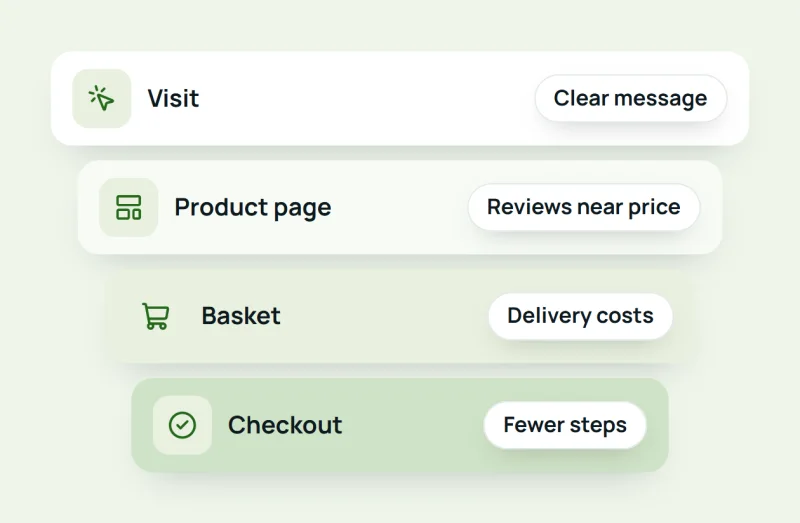
Illustration of a conversion journey from visit to checkout with an improvement at each step

Collection and navigation quick wins

Shoppers who cannot find the right product quickly rarely stay to keep looking.

  • 7. Add filters that match how people shop, such as size, colour, price and material, rather than internal categories.
  • 8. Sort by best-selling rather than alphabetically or by date added, so proven products lead.
  • 9. Show colour swatches and quick add on collection grids to save extra clicks.
  • 10. Tune search with synonyms, typo tolerance and helpful suggestions when nothing matches.

Basket and checkout quick wins

Intent is highest in the basket, so every extra step or doubt here is costly.

  • 11. Add a free delivery progress bar to the basket so shoppers see how close they are.
  • 12. Turn on express payments such as Shop Pay, Apple Pay, Google Pay and PayPal.
  • 13. Offer buy now, pay later where it suits your price point, through providers such as Klarna or Clearpay.
  • 14. Remove surprises: no late fees and no pop-ups once someone is in the basket.
  • 15. Let shoppers edit quantities and variants without leaving the basket.
  • 16. Recover abandoned checkouts with a timely, helpful email from Shopify or Klaviyo.

Trust quick wins

Newer brands especially need to prove they are real, reachable and fair.

  • 17. Show UK contact details and a clear, fair returns policy that is easy to find.
  • 18. Display payment icons only for the methods you actually accept.
  • 19. Add product FAQs covering delivery, care and sizing questions.
  • 20. Offer back-in-stock alerts instead of dead-end sold-out pages.

Person using a calculator beside printed charts and a notebook

Mobile and speed quick wins

Phones are where many shoppers browse, compare and buy, so check every change there first.

  • 21. Add a sticky Add to basket button on mobile product pages.
  • 22. Compress and lazy-load images that sit below the fold.
  • 23. Remove apps you no longer use, along with any leftover code in your theme.
  • 24. Make tap targets thumb-sized and keep text readable without zooming.
  • 25. Simplify forms with fewer fields, the right mobile keyboards and autofill.

Making Shopify conversion rate optimization stick

Change one area at a time and track conversion rate, average order value and revenue per visitor against a clear baseline. Keep a simple log of each change, the date it went live and the result, so your team builds a record of what works for your customers. Quick wins fix the obvious friction; once they are done, the bigger gains come from customer research, structured A/B testing and smarter tools. Our guide to AI for Shopify Stores shows where personalised search, better product content and AI shopping assistants can support conversion.

At Shopify Agency London, every CRO change is scoped at a fixed price, checked through QA with 4-eyes review and reported weekly by a dedicated project manager, so you always know what changed, why it changed and what it achieved.


CRO tips before you start changing things

  • Watch real sessions

    Spend an hour watching session recordings of mobile shoppers on your product pages and basket. Patterns appear quickly: repeated taps on images that do not zoom, scrolling back to find the size guide or hesitation at delivery costs. Each pattern points to a quick win worth fixing first, before any redesign or new app. Note what you see in a shared document.

  • Ask your customer service team

    The questions your team answers every day are free conversion research. If people keep asking about delivery to Northern Ireland, washing instructions or gift wrapping, put those answers on the product page, where hesitant shoppers will see them before they give up and leave for a competitor. Review the most common questions every month.

  • Fix bugs before testing ideas

    Testing a new headline is pointless if the discount code field breaks on Safari. Run a quick check of every key journey on iPhone, Android and desktop first, because broken functionality undermines any test you run and quietly costs sales every single day it stays live. Fix first, then test.

  • Respect UK seasonality

    Compare results with the same period last year or a matching run of weeks, not simply the week before. Payday weekends, Black Friday, Boxing Day sales and bank holidays all shift UK shopping behaviour, and they can make a neutral change look like a big win or an unexpected failure. Patience gives you answers you can trust.

Turn product content into a conversion assetAI Product Content & Descriptions

FAQs

Shopify CRO FAQs

Straight answers before you get in touch. More in our FAQs.

What is a good conversion rate for a Shopify store?

There is no single benchmark worth chasing. Conversion rates vary widely by sector, price point, traffic source, device and season, so a figure that is healthy for a fashion brand could be weak for a supplement store. The most useful comparison is with your own history: aim to improve steadily on your baseline, month after month and year after year, and to track the trend rather than any single week.

Which quick win should I tackle first?

Start with the page that has the most traffic and the biggest drop-off, which for most stores is the product page. Delivery and returns information beside the button, clearer images and an easy-to-find size guide tend to be quick to implement and touch every buyer, so they are sensible first steps before larger changes. Fix the basics there, then move on to collections and the basket.

Do I need extra apps to improve conversion on Shopify?

Not always. Many quick wins are theme settings, content changes or small code tweaks. Apps can help with reviews, search, upsells and back-in-stock alerts, but each one adds weight and a monthly fee. Check what your theme and Shopify already offer before installing anything new, and remove apps that overlap or go unused. A leaner store is usually a faster one.

Can I run A/B tests on a Shopify store?

Yes, using third-party testing tools that work with Shopify themes. The catch is traffic: tests need enough visitors and orders to produce a reliable answer, which can take weeks for smaller stores. If your traffic is modest, focus on fixing obvious problems first and use careful before-and-after comparisons instead of formal split tests, reviewed over several weeks.

How do I know if a change actually improved conversion?

Record a baseline first, then change one thing at a time. Compare like-for-like periods, segment results by device and traffic source, and look at revenue per visitor as well as conversion rate, because a change that lifts orders but cuts average order value may not grow revenue at all. Give each change enough time to show a pattern, not just a good weekend.

Does page speed really affect conversion?

Slow pages frustrate shoppers, especially on mobile connections, and frustrated shoppers leave. Shopify's own speed reports and Google's Core Web Vitals show where you stand. Quick fixes include compressing images, removing unused apps and limiting third-party scripts, while deeper theme work may be needed if the template itself is heavy. Always test speed on product and collection pages, not just the homepage.

How much does it cost to have SAL implement CRO quick wins?

Smaller fixes can run through a Shopify Support plan, from £295 per month for five hours or £595 per month for twelve hours, ex VAT. A full CRO audit with research, a prioritised roadmap and testing is scoped and quoted at a fixed price after a short call, so you know the cost before work begins and can plan your budget with confidence.

Should I fix conversion or buy more traffic first?

Fix the biggest leaks first. Sending more paid traffic to a store that loses shoppers at the product page or basket simply makes each sale more expensive. Once the core journey converts well, every pound spent on ads, email or SEO works harder, and growth becomes far more predictable. Conversion work also makes future marketing budgets easier to justify to your finance team.

Want a prioritised CRO plan for your store?

Share your store and your goals, and a CRO specialist will review your key journeys, rank the fixes by likely impact and effort, and quote implementation at a fixed price, with every change checked through QA and 4-eyes review and progress reported weekly by a dedicated project manager, so you always know what has changed, why it changed and what comes next.

Get a quote Call WhatsApp (opens in new tab)