
Team marking up paper wireframes on a table

AI & Ecommerce

Shopify Sidekick and Shopify Magic: What UK Merchants Should Use

Shopify Sidekick and Shopify Magic explained for UK merchants: what each tool does, where it saves time and where to stay hands-on. Get set up with SAL.

In this article (6 sections)
  1. What is Shopify Sidekick?
  2. What is Shopify Magic?
  3. Shopify Sidekick vs Shopify Magic: which should you use?
  4. Where UK merchants see the most value
  5. How to roll Sidekick and Magic out across your team
  6. Where to stay hands-on

Key takeaways

  • Shopify Sidekick is the AI assistant inside your Shopify admin. You ask questions in plain English and it helps you find answers in your store data, prepare tasks such as discounts or customer segments, and reach the right setting faster. Treat it like a capable junior colleague whose work you still check before it is saved.
  • Shopify Magic is the wider family of AI features woven through the admin: drafting product descriptions, email copy and blog posts, suggesting replies in Shopify Inbox and editing product images. Because it appears inside the screens your team already uses, there is no separate app to install, connect or learn from scratch.
  • The quickest wins for UK merchants are usually unglamorous: first drafts of product copy, fast answers about sales and stock, discount set-up before a bank holiday weekend and tidier customer segments for your email campaigns. Start there, note the time saved and widen use only once your team trusts the results.
  • Neither tool replaces brand judgement. AI drafts can drift into American spelling, generic claims or wording that falls foul of UK advertising and consumer rules, so agree a short review checklist covering tone, accuracy, sizing, materials and any regulated claims before anything reaches your storefront.
  • Features, availability and language support change regularly, so check what is switched on in your own admin and in Shopify's help centre rather than relying on old screenshots or forum posts. Pair the tools with simple internal rules on who uses them, what data goes in and who signs off customer-facing content.

If you run a Shopify store in the UK, you have probably noticed AI prompts popping up all over your admin. Two names come up most often: Shopify Sidekick and Shopify Magic. They sound alike, but they do different jobs, and knowing which one to reach for saves real time every week. This guide explains what each tool does, where it earns its place and where your team should stay firmly in charge.

What is Shopify Sidekick?

Sidekick is a conversational assistant built into the Shopify admin. You ask a question such as ‘which products sold best last month?’ and it works from your store data to answer, often pointing you to the relevant report or setting. It can also help with tasks: drafting a discount, building a customer segment, outlining a Shopify Flow automation or explaining where a setting lives. You open it from the admin and type in everyday language, so there is no query syntax or reporting tool to learn first. Treat every suggestion as a draft and check it before you save or publish.

What is Shopify Magic?

Shopify Magic is the umbrella name for AI features embedded across the admin. Rather than a chat window, it shows up inside the screens you already use:

  • Product descriptions: a first draft from a few keywords and a chosen tone.
  • Email and content: subject lines, Shopify Email copy and blog post drafts.
  • Customer replies: suggested answers in Shopify Inbox based on your store information.
  • Images: media editing such as background removal and replacement.
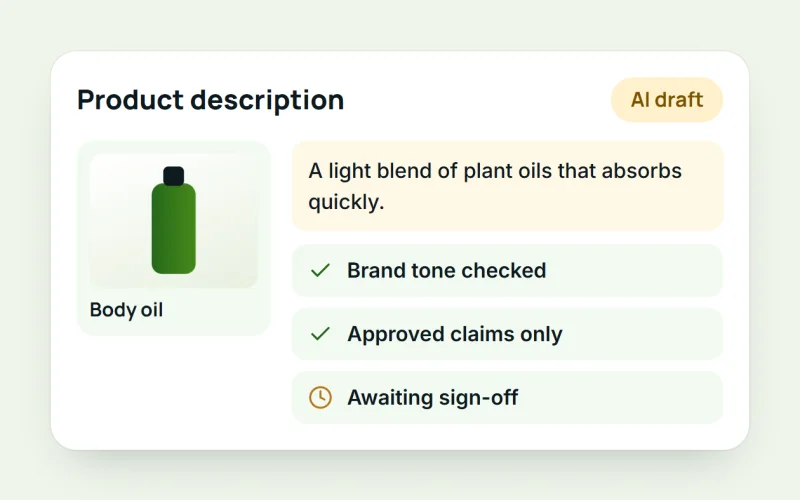
Illustration of an AI-drafted product description being reviewed against brand rules before publishing

Shopify Sidekick vs Shopify Magic: which should you use?

JobBest fitWhy
Question about sales or stockSidekickReads store data conversationally
Draft a product descriptionMagicBuilt into the product editor
Set up a discount or segmentSidekickWalks through the steps
Write an email subject lineMagicSits inside Shopify Email
Tidy a product photoMagicMedia editor tools

In practice most teams use both: Magic for content in context, and Sidekick for questions and admin jobs that would otherwise mean hunting through menus. The real gain comes from knowing which is quicker for each recurring task, then making that the team habit.

Where UK merchants see the most value

Seasonal trading

Before Black Friday, Boxing Day or a bank holiday sale, Sidekick can speed up discount set-up and pull last year's best sellers, so planning starts from facts rather than memory.

Catalogue upkeep

Picture a Manchester homeware brand adding a new range. Magic drafts the descriptions, then an editor adds British spelling, dimensions in centimetres, care instructions and the small details that make the range feel distinctive. The draft removes the blank page; the editor adds the expertise.

Hand drawing a glowing upward line labelled performance

Small teams

Founder-led stores without an analyst get quick answers on trading without exporting spreadsheets late at night, which leaves more energy for product, suppliers and customers.

How to roll Sidekick and Magic out across your team

  1. Pick three weekly tasks that eat time, such as product drafts, discount set-up and sales summaries.
  2. Write a one-page house style brief and a matching review checklist.
  3. Trial the tools on those tasks for a fortnight and note what needed fixing.
  4. Share the prompts that worked in a single team document.
  5. Review the setup monthly, because Shopify adds and changes features often.

Where to stay hands-on

AI speeds up the work, but accountability for what customers see stays with you. Keep a person in the loop for:

  • Regulated claims: cosmetics, supplements and children's products need wording checked against UK rules.
  • Promotions: confirm discount conditions and stacking before they go live.
  • Brand voice: AI drafts default to generic phrasing, so edit for your tone.
  • Data: decide what customer information staff may type into prompts.

If you want a structured view of where AI fits across your store, our AI Consulting for Shopify Brands service maps the opportunities, risks and quick wins in a single workshop.

Quick tips for using Sidekick and Magic

  • Write a house style prompt

    Save a short brief covering your tone, British spelling, banned words and must-include details such as materials or sizing. Paste it into every Magic request so drafts start closer to your voice, and editors spend their time checking accuracy rather than rewriting whole paragraphs from scratch. Update the brief whenever your tone or range changes.

  • Ask Sidekick specific questions

    Vague prompts get vague answers. Instead of asking how sales are going, ask for the top ten products by revenue over the last thirty days, or which discount codes were used most last weekend. Specific questions return answers you can act on and check against your reports. Save the questions that prove useful so colleagues can reuse them.

  • Keep a human sign-off step

    Agree who approves AI-written product copy, emails and discounts before they reach customers. A two-minute check catches wrong materials, invented features or a discount that stacks with free delivery by mistake, all of which cost far more to fix after launch than before it. Record the checks in a shared list so anyone covering holidays follows the same steps.

  • Keep staff permissions tight

    Give each staff account only the admin permissions its role needs, which limits what any AI-assisted change can touch. Remind the team not to paste personal customer details into prompts without good reason, and note your approach in your UK GDPR records. Review permissions whenever someone changes role or leaves the business.

Want AI-written product pages that still sound like your brand?AI Product Content & Descriptions

FAQs

Shopify Sidekick and Magic FAQs

Straight answers before you get in touch. More in our FAQs.

Is Shopify Sidekick available to UK merchants?

Sidekick is built into the Shopify admin, and Shopify has been widening access across plans and languages, with English supported, so it is relevant to UK stores. Access can still depend on your plan and settings, so the simplest check is to look for Sidekick in your own admin or search Shopify's help centre for the current eligibility rules.

Do Shopify Magic and Sidekick cost extra?

Both are built into the Shopify admin rather than sold as separate App Store apps, so there is nothing extra to install. Shopify decides what each plan includes, so confirm the current position on shopify.com. In practice the bigger cost is staff time spent reviewing outputs, which is why a clear sign-off process matters more than the subscription question.

Can Shopify Magic write product descriptions that rank on Google?

Magic gives you a fast first draft, but ranking depends on what you add: unique detail, accurate specifications, natural keywords and helpful answers to buyer questions. Publishing near-identical AI text across many products can leave pages thin. Use Magic to beat the blank page, then edit each description so it says something a competitor's page does not.

Will Sidekick change my store without me checking?

Treat Sidekick as an assistant that prepares work for you rather than one you leave unsupervised. Review any discount, segment, automation or content it drafts before you save or publish it, and keep staff permissions tight so only the right people can approve changes. If in doubt, trial new set-ups on a draft product or a hidden discount first.

Is it safe to use customer data with Shopify's AI tools?

Sidekick works with data already held in your Shopify admin, which is covered by Shopify's own privacy terms. Your job under UK GDPR is deciding who can reach that data and what staff type into prompts. Keep personal details out of free-text requests where possible, document your approach and read Shopify's privacy information so your policy reflects how the tools work.

Which tasks should we never hand to AI?

Keep people in charge of pricing decisions, legal and regulated wording, refund disputes and anything involving vulnerable customers. AI can draft a reply to a complaint, but a person should approve it. Health, safety and sustainability claims also need evidence behind them, and the CMA's Green Claims Code applies to environmental wording whoever, or whatever, wrote it.

How do we train staff to use Sidekick and Magic well?

Start with a short session built around three or four real tasks your team does weekly, such as drafting a product description, setting up a discount and pulling a sales report. Share example prompts, your house style brief and the review checklist. Then regroup after a month to swap prompts that work and retire the ones that do not.

What does SAL charge to set up Sidekick and Magic?

Our AI for Shopify Starter package is from £995 ex VAT as a one-off setup, covering Sidekick and Magic configuration plus AI search setup. Growth is from £2,495 for an AI agent and automation, and larger projects are quoted individually. Every option comes with a fixed price, a dedicated project manager and work carried out under NDA.

Keep reading about AI for Shopify

Get Sidekick and Magic working hard for your store

Our specialists will configure Shopify Magic and Sidekick around your catalogue, write the prompt guides and review checklists your team needs and walk staff through both tools on real tasks, all under NDA with a fixed price, a dedicated project manager, specialist leads and weekly updates so you always know exactly what is happening.

Get a quote Call WhatsApp (opens in new tab)